
Last updated: 15 November 2026. A ranked shortlist of the best email verification tools, with the reasons behind each pick.
Every cold email you send goes to a real inbox or it goes nowhere, and the difference is decided before you press send. A list full of dead addresses bounces, and bounces do more than waste a send: they tell mailbox providers your mail cannot be trusted, which pushes even your good emails toward spam. A list that has been verified, on the other hand, arrives quietly, lands in inboxes, and lets your message do its work. That is the whole job of the best email verification tools — to check every address on your list and tell you, honestly, which ones are safe to email.
Why a verified list changes everything
The reassuring part is that verification is a solved problem with a friendly price tag. The tools below check an address in seconds: they look at the spelling, confirm the domain can receive mail, and ask the mail server whether the mailbox exists — all without sending anything. Most of them let you try the service free, on a real slice of your own list, before you spend a cent. This guide ranks seven of the best email verification tools for 2026, explains what each one actually does, and helps you pick the one that matches your list, your budget, and the way you work.
We have not scored these tools yet, because a score has to be earned in testing and that testing is still ahead of us. Each tool below carries a Best-for label instead: a short summary of who the tool is built for and what its own website says it does best. Skim the comparison table to cut the list to two or three, try the free option on each, and let a real test on your own list settle it. Within a day, a good verification tool should feel reassuring: you upload a list, the results come back clearly labelled, and the addresses you keep are the ones that actually reach people.
Our pick in one line: ZeroBounce for the fullest toolkit, NeverBounce for the fewest bounces
If you want verification plus warmup, inbox tests and DMARC monitoring in one place, start with ZeroBounce — its free plan gives you 100 credits every month. If every bounce hurts and you want the most cautious cleaning available, start with NeverBounce. Verifying on a tight budget? Start with MillionVerifier. Compare all seven in the table below — then test each one on a hundred real addresses from your own list.
Compare the best tools Jump to the comparison tableQuick Answer
The best email verification tools, in one paragraph: ZeroBounce is the best email verification tool overall, with a 99.6% accuracy guarantee and a deliverability suite built in. NeverBounce is the best email verification tool for the lowest bounce rates, with cautious verdicts and automatic list syncing. Bouncer is the best email verification tool for European teams, with EU data storage and deep catch-all checks. MillionVerifier is the best email verification tool for budget bulk cleaning, at $39 for 10,000 credits that never expire. Emailable is the best email verification tool for fast big-list cleaning, processing tens of thousands of addresses a minute. Hunter is the best email verification tool for finding and verifying in one place. And Verifalia is the best email verification tool for developers, with a real-time API and three quality levels. Most offer free credits to start.
The right choice depends on whether you need the cheapest clean, the most cautious clean, or verification wired into your own product. Use the table to cut the list down, then spend the free credits on the two or three that survive.
Table of Contents
- How we ranked these tools
- Best email verification tools at a glance — includes comparison table and feature matrix
- The 7 best email verification tools for 2026
- How email verification actually works — includes video
- How to choose the best email verification tool for you
- Bounce rates, accuracy and the 2% rule — includes video
- Your first month with your new verification tool
- What the best email verification tools cost
- Mistakes to avoid when you pick a verification tool
- Frequently asked questions
- Our verdict
- Your next step
How we ranked the best email verification tools
A ranking only helps when you can see the thinking behind it, so here it is. First, we sorted the tools by the job they do. Some are pure cleaners: you upload a list, they return verdicts, and that is the whole product. Some add a deliverability suite around the cleaning — warmup, inbox placement tests, DMARC monitoring — so verification becomes one part of a bigger sending toolkit. One finds the email and verifies it in the same step. One is built for developers who want to check addresses inside their own product.
Then we looked at what each tool’s own website actually confirms, how it charges, and whether you can try it before you pay. The heaviest weight went to the things that decide whether your emails reach real people: honest accuracy claims, clear verdicts on the tricky addresses, and a way to test the tool on your own list before you commit.
What we weighed most in the best email verification tools
Then we looked at the extras that save time and money day after day. Free credits that actually let you test on a real list, not just three addresses. Credits that do not expire, so a small list verified in January is not paid for twice in June. No charge for addresses the tool could not confirm, because paying for a shrug is a strange deal. A real-time API for checking addresses the moment someone types them into your form. And honest handling of catch-all domains — the company mail servers that accept everything, so no checker can be sure the mailbox exists. A tool that hides its pricing behind a sales call is not disqualified, but it does have to earn its place on accuracy and usefulness alone.
A solo founder verifying a first list of five hundred needs something different from a team cleaning a hundred thousand addresses before a launch. Both need something different again from a developer wiring verification into a signup form. So every tool below carries a Best-for label instead of a number, naming who it suits best. The table shows what is included. Then the free credits show whether it feels right in your hands.
No scores yet — and why
Before the list, one honest note. This article has no scores yet, because we have not put these tools through hands-on tests. Scores will only come after we have run the same real lists through each tool, counted the bounces, and compared the verdicts side by side. The source note under each table names the exact pages we checked, so if a feature matters to you, confirm it on the tool’s site before you buy. Features and plans change, and the provider’s page is always the final word.
Best email verification tools at a glance
The whole shortlist fits on one screen. Look at the Best-for label first, then the free start, then the starting point. In that order, seven tools become two or three in under a minute. The reviews further down go into detail on each pick, and the feature matrix after the table shows which tools verify in real time, handle catch-all domains, or bundle deliverability extras — and which do all of it.
The shortlist of the best email verification tools, ranked
| # | Tool | Best for | Free start | Starting point | |
|---|---|---|---|---|---|
| 1 | ZeroBounceBest overall 99.6% accuracy guarantee, plus warmup, inbox tests and DMARC monitoring in one plan. | 100 credits every month | PAYG from $39 for 2,000 credits | Visit Site →Free plan, no card for trial | |
| 2 | NeverBounceLowest bounce rates Cautious verdicts and automatic sync keep your lists clean without you remembering to clean them. | 10 free credits | PAYG $8 per 1,000 credits | Visit Site →Free list analysis included | |
| 3 | BouncerEU teams & GDPR EU data storage, deep catch-all checks and a toxicity score for risky addresses. | 100 free credits | PAYG from $8 per 1,000 credits | Visit Site →Credits never expire | |
| 4 | MillionVerifierBudget bulk cleaning The cheapest per-check cleaning on this list, with credits that never expire. | 100 free credits | $39 for 10,000 credits | Visit Site →Credits never expire | |
| 5 | EmailableFast big-list cleaning Tens of thousands of addresses a minute, with a quality score on every result. | 250 free credits | PAYG from 5,000 credits | Visit Site →Credits never expire | |
| 6 | HunterFind + verify in one Finds the address and verifies it in the same step, with a free plan every month. | 50 credits a month | Free plan; Starter $49/month | Visit Site →Verify costs 0.5 credits | |
| 7 | VerifaliaDevelopers & API A serious real-time API with three quality levels, and free credits every single day. | 25 credits every day | Free plan; Starter $9/month | Visit Site →Free credits reset daily |
Last checked: 15 November 2026. The free-credit and starting-point details above come from each tool’s official website — see the linked source note under the feature matrix below. Features and pricing can change, so please check the provider’s site before you buy.
The best email verification tools compared at a glance
Same seven tools, one view. You can see at a glance which ones verify in real time, which handle catch-all domains, which give you free credits every month, and which bundle deliverability extras — and which do all of it. A tick means the feature is stated on the tool’s own site; a dash means we could not confirm it there.
| Tool | Bulk upload | Real-time API | Catch-all detection | Free credits monthly | Spam-trap check | Deliverability extras | Finds emails too |
|---|---|---|---|---|---|---|---|
| ZeroBounce | ✓ | ✓ | ✓ | ✓ | ✓ | ✓ | ✓ |
| NeverBounce | ✓ | ✓ | ✓ | — | — | — | — |
| Bouncer | ✓ | ✓ | ✓ | — | ✓ | ✓ | — |
| MillionVerifier | ✓ | ✓ | ✓ | — | — | — | — |
| Emailable | ✓ | ✓ | ✓ | — | — | ✓ | — |
| Hunter | ✓ | ✓ | ✓ | ✓ | — | — | ✓ |
| Verifalia | ✓ | ✓ | ✓ | ✓ | — | — | — |
Last checked: 15 November 2026. The features and free-credit details in this table are based on what we found on each tool’s official website on that date — ZeroBounce, NeverBounce, Bouncer, MillionVerifier, Emailable, Hunter, Verifalia. Features and pricing can change, so please check the provider’s site before you buy. ✓ = the feature is stated on the provider’s site (some features only on certain plans — see the notes below). — = not confirmed for this tool. We do not guess at features, prices or trials.
Reading the table: plan notes
Plan notes, so the ticks above are not overstated: ZeroBounce’s free plan gives 100 verification credits a month when you sign up with a business or premium domain, and its 99.6% accuracy guarantee is backed by a refund — 5% of the validation cost back for each 1% the accuracy falls short, on qualifying lists. NeverBounce’s guarantee is different: it promises no more than 3% bounces when you mail only to addresses it marked valid, under conditions that include cleaning the list within 72 hours of sending. Bouncer’s Deep Catch-All Verification resolves catch-all addresses hosted on Google and Microsoft, the ones a standard check cannot confirm, and its Toxicity Check scores risky addresses from 0 to 5.
Plan notes, continued: MillionVerifier charges only for clear results — risky results are refunded, not billed — and its catch-all verifier runs in beta. Emailable’s deliverability guarantee promises no more than 1% of deliverable addresses will bounce (3% on Microsoft-managed addresses), with a credit refund on qualifying lists of 1,000 or more sent within 24 hours. Hunter’s verification costs half a credit, so its free plan’s 50 monthly credits cover up to 100 verifications, and unknown and disposable results are free. Verifalia’s three quality levels cost different credits — Standard 1, High 2, Extreme 4 — so a daily allowance buys fewer checks at the highest quality. Free credits that reset monthly or daily do not roll over, while pay-as-you-go credits on Bouncer, MillionVerifier and Emailable never expire.
The 7 best email verification tools for 2026
Below is the full shortlist, one tool at a time, with what each one is good at, who it suits, and what to watch out for. Read the two or three that match your situation, skip the rest, and then use the free credits to settle it. New to cold email entirely? Our Cold Email for Beginners guide explains the full system first, so this ranking slots into place more easily.
1. ZeroBounce — Best overall verification + deliverability
ZeroBounce earns the top spot here because it does the most with the cleanest promise. It is the only tool on this list with an explicit accuracy guarantee written as a number: 99.6%. If accuracy falls short on a qualifying list, you get a refund. Behind that number sits a thorough check. It covers more than 30 statuses and sub-statuses, including catch-all, disposable, abuse and spam-trap signals. So the verdict you get is rarely just valid or invalid. You can upload a list, check one address at a time, or call the real-time API from your signup form. The same account also holds warmup, inbox placement tests, DMARC monitoring and a blacklist monitor. For a sender who wants verification and the rest of deliverability in one subscription, that combination is hard to beat.
The free plan is the fairest way to try it. You get 100 verification credits every month when you sign up with a business or premium domain. A monthly inbox placement test and blacklist scan come with it, all replenishing without you paying anything. Unknown results and duplicates do not consume credits, which matters on messy lists where a fifth of the addresses can come back uncertain. The trade-off is price at volume. Pay-as-you-go starts at $39 for 2,000 credits, which is more per check than the budget tools below. The full deliverability suite lives in the $99-a-month ZeroBounce ONE plan. If you only need a list cleaned once and nothing else, a cheaper cleaner will do. If you want one place that verifies, warms, tests and watches your domain, start here. Our Best Email Deliverability Tools 2026 ranking covers the wider toolkit ZeroBounce sits inside.
Watch: how ZeroBounce keeps invalid contacts out of your list
Prefer to watch? This short video from ZeroBounce shows what happens when invalid contacts reach your list — and why catching them before you send protects your sender reputation.
2. NeverBounce — Best for the lowest bounce rates
NeverBounce is the cautious cleaner on this list, and for cold outreach that caution is a feature. Owned by ZoomInfo and built on a 20-step verification process, it is known for conservative verdicts. It would rather mark a borderline address as risky than pass it as valid and let it bounce on your domain. Independent tests have measured some of the lowest bounce rates in the category on the addresses NeverBounce approves. It also handles the boring part for you. Its Sync feature cleans your CRM or email platform automatically on a schedule, so a list you verified in January is not quietly going stale by June. If a bounce costs you more than a lost lead, that combination is exactly what you want.
Pricing is simple. Pay-as-you-go starts at $8 per 1,000 credits, with one credit verifying one email and volume discounts as you buy more. The Growth plan at $49 a month covers up to 10,000 emails. It bills only for new, unique emails — duplicates are free — and adds unlimited parallel cleaning and CRM auto-sync. Two things are worth knowing before you buy. First, pay-as-you-go credits expire 12 months after purchase, so do not stockpile more than you will use in a year. Second, the free start is small: 10 test credits on signup, plus a free list analysis that estimates your bounce rate before you spend anything. Start with that analysis on your real list, and let the number it returns tell you whether this is the tool for you.
3. Bouncer — Best for EU teams and GDPR
Bouncer is the tool you pick when where your data sits matters as much as what the tool finds. It is based in the EU and stores lists only in EU data centres. It carries SOC 2 certification with a clear GDPR story, a combination that makes security reviews noticeably easier for European teams. Its standout feature is Deep Catch-All Verification. It resolves catch-all addresses hosted on Google and Microsoft infrastructure, the ones a standard SMTP check cannot confirm either way. Around that sits a Toxicity Check that flags spam traps and breached, complainer or litigator addresses on a 0-to-5 scale, and a Deliverability Kit with inbox placement tests and blocklist monitoring. For a European sender, that is a thoughtful, complete package.
The pricing is refreshingly plain. Pay-as-you-go starts at $8 per 1,000 credits, or $60 for 10,000, with 100 free credits to start and no card required. Credits never expire, and you are never charged for duplicates or unknown results — only for addresses the tool could actually judge. The trade-off is that there is no ongoing free monthly allowance, only the one-off 100 credits, and Bouncer is a verifier, not a finder: it checks the addresses you already have and does not find new ones. Pair it with a data provider when you need fresh contacts — our Best B2B Data Providers 2026 ranking covers that side — and let Bouncer keep the list you build clean.
4. MillionVerifier — Best for budget bulk cleaning
MillionVerifier is the price leader on this list by a clear distance, and for a big list that is often the deciding factor. Its packages start at $39 for 10,000 credits, fall to $89 for 50,000, and reach $449 for a million — under half a cent per check at the top tier. Credits never expire, catch-all verification is included, and new accounts get 100 free credits to test with. The billing is also unusually fair: you are only charged for addresses classified as good or bad, while risky results are refunded rather than billed. For a team with a large list and a small budget, that maths is hard to argue with. The tool itself stays focused — bulk verification, API checks, and EverClean, its automated daily cleaning subscription — rather than a sprawling suite.
The honest caveat is accuracy on the hard cases. MillionVerifier claims 99% or better on the addresses it can confirm, but independent benchmarks have measured it lower than the premium tools. Its catch-all handling is basic: a dedicated catch-all verifier exists but runs in beta, and in testing it resolved only a small share of catch-all addresses. That does not make it a bad tool — it makes it a tool to use with your eyes open. Run your list through it, then check the risky segment by hand or with a second pass on the addresses that matter most. If your list is large, your budget is tight, and you are willing to treat the risky pile carefully, MillionVerifier is the cheapest honest clean on this list.
5. Emailable — Best for fast big-list cleaning
Emailable is built for one situation: a big list and a deadline. It publishes a bulk speed of more than 30,000 emails a minute. A 10,000-address list typically finishes in under three minutes. Every address also gets an Email Quality Score from 0 to 100. That confidence figure sits next to the verdict and helps you decide what to do with the borderline cases. The workflow is simple: import, verify, analyse, export. It offers bulk uploads, a single verifier, a real-time API and a widget for checking addresses at signup, plus a Deliverability Center for inbox placement monitoring and blacklist surveillance. For a marketer staring at a quarter of a million addresses that must be clean before this afternoon’s send, speed is the feature that matters, and Emailable is the fastest name here.
The pricing is credit-based with no feature gating: one credit per verification, every feature drawing from the same pool, with no seat licences and no long contracts. New accounts get 250 free credits with no card required — the most generous one-off free start on this list. Pay-as-you-go costs $60 for 10,000 credits, with a 5,000-credit minimum purchase and a monthly subscription at $51 for the same volume. Credits never expire, and credits spent on unknown results and duplicates go back to your balance. The guarantee is written around deliverability rather than a percentage: no more than 1% of deliverable addresses will bounce (3% on Microsoft-managed addresses), with a full credit refund on qualifying lists. Two limits to note: verified results are only downloadable for 30 days, and there is no automatic scheduled re-verification, so diary your next clean yourself.
6. Hunter — Best for find + verify in one place
Hunter is the Swiss Army knife on this list: it finds the email and verifies it in the same step, so you never have to stitch two tools together. Its Domain Search lists the addresses a company has. Email Finder predicts the address for a named person, with a confidence score. And Email Verifier checks whether the address is deliverable. All three share one credit pool, with a browser extension, a Google Sheets add-on, an API and an MCP server for AI tools. For a small team building a list from scratch, that matters: you search for the person, Hunter finds the address, and the verification is already included in the same credit. You never export an unverified address by accident, because the unverified step does not exist.
The free plan is genuinely useful: 50 credits a month, no time limit, no card required, and API access included. Because a verification costs half a credit, those 50 credits cover up to 100 verifications if you spend them only on checking addresses you already hold.
Paid plans start at $49 a month for 2,000 credits, rising to $149 for 10,000 and $299 for 25,000, with about 30% off on annual billing. The trade-off is cost at scale. As a pure verifier, Hunter is the most expensive option here per check. Its monthly credits also reset each cycle rather than rolling over. It only makes sense if you already use Hunter to find emails — then the verification is nearly free. If you only need to clean a list you already have, one of the dedicated cleaners above will cost you less. Our How to Get Your First Email Addresses guide shows the safest ways to build the list Hunter then checks.
7. Verifalia — Best for developers and API-first teams
Verifalia is the odd one out on this list, and deliberately so: it is infrastructure, not a marketing dashboard. Its REST API is unusually well documented. It ships SDKs for .NET, Java, Node.js, Ruby, PHP and Go, plus a browser JavaScript widget and published rate limits. So a developer can wire real-time verification into a signup form in an afternoon. Its signature idea is three quality levels. Standard runs one verification pass for 1 credit. High runs three passes with anti-greylisting waits for 2 credits. Extreme runs nine passes for 4 credits. So you can spend more credits only on the addresses where a definite answer matters. It also handles international character sets well and supports bulk uploads of up to 100 MB. For a team building verification into its own product, this is the most developer-friendly tool here.
The pricing model takes a moment to understand, and it is worth understanding before you buy. Every plan includes a daily allowance that resets at midnight UTC and does not roll over. The free plan gives 25 credits a day, forever. Starter gives 250 a day at $9 a month, Professional 1,250 at $49, Enterprise 6,250 at $199, and Ultimate 25,000 at $499.
That free 25 a day is the only genuinely perpetual free tier on this list — roughly 750 checks a month if you use it daily. But it is a drip feed, not a bucket: a 10,000-address list would take over a year at that rate. For spiky workloads, separate pay-as-you-go credit packs never expire. If you verify a steady trickle of signups every day, the daily model fits beautifully. If you clean one big list a quarter, buy a credit pack instead.
How email verification actually works
Verification sounds technical, but the idea is simple: the tool talks to the mail server and asks whether the mailbox exists, without ever sending an email. It does this in stages, and each stage catches a different kind of bad address. First comes the syntax check — is the address shaped like a real email, with an @ sign, a domain, and no illegal characters? A surprising number of list errors fail right here: typos, missing dots, spaces pasted in from a spreadsheet. Then comes the domain check: does the domain exist, and does it have mail exchange records saying it can receive mail? A domain that has expired or never had mail set up fails at this stage, and no mailbox check can save it.
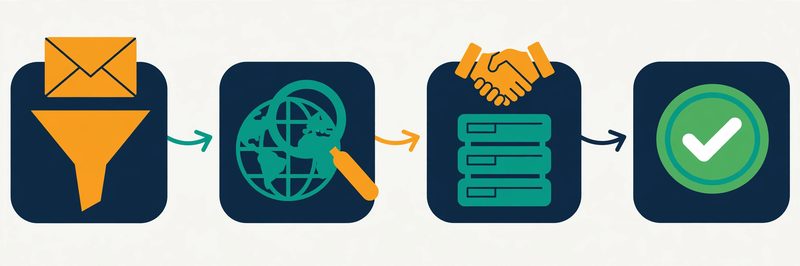
The third stage is the clever one: the SMTP handshake. The verifier connects to the recipient’s mail server and starts the same conversation a sending server would — hello, I have mail for this address — then stops before any message is delivered. A 250 response means the server will accept mail for that mailbox; a 550 usually means it will not.
Some servers refuse to answer, or answer yes to everything, and that is where the fourth stage comes in: catch-all detection. A catch-all domain accepts mail for any address, real or invented, so no checker can confirm a single mailbox on it with certainty. Good tools say so plainly and return the address as catch-all or risky, instead of guessing. Around these four stages sit the extra checks — disposable mailbox detection, role-address flags for info@ and support@, spam-trap databases — that separate a careful verifier from a quick one.
The honest limit: no tool is perfect
One honest limit belongs here: no verification tool gives you 100% accuracy, and any tool that promises it is overselling. Mail servers change their answers, people leave jobs, and a mailbox that existed on Monday can be closed by Friday. Verification tells you the address looked deliverable at the moment of the check. That is why the best practice is to verify close to the send, within 72 hours for the strongest guarantees. Re-verify a list you have not touched in months rather than trusting last quarter’s results. Our email verification hub sits at the centre of this system for a reason: every other step in cold email depends on this one being done well.
How to choose the best email verification tool for you
Three questions that narrow the list of the best email verification tools
Seven good tools is still six too many to test properly. Three quick questions will cut the list down fast, and the answer usually picks itself. First, how big is your list, and how often will you verify it? A one-off clean of a thousand addresses suits a pay-as-you-go tool with credits that never expire — Bouncer, MillionVerifier or Emailable — because you buy once and the leftover credits wait patiently. A list you clean every month suits a monthly free allowance — ZeroBounce’s 100 credits a month or Hunter’s 50 — or a subscription that refills. And a steady trickle of signups suits Verifalia’s daily credits or a real-time API on any of these tools.

What hurts more: a bounce or a lost lead?
Second, what hurts more: a bounce or a lost lead? If a bounce on your domain is the bigger risk — a new sending domain, a cold outreach campaign, a hard-won sender reputation — pick the most cautious cleaner, NeverBounce. Accept that it will reject some addresses that might have worked.
If losing a good lead is the bigger risk, pick a tool with scoring — ZeroBounce’s AI scoring or Emailable’s quality score — and send to the borderline addresses that score well. Third, where does verification need to happen? If it happens in a spreadsheet once a quarter, any bulk uploader will do. If it happens inside your signup form or your CRM, you need a real-time API and the integrations to match — Verifalia for developers, ZeroBounce or Bouncer for everyone else. The best email verification tools all do one of these jobs well, so matching the job to the tool is the whole trick.
Run the free credits like a real check
Then give the free credits a genuine job to do. A free test is not a walk around the settings page; it is a small live test. Take a hundred addresses from your real list and run them through the tool. Include some you already know are good, some you suspect are dead, and a few from catch-all company domains. Count how many come back valid, how many invalid, and how many the tool could not decide. Then do the same hundred through a second tool and compare the verdicts.
The tool has earned its place when the results feel clear and the interface stays out of your way. The upload takes a minute, the verdicts are labelled in plain language, and the export drops cleanly back into your spreadsheet or CRM. If a tool confuses you in the first hour, it will still be confusing you in month six, so pay attention to that first impression. Keep everything else the same while you test: same hundred addresses, same day, same checks. That way you are comparing tools, not lists. Our sending domain guide pairs well with any of these tools — a verified list still needs a warmed-up domain before it turns into meetings.
Bounce rates, accuracy and the 2% rule
The number that matters most after verification is your bounce rate: the share of your sent emails that come back undelivered. Keep it under 2% on every send, and mailbox providers will treat your domain as a trustworthy sender. Let it climb above 2%, and the same providers start filtering your mail more aggressively — and above 5%, you are in real trouble, with spam-folder placement and, in the worst cases, blocks. This is why verification exists. A list that has been properly cleaned should bounce well under 2%; a list that has not been cleaned at all commonly bounces at 5%, 10% or worse. The 2% line is not a suggestion from one vendor — it is the threshold the whole sending ecosystem watches, and it is the simplest health check you own.

Reading accuracy claims honestly
Accuracy claims need the same plain treatment. Every tool on this list claims something between 99% and 99.6%, and those figures are the vendors’ own claims, not independent measurements. Independent benchmarks that run the same real addresses through many tools at once tell a more modest story. The best tools land in the high 90s on straightforward lists, and much lower once catch-all domains and tricky corporate servers are included.
That gap is not a scandal; it is the shape of the problem. Catch-all domains alone cover a fifth to nearly a third of B2B addresses, and no tool can confirm a mailbox behind one with certainty. So read accuracy claims as a signal of confidence, not a fact. Judge a tool by its guarantees and its honesty about unknowns instead. A tool that refunds unknown results and tells you plainly which addresses it could not decide is worth more than a tool that claims 99.6% and guesses at the rest.
What your bounce rate is telling you
| Bounce rate | What it means | What to do |
|---|---|---|
| Under 2% | Healthy. Your list is clean and your domain is trusted. | Keep verifying before each send and re-check the list quarterly. |
| 2% to 5% | Warning. Something in the list is going stale. | Re-verify the whole list now, and check how old the data is. |
| Over 5% | Serious. Mailbox providers are noticing, and spam placement will follow. | Stop sending, clean the list, and warm the domain up again before the next campaign. |
Last checked: 15 November 2026. Bounce-rate guidance reflects the thresholds used across the deliverability industry and the guarantees published by ZeroBounce, NeverBounce and Emailable on their official sites. Your email provider may apply its own limits, so check its sender guidance too.
Watch: the deliverability guide that pairs with verification
Verification is one half of deliverability; the other half is how you send. This guide from Instantly walks through the deliverability habits — warmup, sending limits, domain setup — that keep a freshly verified list landing in inboxes instead of spam.
Your first month with your new verification tool
A four-week plan: clean small, then build the habit
Once you have picked a tool, the first month is about building a habit, not buying a big credit pack. Start in week one by exporting your current list and keeping an untouched backup copy somewhere safe — never verify the only copy of anything. Run a hundred addresses through the free credits and read every verdict category before you touch the full list, so you know what valid, invalid, risky and catch-all actually mean in this tool. Week two is for the first full clean: upload the list, let it run, and sort the results into three piles — send, review by hand, and remove. The review pile is where the judgement lives: a catch-all address for a real person at a real company may be worth a careful send, while a disposable address never is.
Weeks three and four: send, then set the rhythm
In week three, send your first campaign to the cleaned list and watch the bounce rate, not just the replies. A bounce rate under 2% means the clean worked; anything higher means the list needs another pass or the data was older than you thought.
By week four, set the rhythm that keeps the list alive. Verify every new batch of addresses before it enters your sender. Re-verify the whole list every three months. Verify again within 72 hours of any big send, so the strongest guarantees still apply. Lists decay by roughly a quarter every year as people change jobs, so a list you cleaned once and forgot is a list that is quietly going stale. For the full week-by-week plan, our beginner’s guide covers it step by step, and our Best Email Deliverability Tools 2026 ranking covers the warmup and monitoring that sit around verification.
Your first month, in four steps: back the list up, test a hundred addresses free, clean the full list and sort the verdicts, then send and watch the bounce rate. Repeat quarterly, and the list stays fresh.
What the best email verification tools cost
Three pricing models in the best email verification tools
The best email verification tools are priced in three different ways, and understanding the model matters more than comparing any single number. Pay-as-you-go credit packs charge for every address you check, with the per-check price falling as you buy more — MillionVerifier at $39 for 10,000 and NeverBounce at $8 per 1,000 are the clearest examples. That suits a sender who cleans in bursts.
Monthly subscriptions charge a flat fee for an allowance that refills. ZeroBounce ONE costs $99 a month, NeverBounce Growth $49, and Verifalia sells daily allowances. That suits a team verifying every month, and punishes a team that verifies twice a year. And free allowances — ZeroBounce’s 100 a month, Verifalia’s 25 a day, Hunter’s 50 a month — suit a small sender entirely on their own, at least until the list grows past them.
Watch for the extras
Watch for the extras, too. Credit expiry is the first: NeverBounce’s pay-as-you-go credits expire after 12 months, Hunter’s monthly credits reset each cycle, and Verifalia’s daily credits vanish at midnight UTC — while Bouncer, MillionVerifier and Emailable credits never expire at all. Unknown results are the second: ZeroBounce, Bouncer and Hunter do not charge for them, MillionVerifier refunds risky results, and Emailable credits the unknowns back. So ask any tool you consider what happens to the addresses it cannot decide. On a messy B2B list that can be a quarter of your spend. Minimum purchases are the third: Emailable’s pay-as-you-go starts at 5,000 credits, and MillionVerifier’s smallest pack is 10,000. Add up the plan, the expiry terms and the unknowns, then compare that total across your shortlist of the best email verification tools. Check the provider’s site for current pricing before you buy. Prices and plans change.
Mistakes to avoid when you pick a verification tool
- Believing the 99% headline. Every tool claims it, and the claims are measured on different terms. Judge a tool by its guarantee, its refund for unknowns, and a test on your own list.
- Verifying once and never again. Lists decay by roughly a quarter a year. A list verified in January is a different list by September, so re-verify quarterly and within 72 hours of a big send.
- Sending to every catch-all address. A catch-all verdict means the tool could not confirm the mailbox. Send to the ones you have another reason to trust, and leave the rest out.
- Buying credits that expire before you use them. Check the expiry terms first: 12 months, monthly reset, daily reset, or never. A cheap pack you never use is the most expensive one.
- Paying for unknowns. If a tool charges you for addresses it could not decide, that cost adds up fast on messy lists. Prefer tools that refund or skip unknowns.
- Deleting the risky pile without reading it. Risky does not always mean wrong — it can mean a role address, a catch-all, or a mailbox the server would not confirm. Review it by hand before you delete real people.
- Verifying the only copy of your list. Always keep an untouched backup. Verification tools return new files, and a misclick can overwrite the original.
- Sending without verifying again after a long gap. No tool’s verdict lasts forever. If the list sat untouched for months, verify it again before the next campaign.
Frequently asked questions about the best email verification tools
What is the best email verification tool for beginners?
For a complete beginner, ZeroBounce is the gentlest start on this list. Its free plan gives you 100 credits every month with no card required, the verdicts are labelled in plain language, and the same account holds the deliverability tools you will want next. If your list is large and your budget is small, MillionVerifier is the simpler choice: $39 cleans 10,000 addresses and the credits never expire. For a gentler tour of every ranking at once, see our Best Cold Email Tools for Beginners 2026 guide.
Which email verification tool is most accurate?
No tool is most accurate everywhere. Accuracy depends on your list, and independent benchmarks that run the same real addresses through many tools find the leaders close together on straightforward lists and further apart once catch-all domains are included. ZeroBounce’s 99.6% guarantee is the strongest written promise on this list, and NeverBounce’s conservative verdicts have measured the lowest bounce rates in independent tests. The honest answer is to test them yourself: run the same hundred addresses through two tools and compare the verdicts and the bounces. Whichever you pick, verify again close to the send.
How often should I verify my email list?
Verify every new batch of addresses before it enters your sender, re-verify the whole list every three months, and verify again within 72 hours of a big send. Lists decay by roughly a quarter every year as people change jobs, so a list you verified six months ago already holds dead addresses. The strongest guarantees — from ZeroBounce, NeverBounce and Emailable — only apply to lists sent within a short window of verification, which is another reason to verify close to the send rather than months ahead.
What is a catch-all email address, and should I send to it?
A catch-all domain is a company mail server set to accept mail for any address at that domain, real or invented. Because the server always says yes, no verification tool can confirm whether a single mailbox behind it actually exists. Good tools return these addresses as catch-all or risky instead of guessing. Send to them only when you have another reason to trust the address — you know the person, or the address came from a reliable source — and leave the rest out. Bouncer’s Deep Catch-All Verification and ZeroBounce’s scoring can help you decide which ones are worth the risk.
Can I verify emails for free?
Yes. ZeroBounce gives 100 free credits every month, Verifalia gives 25 free credits every day, Hunter gives 50 credits a month, Emailable gives 250 credits on signup, and Bouncer and MillionVerifier each give 100 credits to start. NeverBounce gives 10 test credits plus a free list analysis. Between them, the best email verification tools on this list can genuinely clean a small list for nothing — but check whether the free credits refill monthly, reset daily, or never come back, because that decides whether the free tier lasts beyond your first clean.
Why do my emails bounce even though I verified the list?
Because verification is a snapshot, not a promise. People change jobs, mailboxes close, and a list verified months ago has already decayed — roughly a quarter of addresses go invalid every year. Catch-all addresses are the other reason: a tool can mark one as risky, but if you send to it anyway and the mailbox does not exist, it bounces. Re-verify before you send, keep your lists small, and refresh them regularly rather than cleaning one big list and using it for a year. Our sending domain guide also helps, because bounces hurt your domain’s reputation as well as your reply rate. If you are unsure whether a bounce is a list problem or a sending problem, read our Is Cold Email Legal? guide for the checklist that covers both.
Our verdict on the best email verification tools
Your next step
That is the whole shortlist: seven tools, a comparison table, a feature matrix, and a Best-for label on each one, all checkable against the tools’ own sites. The next step is a small one. Pick the tool that matches the list you actually have — and run a hundred real addresses through its free credits this week. Compare the verdicts, not the homepage — the tool that keeps your bounce rate under 2% is the right one. Then keep going through the system: our Start Here hub, Cold Email for Beginners, and the hub page for this ranking, which gathers our comparisons in one place.
Keep reading — next in this series
You have the ranking now. These guides cover the steps around it in more depth:
- Cold Email for Beginners: The Complete 2026 Guide — offer, list, domain, warmup and first replies in one place.
- Best Cold Email Software 2026 — the sending-tool ranking this verification guide pairs with.
- Best Email Deliverability Tools 2026 — warmup, testing and monitoring once your list is clean.
- Best B2B Data Providers 2026 — the data ranking that feeds the lists you verify.
- Best Cold Email Tools for Beginners 2026 — the rankings rewritten for first-timers.
- How to Set Up a Sending Domain: SPF, DKIM, DMARC and Warmup
- How to Get Your First Email Addresses — the Safest Ways, in Order
- Is Cold Email Legal? The Simple Checklist
- Our comparison hub — the hub page for this ranking.
Leave a Reply