Category: Email verification

Email verification tools — clean lists before you send, keep bounces under 2%.

  • Email Verification Guide 2026

    Email Verification Guide 2026

    Every cold email starts with one question: is this address real?

    This email verification guide answers that question properly. It explains what verification actually checks, how to read the results, what it costs at real volumes, and which verifier fits a beginner, a scaling team, or a sender who only cleans a list now and then. All six verifiers were priced on their official sites on 16 November 2026.

    Visit Bouncer →Explore ZeroBounce →See NeverBounce →

    Prices checked 16 November 2026 on the official sites of all six providers. Features and pricing can change, so please check the provider’s site before you buy. We do not guess at features, prices or trials.

    Quick Answer

    Email verification is the check that confirms an email address is real, formatted correctly and able to receive mail, before you ever send to it. A good verifier runs seven checks, from syntax to a live SMTP handshake, and returns a simple result: Valid, Risky, Catch-all, Invalid or Unknown. Keep bounces below 2% and spam complaints below 0.1%, and your sender reputation stays healthy.

    Bouncer is the best value for most senders, at $8 for 1,000 credits that never expire. ZeroBounce is the best all-round verifier, with a 99.6% accuracy guarantee from $39 for 2,000 credits. In short, verify every list before the first send, drop the Invalids, and re-verify every three to four months.

    Why this email verification guide starts with the bounce, not the subject line

    Firstly, most cold email advice starts with writing, and that order is backwards. A brilliant subject line means nothing when the email bounces, because a bounced email reaches nobody. Every bounce tells the mailbox providers that the sender mails dead addresses, and enough bounces tell them the sender is a spammer. This email verification guide therefore starts at the bounce, the one number that can end a campaign before the copy is even read.

    Secondly, the good news is that verification is simple, cheap and fast. A list of ten thousand addresses costs between $8 and $129 to check, depending on the verifier, and the check takes minutes. Compared with the cost of a burned domain, a blocked sending account, or a month of replies that never arrive, verification is the cheapest insurance in cold email. Every tool in this email verification guide exists to make that insurance easy to buy.

    Finally, every price and feature in this email verification guide was checked on the official sites on 16 November 2026. Where a vendor publishes no figure, or where a number comes from a third-party breakdown of the vendor’s own volume selector, the guide says so in plain language. Jump to the pricing section when the budget is the constraint, and start at the top when the goal is understanding how verification actually works.

    What email verification is, and why it matters for cold email

    In fact, email verification is the process of checking whether an email address is real and able to receive mail, without sending a message to it. The verifier runs a series of technical checks against the address and its domain, then returns a verdict for each address. A list that has been verified contains only addresses that passed those checks, so the campaign that follows it bounces far less. Verification answers one question: can this address receive an email?

    Moreover, the reason verification matters for cold email is the bounce rate. Mailbox providers watch how many of a sender’s emails bounce. They treat a high bounce rate as evidence of sloppy or spammy sending. Keep bounces below 2% and the sender looks careful. Let them rise above 2% and the sender starts landing in spam. Let them rise much further and the sending account can be restricted or closed. Verification is the step that keeps the bounce rate under control. It is the only step that does it before the first send.

    Email verification guide: verification is not the same as validation

    Firstly, two words get mixed up, and the mix-up causes real confusion. Validation checks whether an address is formatted correctly and whether its domain can receive mail. Verification goes further: it checks whether the specific mailbox exists, usually by talking to the receiving server. Most modern tools do both in one pass, which is why the words are used interchangeably, yet the distinction matters when a tool claims to verify and only validates. A tool that stops at the domain check will pass addresses whose mailboxes closed years ago.

    Secondly, verification is also different from double opt-in, which is a different job entirely. Double opt-in asks the owner of an address to confirm they want the mail, usually by clicking a link. Verification asks the server whether the address exists. Cold email lists are built from public sources, not from sign-up forms, so double opt-in does not apply to them. Verification is the right check for a cold list, and it is the check this email verification guide is about.

    Email verification guide: the three numbers verification protects

    For example, verification protects three numbers, and all three decide whether cold email works. The bounce rate should stay below 2%, and below 1% is better. The spam complaint rate should stay below 0.1%, and Gmail treats anything above 0.3% as a problem. Inbox placement should stay at 90% or more in the primary inbox. A verified list helps all three, because dead addresses bounce, risky addresses complain, and spam traps destroy placement. Our Deliverability Guide 2026 explains the whole system these numbers belong to.

    In sum, verification is not a nice extra, and it is not a task for later. It is the first thing to do with any new list, and the first thing to repeat when a list gets old. Lists decay: people change jobs, companies close, and inboxes get abandoned. Roughly a fifth of the addresses on a list go stale every year, so a list verified in January is a different list by June. The rest of this email verification guide shows how the checks work, how to read the results, and which verifier to buy.

    Verification types explained: the seven checks behind one result
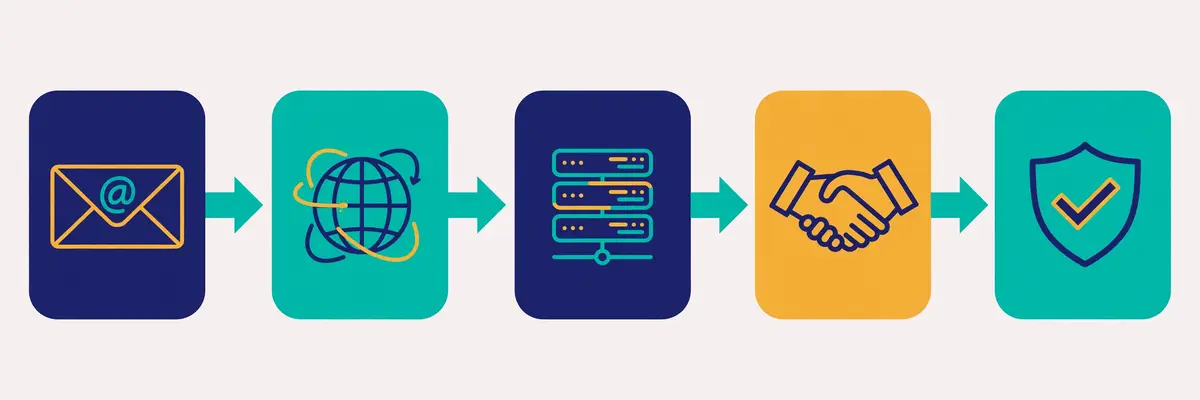
    Email verification guide: five connected cards showing the verification pipeline, from an envelope with an @ symbol through a globe, a server rack, a handshake and a shield with a checkmark
    The verification pipeline in this email verification guide: five checks in a row, from syntax and domain to the server handshake and the final verdict, each one catching a different kind of bad address.

    Secondly, a verifier does not run one check. It runs a pipeline, usually six or seven checks in a row, and each check catches a different kind of bad address. An address must pass all of them to come back Valid. The pipeline runs in milliseconds per address, and the whole list is checked in minutes. Understanding the pipeline matters, because it explains why two verifiers can disagree about the same address: they run different checks, or they run the same checks with different strictness.

    In fact, the checks run in a sensible order, from the cheapest to the most expensive. A syntax check costs nothing, so it runs first. A domain check costs a DNS lookup, so it runs second. The SMTP handshake costs a live connection to the receiving server, so it runs last, and only for addresses that passed everything before it. A verifier that skipped the cheap checks would waste time and money talking to servers about addresses that were never deliverable.

    Email verification guide: syntax, the cheapest check of all

    Firstly, the syntax check asks whether the address is even written correctly. It checks for the @ symbol, a valid local part before it, a valid domain after it, and no forbidden characters or spaces. An address such as john@@example.com or sarah@example fails here, and so does an address with a space in the middle. Typos are the most common cause of failure at this stage. The fix is often obvious: a missing letter, a doubled @, or a domain typed as gamil instead of gmail. Some verifiers suggest the correction automatically.

    Secondly, syntax alone proves almost nothing. An address can be perfectly written and still belong to nobody. Syntax is a gate, not a verdict: it removes the addresses that could never work, so the expensive checks are spent only on addresses that might. A verifier that stopped at syntax would be a spellchecker, not a verifier.

    Email verification guide: domain and MX records, the address book check

    Moreover, the domain check asks whether the domain exists and whether it can receive mail. The verifier looks up the domain’s DNS records, and specifically its MX records, which name the mail servers that accept mail for that domain. A domain with no MX records cannot receive email at all, so every address on it is Invalid. A domain that exists but has no mail server, such as a parked domain, fails the same way. This check catches the addresses collected from companies that closed, domains that lapsed, and typos that produced a real-looking but mail-less domain.

    For example, the MX check also reveals how the domain is set up. A domain whose MX records point to Google Workspace or Microsoft 365 is a normal business domain. A domain whose MX records point nowhere, or to a server that refuses connections, is a dead end. The verifier records all of this, because the later checks depend on knowing which server to talk to.

    Email verification guide: the SMTP handshake, the check that matters most

    Finally, the SMTP handshake is the check that separates verification from validation. The verifier connects to the receiving mail server and asks, in the language of email servers, whether it would accept a message for this address, then disconnects before sending anything. The server answers with a code: 250 means the mailbox exists, 550 means it does not. No email is ever sent, and the recipient never sees anything. This is the only check that can confirm a specific mailbox exists. It is the reason verification works at all.

    In sum, the handshake has one honest limit, and every verifier shares it. Some servers refuse to answer, or answer the same way for every address, to stop exactly this kind of probing. Microsoft 365, for instance, blocks sender verification entirely on many domains. When the server will not answer, the verifier cannot know. The address comes back Unknown or Catch-all instead of Valid or Invalid. That limit is not a flaw in one tool. It is a property of email itself, and it is why no verifier can honestly promise 100%.

    Email verification guide: catch-all, disposable, role-based and spam traps

    Secondly, four extra checks sort the addresses that pass the handshake but are still risky. A catch-all domain accepts mail for any address, real or invented, so the handshake says yes for every address on it. The verifier must flag the whole domain as Catch-all. A disposable address comes from a temporary inbox service that self-destructs after minutes or hours, so it is real today and dead tomorrow. A role-based address, such as info@, support@ or sales@, belongs to a team rather than a person. It bounces less yet replies less, and complains more. A spam trap is an address that was never owned by a real person, planted to catch senders who mail scraped lists, and mailing one can damage a domain’s reputation badly.

    Moreover, these four checks are where verifiers genuinely differ. Catch-all detection needs a probe address that does not exist, to see whether the server accepts it anyway. Disposable detection needs a maintained list of temporary-mail domains, which changes constantly. Spam trap detection needs a database of known traps, which no vendor publishes in full. A cheap verifier may skip one or more of these checks. The addresses it misses are the ones that cost the sender later. The feature matrix in this email verification guide shows which verifiers cover each check.

    Bulk, API and real-time verification: three ways to check

    Secondly, verification comes in three forms, and most senders need only one of them. Bulk verification uploads a list, usually as a CSV file, and checks the whole list at once. API verification checks one address at a time, called from another piece of software. Real-time verification checks an address at the moment it is typed into a form, before the form is even submitted. The checks inside are the same. The difference is when they run, and who triggers them.

    In fact, bulk verification is the form this email verification guide is mostly about, because it is the form cold email uses. A sender builds a list, uploads it, waits a few minutes, downloads the results, and mails only the Valid addresses. Every verifier in this email verification guide sells bulk verification. It is priced in credits: one credit per address checked, with some verifiers charging nothing for Unknown results or duplicates.

    Email verification guide: bulk verification, the cold email standard

    Firstly, bulk verification suits any list that is checked before a campaign. The list is uploaded, the verifier works through it. The results come back as a file with a status on every row. The sender then segments the list: Valid addresses go into the campaign, Invalid addresses are deleted. The rest are handled according to the rules in the next section. A list of ten thousand addresses typically takes five to thirty minutes to check, depending on the verifier and the domains involved.

    Secondly, bulk verification has one practical rule: keep the original list. Never overwrite the only copy with the verified version, because the results are a snapshot, not a permanent truth. A list verified in January will have decayed by June. The sender who kept the original can re-verify it in one upload. A sender who deleted the original must rebuild the list from scratch.

    Email verification guide: API verification, for software that checks as it goes

    Moreover, API verification suits teams whose software collects addresses continuously. A CRM, a sign-up flow, or a lead-generation tool calls the verifier’s API for each new address. The result decides what happens next: a Valid address enters the pipeline, an Invalid one is rejected with a polite message. All six verifiers in this email verification guide offer an API. The credit cost is the same as bulk, one credit per address. The difference is the plumbing, not the price.

    For example, API verification is how a team stops bad addresses entering the system at all, rather than cleaning them out later. A form that verifies in real time never stores the typo, the disposable address, or the fake. A CRM that verifies on import never fills up with dead contacts. The cost is the same per address, yet the saving is larger, because a bad address that never enters the system never needs cleaning, segmenting or deleting.

    Email verification guide: real-time verification, the form guard

    Finally, real-time verification is API verification with a user interface: it checks the address while the visitor is still typing, and warns them before they submit. Bouncer sells this as a separate product, Bouncer Shield, from $2 a month for 1,000 checks. ZeroBounce includes real-time checks in its ONE plan. For a cold email sender, real-time verification matters less than bulk, because cold lists do not come from forms. For a team that also runs a website with sign-up forms, it is the cheapest way to keep the house list clean from day one.

    Video: How to Verify Any Email Address and Reduce Bounce Rates by Snovio on YouTube. This video is the creator’s property, embedded via YouTube for education. OutreachCompare is not affiliated with Snovio and does not claim ownership of this video.

    In sum, the video above walks through the same pipeline this section describes, from the first syntax check to the final result. It shows the checks running on a real list. Pick bulk verification when the list already exists, pick the API when addresses arrive continuously, and pick real-time checks when the addresses come from a form. Most cold email senders need bulk only, and that is the honest starting point.

    How to read a verification result: Valid, Risky, Catch-all, Invalid, Unknown

    Email verification guide: a laptop screen showing four stacks of envelopes sorted by result, green with a checkmark, amber with a question mark, grey with a shield, and red with a cross
    Reading a verification result in this email verification guide: four stacks, green Valid, amber Catch-all, grey Risky, and red Invalid, each with a different rule for what to do next.

    Secondly, every verifier returns the same five results, even when the names differ slightly. Valid means the address passed every check and is safe to mail. Invalid means the address failed a check and will bounce. Catch-all means the domain accepts everything, so the verifier cannot confirm the mailbox. Risky means the address passed the technical checks yet carries a warning, such as a role-based inbox, a disposable domain, or a spam trap signal. Unknown means the server would not answer, so the verifier could not decide. Five results, five different actions, and the most expensive mistake in verification is treating them all the same.

    In fact, the rules are simple once they are written down. Mail the Valid addresses, and mail nothing else without thinking first. Delete the Invalid addresses at once, and never mail them again. Treat Catch-all as a maybe, and decide by value: mail the high-value catch-alls slowly, in a separate campaign, and drop the rest. Risky deserves a no for cold email, with one exception: a role-based address at a small company can be worth one careful email, while a disposable address is never worth one. Unknown is a retry, not a verdict: check it again in a week, and if it stays Unknown, drop it.

    Email verification guide: Valid, the only green light

    Firstly, a Valid result means the address passed syntax, domain, MX, SMTP and the risk checks, and the mailbox exists. Valid addresses are the campaign. A list that returns 80% Valid is a healthy list. A list that returns 50% Valid was built from stale or careless sources. The sender should ask where it came from before mailing it. The valid share is the first quality signal a list gives. It is worth reading before any email is written.

    Secondly, Valid does not mean engaged, interested, or even human. It means the mailbox exists and can receive mail. A Valid address can still ignore the email, mark it as spam, or belong to someone who left the company and whose inbox is now monitored by a colleague. Verification proves deliverability, not receptiveness, and no verifier claims otherwise. The copy still has to earn the reply.

    Email verification guide: Invalid, the address to delete at once

    Moreover, an Invalid result means the address will bounce, and mailing it is pure cost. The bounce hurts the sender reputation, the sending tool may count it against the account, and the address will never reply. Delete Invalid addresses from the sending list immediately, and keep them in a suppression list so they are never re-added by a fresh import. A sender who mails Invalid addresses after verification has paid for the check and then ignored it, which is the worst of both worlds.

    For example, the Invalid share also diagnoses the list source. A scraped list with 30% Invalid was scraped badly. A bought list with 40% Invalid was bought from a seller who does not verify. A list built by hand from company websites should return under 10% Invalid, and if it does not, the building process has a flaw, usually a typo pattern or a stale source. The Invalid rate is a report card on the list, not just a cleaning step.

    Email verification guide: Catch-all, the honest maybe

    Finally, a Catch-all result is the hardest call in verification, because it is not a verdict at all. The domain accepts every address, so the verifier cannot tell whether the mailbox exists. Mailing a catch-all is a gamble: the address may be real, or it may bounce, or it may land in a catch-all inbox that nobody reads. The right approach is to mail catch-alls separately, slowly, and only when the person matters. A list with 20% catch-all is normal in B2B, where many small companies run catch-all domains. A list with 50% catch-all is a warning that the list was built from guesses rather than findings.

    In sum, the catch-all share is also where verifiers earn their money. A verifier with good catch-all handling probes the domain with a fake address to confirm the catch-all, and then applies extra signals, such as pattern checks and historical data, to guess whether the address is real. A verifier with poor catch-all handling marks everything on the domain as Catch-all and leaves the sender to guess. The accuracy section of this email verification guide shows how much that difference matters in practice.

    The full verification workflow, step by step

    Email verification guide: a circular workflow loop around a central envelope, with finding contacts, verifying the list, cleaning, sending the campaign and a calendar refresh step
    The verification workflow in this email verification guide: find, verify, clean, segment, send, and re-verify on a calendar, in a loop that repeats every few months.

    Secondly, verification works best as a workflow, not a one-off chore. The workflow has six steps, and each step takes minutes. A sender who follows it will keep bounce rates below 2% without thinking about it. A sender who skips steps will keep wondering why replies stopped. The six steps are: find, verify, clean, segment, send, and re-verify. The rest of this section walks through each one.

    In fact, the workflow matters more than the verifier. The best verifier in the world cannot save a list that was never cleaned. The cheapest verifier in the world is enough for a sender who follows the steps. Buy the verifier that fits the budget, then follow the workflow every time, and the results will take care of themselves.

    Email verification guide: step 1, find the addresses

    Firstly, find the addresses from a source that publishes them. Company websites, LinkedIn profiles, directories and databases such as Apollo, Hunter and Snov.io are the honest sources. A finder that returns a verified address is worth more than a finder that returns a guess, because a guess costs a verification credit and often bounces anyway. Our Email Finders Guide and our guide to building a cold email list cover the finding step in full.

    Secondly, keep the source with the address. A column that records where each address came from, and when, turns a list into a traceable asset. When a campaign bounces, the sender can see which source produced the bad addresses and stop using it. When a source produces 90% Valid addresses month after month, the sender can trust it more. A list without sources is a list without a memory.

    Email verification guide: step 2, verify the whole list

    Moreover, verify the whole list before the first send, in one bulk upload. Do not verify a sample and mail the rest, because the sample is not the list. The untested half is where the bounces live. Do not verify after the first campaign, because the first campaign is where the damage happens. Upload the list, wait for the results, and download the file with the status on every row. The cost is a few dollars per thousand addresses, and the check takes minutes.

    For example, a sender with a list of ten thousand addresses should expect the check to cost between $8 and $129, depending on the verifier, and to take five to thirty minutes. A sender with a list of one hundred thousand should expect $400 to $649 on pay-as-you-go, or less on a monthly plan. The cost table later in this email verification guide shows the exact figures for each verifier at each volume.

    Email verification guide: step 3, clean the list

    Finally, clean the list by deleting every Invalid address and every disposable address, and by suppressing every spam trap. This is the step that protects the domain. A list that was 80% Valid becomes a campaign that bounces under 2%, because the 20% that would have bounced is gone. Keep the deleted addresses in a suppression file, not in the bin, so a careless re-import cannot bring them back.

    In sum, cleaning is also the moment to fix typos. A verifier that flags gamil.com or hotmal.com has found an address that is one letter from being right, and the fix is a single keystroke. Some verifiers suggest the correction automatically. A sender who fixes the typos recovers addresses that would otherwise be lost. A list that gains 2% back from typos is a list that was worth verifying twice over.

    Email verification guide: step 4, segment what is left

    Secondly, segment the cleaned list before sending. Valid addresses go into the main campaign. Catch-all addresses go into a separate, slower campaign, with a lower daily volume and a closer eye on bounces. Role-based addresses go into a third segment, mailed only when the company is small enough that info@ reaches a real person. Unknown addresses go into a holding segment, to be re-checked in a week. Segmentation is what turns five results into five sensible decisions, instead of one blunt one.

    Moreover, segmentation also protects the sender when a segment goes wrong. If the catch-all segment bounces above 2%, the sender pauses that segment only, while the main campaign keeps running. If the whole list had been mailed as one campaign, the same bounces would have damaged the whole domain. Segments are bulkheads: a leak in one does not sink the ship.

    Email verification guide: step 5, send slowly and watch the numbers

    For example, send the verified list slowly, at thirty to fifty emails a day per mailbox, and watch the bounce rate after the first hundred sends. A verified list should bounce under 2%, and under 1% is better. A bounce rate above 2% on a verified list means something went wrong: the list was verified too long ago, the verifier missed a pattern, or the sending domain has a problem of its own. Pause, investigate, and do not push through. Our guide to warming up a new email domain explains the sending pace in full.

    Finally, watch the spam complaint rate beside the bounce rate. Complaints should stay below 0.1%, and Gmail treats anything above 0.3% as a problem. A verified list rarely produces complaints, because dead addresses cannot complain, yet a verified list mailed to the wrong people certainly can. Verification protects deliverability. Targeting protects reputation. Both numbers need watching, every week, for every campaign.

    Email verification guide: step 6, re-verify on a calendar

    In fact, re-verify every list every three to four months, and verify again 24 to 48 hours before any big campaign. Lists decay by roughly a fifth each year, as people change jobs and companies close, so a list that was clean in January is a different list by June. A re-verification costs the same per address as the first check, and it is cheaper than the bounces it prevents. Put the re-verification on the calendar, next to the campaign dates, so it happens before the send rather than after the damage.

    In sum, the workflow is a loop, not a line. Find, verify, clean, segment, send, and re-verify, then find more addresses and start again. Each pass through the loop makes the list a little cleaner and the sender a little safer. A sender who runs the loop every quarter will never face a bounce crisis, because the crisis was prevented three months earlier, in a ten-minute upload.

    Pricing compared: six verifiers, honest numbers

    Secondly, pricing is where the six verifiers differ most, and the difference is larger than most senders expect. At ten thousand verifications, the cheapest option costs $48 a month and the most expensive costs $129 for a single purchase, a gap of nearly three times for the same job. At one hundred thousand, the gap is wider still. The tables below show the figures exactly as they appear on the official sites, checked on 16 November 2026, with the catches flagged beside them.

    In fact, every verifier in this email verification guide charges in credits, and one credit verifies one address. The differences are the minimum purchase, the expiry rule, the free allowance, and what happens to Unknown results and duplicates. A credit that never expires is worth more than a credit that expires in twelve months. A verifier that does not charge for Unknown results is cheaper than its price list suggests. Read the footnotes, not just the headline.

    Email verification guide: the three specialists, priced

    VerifierFree allowancePay-as-you-goMonthly planCredits expire?
    ZeroBounce100 credits a month
    Freemium plan, $0
    From $39 for 2,000
    $69 for 5,000; $129 for 10,000
    ONE $99/mo; $79 annual
    10,000 credits a month
    Never while subscribed
    PAYG: 2 years after last purchase*
    NeverBounceFree first list
    No card required; no ongoing free plan
    $8 for 1,000
    $50 for 10,000; $400 for 100,000
    Growth $49/mo
    Allowance not stated on the page†
    Yes, 12 months
    After purchase, PAYG only
    Bouncer100 free credits
    On signup, no card
    $8 for 1,000
    $60 for 10,000; $400 for 100,000
    20% less than PAYG
    $48 a month for 10,000
    Never
    Neither PAYG nor subscription

    * ZeroBounce credit expiry depends on the account: credits never expire on accounts created on or before 1 June 2026, or while a ONE subscription is active. On newer accounts, purchased credits expire two years after the most recent purchase. † NeverBounce’s Growth page shows $49 a month with no credit allowance stated; third-party breakdowns of the page’s volume selector list $49 for up to 10,000 emails, $99 for 50,000, $159 for 100,000 and $999 for 1,000,000 a month. Last checked: 16 November 2026. Features and pricing can change, so please check the provider’s site before you buy. We do not guess at features, prices or trials.

    What the specialists bundle beside verification

    Moreover, the three specialists sell different things beside verification. ZeroBounce ONE bundles a deliverability suite: warmup seeds, inbox placement tests, blacklist monitors, a DMARC monitor and an email finder, which is why it costs $99 a month for the same 10,000 credits that cost $129 as a one-off purchase. NeverBounce Growth adds automatic CRM sync, AI scoring and 200 AI-picked leads a month, which is why it suits teams that verify continuously. Bouncer sells its extras separately: a Deliverability Kit from $25 a month, and Bouncer Shield real-time checks from $2 a month. A sender who wants the extras should compare the bundle, not just the credit price.

    For example, the free allowance also differs in a way that matters to a beginner. ZeroBounce gives 100 credits every month, forever, which is enough to test the tool on a real sample each month. Bouncer gives 100 credits once, at signup, which is enough to test the tool once. NeverBounce gives a free first list with no card, which is generous for a first clean, yet there is no ongoing free tier after it. A beginner who wants to try before buying should start with ZeroBounce’s monthly 100, then test Bouncer’s 100, then run the first real list through NeverBounce.

    Email verification guide: the three finders, priced

    FinderFree planEntry planTop plan shownHow verification is charged
    Hunter$0, 50 credits a monthStarter $49/mo; $34 annual
    2,000 credits a month
    Scale $299/mo; $209 annual
    25,000 credits a month
    1 credit per email found
    0.5 credit per verification
    Snov.ioTrial, 50 credits
    100 recipients
    Starter $39/mo; $29.25 annualUltra $738/mo; $553.50 annualVerification included
    Part of the credit allowance
    Skrapp$0, 50 credits a monthProfessional $39/mo; $29 annual
    2,000 credits a month, 2 users
    Enterprise $349/mo; $262 annual
    50,000 credits a month, 15 users
    Only Valid and Catch-all charged
    Credits roll over

    Hunter Growth is $149 a month, or $104 on annual billing, for 10,000 credits. Snov.io Pro S is $99, Pro M $189 and Pro L $369 a month. Last checked: 16 November 2026. Features and pricing can change, so please check the provider’s site before you buy. We do not guess at features, prices or trials.

    Reading the finder prices: credits do double duty

    Secondly, the finders are not pure verifiers, and their pricing shows it. Hunter charges half a credit per verification, so a Starter plan with 2,000 credits verifies up to 4,000 addresses a month when nothing is spent on finding, which is a quiet bargain for a sender who already has a list. Skrapp charges only for Valid and Catch-all results, so the Invalid addresses that a list is full of cost nothing, and its credits roll over to the next month. Snov.io bundles verification into a wider platform, so the verification price is inseparable from the finding, warmup and CRM features that share the same credits.

    In sum, the finder prices make sense only when the finding is counted too. A sender who needs finding and verification in one tool should compare Hunter, Snov.io and Skrapp on the combined cost, not on verification alone. A sender who already has a list should compare the three specialists instead, because a pure verifier is cheaper per check than a finder’s credits. Our Best Email Verification Tools Compared article puts all six side by side, and our Hunter vs Skrapp comparison covers the two finders in depth.

    What 1,000, 10,000 and 100,000 verifications actually cost

    Secondly, the headline price is rarely the price a sender pays, because the minimum purchase, the volume discount and the subscription all change the maths. The table below shows the cheapest way to buy each volume from each specialist, using the figures checked on 16 November 2026. The arithmetic is shown beside each figure, so the reader can check it. Where a figure comes from a third-party breakdown rather than the vendor’s own headline, the note says so.

    VolumeZeroBounceNeverBounceBouncer
    1,000 checks$39 PAYG
    Minimum pack is 2,000 credits
    $8 PAYG
    1,000 credits at $0.008 each
    $8 PAYG
    1,000 credits at $0.008 each
    10,000 checks$99 ONE / $129 PAYG
    $99 is $0.0099 per check
    $49 Growth / $50 PAYG
    $49 is $0.0049 per check
    $48 monthly / $60 PAYG
    $48 is $0.0048 per check
    100,000 checks$449 ONE / $649 PAYG
    $449 is $0.0045 per check
    $159 Growth† / $400 PAYG
    $159 is $0.0016 per check
    $320 monthly / $400 PAYG
    $320 is $0.0032 per check

    † NeverBounce Growth at 100,000 comes from a third-party breakdown of the pricing page’s volume selector, not from the page headline, which states only $49 a month with no allowance. Last checked: 16 November 2026. All figures are arithmetic from the published packs and plans; check the provider’s site before you buy.

    Three lessons from the cost table

    Moreover, three lessons fall out of the table. The first is that ZeroBounce is the most expensive at every volume. The gap is largest at the smallest volume, where its $39 minimum pack costs nearly five times the $8 that NeverBounce and Bouncer charge for 1,000 checks. The second is that NeverBounce Growth is the cheapest at every volume above 1,000, when the third-party volume figures hold, at $49, $159 and $999 a month for 10,000, 100,000 and 1,000,000 checks. The third is that Bouncer is the cheapest honest pay-as-you-go option at every volume, and the only one whose credits never expire, which makes it the best choice for a sender who verifies irregularly.

    For example, a sender who verifies 10,000 addresses once, and then nothing for six months, should buy Bouncer pay-as-you-go for $60, because the credits will still be there in six months. A sender who verifies 10,000 addresses every month should buy NeverBounce Growth at $49 a month, or Bouncer’s monthly plan at $48, because both beat a one-off purchase. A sender who verifies 10,000 addresses a month and also wants placement tests, warmup and a DMARC monitor should buy ZeroBounce ONE at $99, because the bundle is worth more than the $50 gap to the cheapest option. The right price depends on the pattern, not just the volume.

    See a bulk verification run in action

    Video: Avoid Sending Emails to Invalid Contacts by ZeroBounce on YouTube. This video is the creator’s property, embedded via YouTube for education. OutreachCompare is not affiliated with ZeroBounce and does not claim ownership of this video.

    In sum, the video above shows the ZeroBounce workflow in action, from uploading a list to downloading the cleaned results. It is the clearest picture of what a bulk verification run looks like in practice. The prices in the table are the ones to compare against it: the workflow is the same at every verifier, and the price is what differs.

    The accuracy reality: vendor claims against independent benchmarks

    Secondly, every verifier claims high accuracy, and the claims are hard to compare, because each vendor measures accuracy differently. ZeroBounce guarantees 99.6% accuracy, with a footnote that the figure depends on its Verify+ service. Without it, the figure is 96% for some providers such as Yahoo. NeverBounce claims 99.9%. Bouncer claims 99.5%. Snov.io claims 98%. These are vendor claims, measured by the vendors themselves, on their own tests, and no neutral audit exists that tests them all the same way. That fact should be stated plainly, because it changes how much weight the claims deserve.

    In fact, the independent benchmarks that do exist tell a more complicated story, and they disagree with each other. A thirty-day test by La Growth Machine found NeverBounce at 99.9% and ZeroBounce at 99.0%, which supports both vendors’ claims. A stricter benchmark by Hunter, which counted Unknown results as failures, found NeverBounce at 63.17% and ZeroBounce at 60.7%. Both tests are real, both are third-party, and neither is a neutral audit. The difference is what counts as a failure: a verifier that says Unknown is being honest, yet a benchmark that counts Unknown as wrong will punish it for that honesty.

    What the finder benchmarks found

    Firstly, the finder benchmarks are the most surprising numbers in this email verification guide. An Anymail Finder benchmark from September 2025 and a Tomba benchmark from February 2026 both measured how many found addresses were actually verified, and both found low figures: Skrapp at 42.8% verified, against its own claim of 92% search success, and Hunter at 37.6%. These figures measure finding plus verification together, not verification alone, so they do not mean the verifiers are wrong 60% of the time. They mean that finding an address and verifying it are different jobs, and that a finder’s search success is not a verification rate.

    Secondly, the lesson is to read the claim, not just the number. A claim of 92% search success means the finder found an address pattern for 92% of the names it tried. A claim of 42.8% verified means only 42.8% of those addresses passed the verification checks. Both can be true at once, and the gap between them is the addresses that look right yet do not exist. A sender who buys a finder for its search rate, and then mails the unverified results, will bounce far more than a sender who verifies first.

    Why no verifier can promise 100%

    Moreover, no verifier can promise 100% accuracy, because the email system itself will not allow it. Some servers refuse to answer the SMTP handshake, some domains accept every address, and some mailboxes close between the check and the send. A verifier that promises 100% is either counting Unknown results as correct, or it is not telling the truth. The honest promise is a low bounce rate on Valid addresses. ZeroBounce states it directly: Valid addresses should bounce below 2%. That is a testable promise, and it is the one to hold a verifier to.

    For example, the practical way to judge accuracy is to test it on a known list. Take one hundred addresses that are known to be real, and one hundred that are known to be dead, run both through the verifier, and count the mistakes. A verifier that marks dead addresses as Valid is dangerous. Marking real addresses as Invalid is wasteful. Many Unknown results are honest yet unhelpful. The test costs a few dollars in credits, and it tells the sender more than any vendor claim ever will.

    Email verification guide: the accuracy checklist before you buy

    Finally, four questions separate a good verifier from a good sales page. Does it charge for Unknown results, or only for answers? Will it run a catch-all probe, or mark every address on a catch-all domain the same way? Does it check for spam traps and disposable domains, or only for syntax and MX records? Is there a published bounce-rate promise for Valid addresses, or only an accuracy percentage? A verifier that answers all four well is worth its price. A verifier that dodges them is not, whatever the headline claims.

    Pros and cons: the honest case for each verifier

    Secondly, every verifier in this email verification guide has a genuine strength and a genuine weakness. The honest case for each one is worth stating. A guide that lists only strengths is a sales page. A guide that lists only weaknesses is a hit piece. The table-free version below gives each verifier its due, in plain language, so the reader can weigh the trade-off rather than taking a recommendation on trust.

    Email verification guide: ZeroBounce, the all-rounder

    Firstly, ZeroBounce is the best all-round verifier, and its strength is breadth. It checks more than thirty statuses, it bundles placement tests, warmup, DMARC monitoring and an email finder into ONE. It guarantees 99.6% accuracy with a promise of bounces below 2% on Valid addresses. Its weakness is price: it is the most expensive verifier at every volume, its minimum purchase is $39 for 2,000 credits, and its accuracy guarantee carries the Verify+ footnote that drops the figure to 96% for some providers. A sender who wants one vendor for verification and deliverability should buy it. A sender who wants only verification should not.

    NeverBounce, the monthly workhorse

    Secondly, NeverBounce is the best verifier for a team that verifies every month, and its strength is the Growth plan. At $49 a month it is the cheapest monthly option above 1,000 checks, it syncs automatically with the CRM, it charges only for new unique emails. It adds AI scoring and 200 AI-picked leads a month. Its weakness is transparency: the Growth page states no credit allowance, so the buyer must trust third-party breakdowns for the higher tiers, and its pay-as-you-go credits expire after twelve months. A sender who verifies monthly should buy it. A sender who verifies twice a year should not.

    Email verification guide: Bouncer, the value pick

    Moreover, Bouncer is the best value verifier, and its strength is fairness. Its credits never expire, it never charges for duplicates or Unknown results, it gives 100 free credits at signup. It is the cheapest pay-as-you-go option at every volume. Its weakness is scope: it has no ongoing free plan, its deliverability tools cost extra from $25 a month. It is a smaller vendor than its two rivals, with a narrower integration list. A sender who verifies irregularly should buy it. A sender who wants a free monthly allowance should look at ZeroBounce instead.

    Hunter, the finder that verifies cheaply

    For example, Hunter is the best finder for a sender who already has a list, and its strength is the half-credit verification. A Starter plan with 2,000 credits verifies up to 4,000 addresses a month, which makes it cheaper than a specialist for verification alone. It also finds addresses, runs campaigns and tracks replies. Its weakness is accuracy: independent benchmarks measured only 37.6% of its found addresses as verified, and its verification is a feature of a wider platform rather than a specialist’s core job. A sender who needs finding and verification together should buy it. A sender who needs verification only should buy a specialist.

    Email verification guide: Snov.io, the platform play

    Finally, Snov.io is the best verifier inside a wider platform, and its strength is integration. Verification sits beside finding, warmup, drip campaigns and a CRM in one subscription, the video above shows its verification workflow clearly, and its 98% accuracy claim is backed by a stated 1% bounce rate on Valid addresses. Its weakness is price clarity: verification shares credits with every other feature, so the cost of verification alone is hard to isolate. The entry plan is $39 a month for a bundle the sender may not need. A sender who wants one platform for everything should buy it. A sender who wants a cheap standalone verifier should not.

    Skrapp, the rollover specialist

    In sum, Skrapp is the best verifier for a sender who verifies in bursts, and its strength is the rollover. Credits roll over to the next month, only Valid and Catch-all results are charged. The Professional plan gives 2,000 credits a month for $39, or $29 on annual billing. Its weakness is the benchmark gap: independent tests measured 42.8% of its found addresses as verified, against its own 92% search-success claim, which means the finding is stronger than the verification. A sender who finds on LinkedIn and verifies in bursts should buy it. A sender who needs a pure verification specialist should buy Bouncer or ZeroBounce.

    Who should pick which: a decision framework

    Secondly, the decision is simpler than the comparison suggests, because most senders fall into one of four groups, and each group has an obvious pick. Answer which group describes the sender, and the choice narrows from six verifiers to one or two. Skip the question, and the choice stays six wide, which is no choice at all. The framework below covers the beginner, the monthly sender, the irregular sender, and the sender who needs finding as well.

    Pick Bouncer when the budget is tight or the volume is irregular

    Firstly, pick Bouncer when the budget is tight, or when verification happens a few times a year rather than every month. Its credits never expire, so a $60 pack bought in January is still there in September, and its $8 minimum purchase is the lowest in this email verification guide. A freelancer cleaning one list a quarter, a startup verifying its first thousand leads, or a team that inherited a stale list and needs one big clean should all start with Bouncer. The only reason to look elsewhere is a need for a free monthly allowance, or for a deliverability bundle in the same subscription.

    Pick ZeroBounce when one vendor should do everything

    Secondly, pick ZeroBounce when the sender wants one vendor for verification, placement testing, warmup and DMARC monitoring. The ONE plan at $99 a month, or $79 on annual billing, is expensive for verification alone, yet it replaces three or four separate subscriptions, and its 100 free credits a month let a beginner test it indefinitely. A marketing team with a large opt-in list, a sender who already pays for placement tests elsewhere, or a team that wants the strongest accuracy guarantee should all pick ZeroBounce. The only reason to look elsewhere is price, and the price gap is real.

    Pick NeverBounce when verification runs every month

    Moreover, pick NeverBounce when verification is a monthly habit rather than a one-off chore. The Growth plan at $49 a month syncs with the CRM automatically, charges only for new unique emails, and adds AI scoring and leads on top, which makes it the cheapest monthly option above 1,000 checks. A sales team that adds leads every week, a company with a signup form that never stops, or an agency that cleans client lists monthly should all pick NeverBounce. The only reason to look elsewhere is the unstated allowance, which the buyer should confirm on the site before committing, or a volume pattern that is irregular rather than monthly.

    Pick Hunter, Snov.io or Skrapp when finding comes first

    For example, pick Hunter when the list still needs building and the budget is small, because its half-credit verification stretches a $49 plan to 4,000 checks a month. Pick Snov.io when the team wants finding, verification, warmup and campaigns in one platform, and is willing to pay $39 a month for the bundle. Pick Skrapp when the finding happens on LinkedIn and verification happens in bursts, because its credits roll over and only Valid and Catch-all results are charged. A sender who already has a list should not pick any of the three, because a specialist verifier is cheaper per check.

    In sum, the framework is a ladder, not a leap. Start with the cheapest verifier that fits the pattern, verify the first list, and watch the bounce rate. If the bounce rate stays below 2%, the verifier is doing its job, and the sender should stay with it. If the volume grows, or the needs change, the sender can switch, because verification credits are not a marriage. A sender who picks by pattern will spend less, bounce less, and switch less than a sender who picks by brand.

    Frequently asked questions

    Email verification guide: what is email verification, in one sentence?

    Email verification is the check that confirms an email address is real, formatted correctly and able to receive mail, before you ever send to it. A verifier runs checks from syntax to a live SMTP handshake, then returns Valid, Risky, Catch-all, Invalid or Unknown for each address. The sender mails only the Valid ones.

    Email verification guide: how much does email verification cost?

    Email verification costs from $8 for 1,000 checks at Bouncer and NeverBounce, to $39 for 2,000 checks at ZeroBounce, with the price per check falling sharply at volume. At 10,000 checks, the cheapest options are Bouncer at $48 a month and NeverBounce Growth at $49 a month, while ZeroBounce ONE costs $99 a month. At 100,000 checks, NeverBounce Growth is cheapest at $159 a month on third-party volume figures, against $320 at Bouncer and $449 at ZeroBounce.

    Email verification guide: how accurate is email verification?

    Vendor claims run from 98% to 99.9%, yet no neutral audit exists, and independent benchmarks disagree. A thirty-day test found NeverBounce at 99.9% and ZeroBounce at 99.0%, while a stricter benchmark that counted Unknown results as failures found both near 60%. The honest promise to hold a verifier to is a bounce rate below 2% on Valid addresses, which ZeroBounce states directly.

    Email verification guide: what should I do with catch-all addresses?

    Mail catch-all addresses separately, slowly, and only when the person matters. A catch-all domain accepts every address, so the verifier cannot confirm the mailbox, and mailing the whole segment at full speed risks bounces. A list with 20% catch-all is normal in B2B. A list with 50% catch-all was probably built from guesses, and the sender should rebuild it from real sources.

    Email verification guide: how often should I re-verify my list?

    Re-verify every list every three to four months, and again 24 to 48 hours before any big campaign. Lists decay by roughly a fifth each year, as people change jobs and companies close, so a list verified in January is a different list by June. Re-verification costs the same per address as the first check, and it is cheaper than the bounces it prevents.

    Email verification guide: does verification guarantee my emails reach the inbox?

    No. Verification proves an address can receive mail, which keeps bounces low, yet inbox placement also depends on authentication, sender reputation, warmup, content and engagement. A verified list mailed from an unauthenticated domain with no warmup will still land in spam. Verification is the first step, not the whole job, and our Deliverability Guide 2026 covers the rest.

    The verdict

    Secondly, the verdict in this email verification guide is a set of best-for labels, not a numeric score, because no hands-on testing has been done yet. A score without testing would be a guess. The labels below come from the features and prices checked on the official sites on 16 November 2026, and from the way each verifier fits a beginner, a monthly sender, an irregular sender, and a sender who needs finding as well.

    For example, Bouncer is the best value verifier, at $8 for 1,000 credits that never expire, with no charge for duplicates or Unknown results. ZeroBounce is the best all-round verifier, with a 99.6% accuracy guarantee and a deliverability suite bundled into ONE from $99 a month. NeverBounce is the best verifier for monthly senders, with automatic CRM sync and the cheapest Growth plan above 1,000 checks. Hunter is the best finder that verifies cheaply, at half a credit per check.

    Email verification guide: the finder verdict

    Moreover, Snov.io is the best verifier inside a wider platform, with finding, warmup, campaigns and a CRM sharing one subscription from $39 a month. Skrapp is the best verifier for LinkedIn-first senders who verify in bursts, with credits that roll over and charges only for Valid and Catch-all results. Meanwhile, the advice that matters most is not a tool pick: verify every list before the first send, delete the Invalids, segment the catch-alls, and re-verify every three to four months.

    Finally, verification is the cheapest insurance in cold email. The senders who buy it are the senders who keep landing in the inbox year after year. Start with Bouncer when the budget is tight, move to NeverBounce when verification becomes monthly, and move to ZeroBounce when one vendor should do everything. A verified list, a separate sending domain, a patient warmup and a careful pace will take a sender further than any single tool ever will.

    Our verdict on this email verification guide

    For the best value, choose Bouncer, from $8 for 1,000 credits that never expire. ZeroBounce is the best all-round verifier, with a 99.6% accuracy guarantee from $39 for 2,000 credits. NeverBounce is the best choice for monthly senders, with automatic CRM sync from $49 a month. Hunter is the best finder that verifies cheaply, at half a credit per check from $49 a month. No numeric score is given, because no hands-on testing has been done yet.

    Start here: pick the verifier that fits how often you verify, upload the list, delete the Invalids, segment the catch-alls, and re-verify every three to four months.

    Keep reading

    Email verification guideBouncer from $8/1,000 · ZeroBounce from $39/2,000 · NeverBounce from $49/mo Visit Bouncer →
  • ZeroBounce vs NeverBounce 2026

    ZeroBounce vs NeverBounce 2026

    A full deliverability suite against a focused verification specialist — and a clear winner for each job

    ZeroBounce vs NeverBounce is the most useful head-to-head in email verification, because the two tools answer the same question in opposite ways. ZeroBounce bundles verification with scoring, an email finder, warmup, inbox placement tests, blacklist monitoring and DMARC checks, from $39 for a one-off pack or $99 a month for the ONE subscription. NeverBounce does one job, verification, and does it fast and cheaply, from $8 per 1,000 credits or $49 a month on its Growth plan. This ZeroBounce vs NeverBounce comparison checks pricing, accuracy, verification types, speed, bulk handling, real-time checks, scoring, integrations and data handling on both official sites, so you can pick with confidence.

    Visit ZeroBounce →See NeverBounce Plans →

    Prices checked 16 November 2026 on ZeroBounce’s and NeverBounce’s official pricing pages. Features and pricing can change, so please check the provider’s site before you buy.

    Quick Answer

    ZeroBounce wins on breadth. Its ONE subscription at $99 a month bundles 10,000 verification credits with scoring, an email finder, warmup, inbox placement tests, blacklist monitoring and DMARC checks, plus a 100-credit free plan every month. NeverBounce wins on price and speed. Pay as you go starts at $8 per 1,000 credits, Growth costs $49 a month, and the official site says 10,000 emails can be cleaned in as little as 3 minutes. ZeroBounce leads on detail, returning more than 30 statuses and sub-statuses per address, while NeverBounce leads on simplicity, with five clear statuses and a hybrid check that resolves more catch-all domains outright.

    Accuracy claims are close on paper, with ZeroBounce guaranteeing 99.6% and NeverBounce claiming 99.9%, yet independent tests disagree by thirty points depending on how unknown results are counted. Credit expiry is the quiet difference: ZeroBounce credits never expire while a ONE subscription is active, while NeverBounce pay-as-you-go credits expire 12 months after purchase. Bouncer is the cost benchmark in this ZeroBounce vs NeverBounce comparison, at $8 for 1,000 checks and $400 for 100,000, with credits that never expire.

    Why this ZeroBounce vs NeverBounce comparison settles the choice

    Every cold email campaign stands or falls on the quality of its list, and the two best-known verifiers both promise the same thing: fewer bounces, a safer sender reputation, and more of your emails reaching real inboxes. ZeroBounce and NeverBounce have cleaned lists for years, they both publish accuracy figures above 99%, and they both charge by the credit. That shared promise is exactly why the decision feels stuck.

    Look closer, and the two tools stop looking alike. ZeroBounce has grown into a deliverability suite, with scoring, finding, warmup and monitoring beside verification. NeverBounce has stayed a specialist, with one job, a fast engine and a low price. One of them charges $39 before you can verify a single address, and the other starts at $8. One of them answers a catch-all with a score, and the other answers it with a second, deeper check. Each difference points at a different kind of buyer.

    This ZeroBounce vs NeverBounce comparison takes those differences in turn. Pricing leads, because $39 against $8 is the first number every buyer sees. Cost per volume comes next, because the cheapest tool at 1,000 checks is not the cheapest at 100,000. Accuracy follows, with vendor claims kept firmly apart from independent benchmarks. Then come the checks themselves, bulk and real-time handling, scoring and monitoring, integrations and data handling, a feature matrix and the honest pros and cons. By the end, the right verifier, and the right way to buy it, should be clear.

    ZeroBounce and NeverBounce in plain English: a deliverability suite against a verification specialist

    ZeroBounce is an email verification and deliverability platform used by more than 650,000 clients, according to its own site. You upload a list or connect the API, and it returns a status for every address, from valid and invalid to catch-all, disposable, abuse and spam trap, with more than 30 statuses and sub-statuses in total. Beside verification sit AI scoring, an email finder, domain search, warmup, inbox placement tests, blacklist monitoring and DMARC monitoring, all bundled into the ONE subscription. It suits a team that wants the whole deliverability toolkit under one login. Verification starts with a free plan of 100 credits a month, pay as you go from $39 for 2,000 credits, or ONE from $99 a month.

    NeverBounce is a verification-only service, now owned by ZoomInfo, which acquired it in 2019. You bring a list, it tells you which addresses are safe to send to, and that is the whole product. Verification runs through a hybrid check that combines accept-all detection with real-time mailbox checks, returning five statuses: valid, invalid, disposable, catch-all and unknown, with role addresses flagged separately. Nothing here finds addresses, enriches contacts or sends campaigns. It fits a team that already owns its list and wants it cleaned quickly and cheaply. Verification starts at $8 per 1,000 pay-as-you-go credits, or $49 a month on Growth.

    Two tools, one job, different shapes in this ZeroBounce vs NeverBounce comparison

    Both tools cover the same core job at heart. You begin with a list of addresses, some of which are dead, risky or fake. You then run the list through the verifier, which checks syntax, domain, mail server and mailbox in turn. Next you download the results, keep the valid addresses, and drop or quarantine the rest. To finish, you send to the clean list and watch the bounce rate fall. Because the loop matches on both tools, the decision rests on what happens around it: price, speed, detail and the extras.

    What ZeroBounce adds on top of verification in this ZeroBounce vs NeverBounce comparison

    Above all, ZeroBounce turns from a verifier into a deliverability platform through the ONE bundle. AI scoring grades every address from 0 to 10 on its likelihood to engage, activity data shows whether a mailbox has been active in the past 30 to 365 days, and the email finder locates addresses from a name and domain. Warmup keeps new senders healthy, inbox placement tests show where mail actually lands, blacklist monitors scan every 8 hours, and a DMARC monitor watches authentication. A team that buys those tools separately elsewhere can replace several subscriptions with one.

    Moreover, ZeroBounce adds verification depth that NeverBounce does not match on paper. Its results carry sub-statuses that name the exact reason an address failed, such as mailbox not found, mailbox quota exceeded, global suppression or mail server did not respond. That granularity lets a team build suppression rules per failure type instead of one blunt valid-or-invalid split. Our best email verification tools compared guide sets both tools against four more rivals.

    What NeverBounce adds on top of verification in this ZeroBounce vs NeverBounce comparison

    NeverBounce, meanwhile, turns from a verifier into an always-on cleaning service through Growth and Sync. The Growth plan re-verifies CRM and email platform lists automatically on a daily, weekly or monthly schedule, charging only for new, unique emails, so duplicates are free. AI scoring ranks leads by likelihood to convert, and 200 AI-picked leads a month arrive matched to your best customers. A team that verifies the same lists every month can set it once and forget it.

    Similarly, NeverBounce adds speed and human review where it counts. The official features page says 10,000 emails can be cleaned in as little as 3 minutes, and independent reviews report a real-time API response around 15 milliseconds, fast enough for a signup form to check an address while the visitor is still typing. When a list returns many unknowns, the NeverBounce team reviews it personally, which is a human touch neither rival advertises. The free Instant Bounce Analysis tells you whether a list needs cleaning at all before you pay for a full run.

    The one-sentence difference in this ZeroBounce vs NeverBounce comparison

    ZeroBounce is the deliverability suite: verification plus scoring, finding, warmup and monitoring, with the deepest result detail in the category, priced from $39 a pack or $99 a month. NeverBounce is the verification specialist: one job, five clear statuses, the fastest bulk cleaning in this ZeroBounce vs NeverBounce comparison, priced from $8 per 1,000 credits or $49 a month. A team that wants everything in one place will notice the difference in week one. A team that wants a clean list for the least money will notice it on the first invoice.

    Neither tool finds email addresses for you, except that ZeroBounce bundles an email finder inside ONE while NeverBounce finds none at all, so a team that still needs to build its list should read our guide to building a cold email list first. For a team that already owns its list, though, this pair stays the most useful match-up in verification.

    Pricing head-to-head in this ZeroBounce vs NeverBounce comparison

    Pricing is where this ZeroBounce vs NeverBounce comparison first gets interesting, because the two price lists work in different shapes. ZeroBounce sells a minimum pack of 2,000 credits for $39, then steps the per-credit price down as the pack grows, and sells a subscription that bundles the deliverability suite on top. NeverBounce sells credits from 1,000 at a time for $8, steps the price down with volume too, and sells a subscription that automates the cleaning instead of adding tools. A team that cleans one list a quarter and a team that cleans every week will read the same two price lists and reach opposite conclusions.

    All prices below come from the official pricing pages, read today, 16 November 2026. Where the live page shows only a headline rate and the volume ladder sits behind a slider, this ZeroBounce vs NeverBounce comparison says so plainly and labels the ladder figures as corroborated by independent checks of the same official page in October and November 2026. Where a price is not shown on the official page, the article says so instead of guessing.

    ZeroBounce vs NeverBounce comparison: two bar charts side by side, one bar growing taller with volume beside coin stacks, the other a flat monthly subscription card with a calendar icon, plus a small clock showing credits expiring
    Pricing in this ZeroBounce vs NeverBounce comparison: ZeroBounce sells minimum packs of 2,000 credits and a $99-a-month suite, while NeverBounce sells credits from 1,000 at a time and a $49-a-month subscription.

    ZeroBounce plans in this ZeroBounce vs NeverBounce comparison: Freemium, pay as you go and ONE

    PlanPrice*What you getBest forVisit
    ZeroBounce — FreemiumBest for testing$0 a month
    100 credits a month, refilled
    100 validation credits
    1 inbox test, 1 server test, 1 blacklist monitor, 10 Email Finder
    Trying accuracy on a sampleVisit Site →
    ZeroBounce — Pay as you goBest for one-off cleansFrom $39
    2,000 credits, minimum purchase
    1 credit per address
    Unknown results free, duplicates free
    Cleaning a list now and thenSee Pay As You Go →
    ZeroBounce — ONEBest for regular senders$99 a month
    $79 billed yearly, from 10,000 credits
    10,000 credits a month
    Scoring, Finder, warmup, placement tests, DMARC
    Monthly verification plus monitoringExplore ONE →

    * Last checked: 16 November 2026 on ZeroBounce’s pricing page. The page shows the $39 minimum pack, the $99 ONE entry point and the 100-credit free plan; the volume ladder and higher ONE tiers below are corroborated by independent checks of the same official page in October 2026, flagged as such. Features and pricing can change, so please check the provider’s site before you buy. We do not guess at features, prices or trials.

    Reading ZeroBounce’s pay-as-you-go ladder in this ZeroBounce vs NeverBounce comparison

    ZeroBounce’s pay-as-you-go ladder steps the per-credit price down as the pack grows, and the steps are worth knowing before you buy the minimum pack. The figures below were corroborated by independent checks of the same official page in October 2026, because the live page today shows the $39 minimum and asks you to enter a volume rather than printing the full ladder. The 10,000-credit pack costs $129, which works out at about $0.0129 per credit. Fifty thousand credits cost $499, and 100,000 cost $649, which works out at about $0.0065 per credit. One million credits cost $3,199, which works out at about $0.0032 per credit.

    ONE subscribers get 15% off additional pay-as-you-go credits, and unused ONE credits roll over while the subscription stays active. The ONE tiers above the entry point were corroborated the same way: 50,000 credits a month costs $379, and 100,000 credits a month costs $449. A 1,000,000-credit ONE tier at $2,499 a month was corroborated by a single independent November 2026 check of the same page, so treat that figure as indicative and confirm it at checkout. Annual billing saves 20% on ONE, taking the entry tier from $99 to $79 a month.

    Credit expiry is the detail most buyers overlook, and ZeroBounce states it plainly in its own FAQ. Credits never expire while a ONE subscription is active. Without a subscription, expiry rules may apply depending on when the account was created, and independent checks report that accounts created after 1 June 2026 see purchased credits expire two years after the most recent purchase. Either way, a team that buys a large pack and cleans slowly should check the expiry rule for its own account before paying.

    NeverBounce plans in this ZeroBounce vs NeverBounce comparison: pay as you go, Growth and Enterprise

    PlanPrice*What you getBest forVisit
    NeverBounce — Pay as you goBest for one-off cleans$8 per 1,000 credits
    Minimum purchase 1,000 credits
    1 credit per email
    Typo fixes, company name append, up to 10 lists at once
    Cleaning a list now and thenVisit Site →
    NeverBounce — GrowthBest for regular senders$49 a month
    Credit allowance not stated on the page
    Auto-sync with your CRM
    AI scoring, 200 AI-picked leads a month, duplicates free
    Teams verifying every monthSee Growth →
    NeverBounce — EnterpriseBest for large teamsCustom
    Typically 250,000+ emails a month
    Unlimited usage
    Dedicated manager, advanced security, custom rules
    Large teams with complex stacksGet a Quote →

    * Last checked: 16 November 2026 on NeverBounce’s pricing page. The page shows $8 per 1,000 credits and $49 a month for Growth, but states no credit allowance for Growth; the allowance and the volume tiers below are corroborated by independent checks of the same official page in October and November 2026, flagged as such. Features and pricing can change, so please check the provider’s site before you buy. We do not guess at features, prices or trials.

    Reading NeverBounce’s volume tiers in this ZeroBounce vs NeverBounce comparison

    NeverBounce’s volume tiers sit behind a slider on the pricing page, and several independent checks of that slider in October and November 2026 agree on the same ladder. Pay as you go costs $40 for 5,000 credits, $50 for 10,000, $125 for 25,000, $250 for 50,000, $400 for 100,000, $750 for 250,000, $1,500 for 500,000 and $2,500 for 1,000,000, with $4,000 buying 2,000,000. The per-credit price therefore falls from $0.008 at the entry tier to $0.002 at 2,000,000. The live page today shows only the $8 per 1,000 headline rate, so confirm the tier for your volume at checkout.

    Growth follows the same pattern. Independent checks report $49 a month for up to 10,000 emails, $99 for up to 50,000, $159 for up to 100,000, $249 for up to 250,000, $499 for up to 500,000 and $999 for up to 1,000,000. The page itself states no allowance at all, which is why this ZeroBounce vs NeverBounce comparison flags those figures as corroborated rather than directly observed. Growth credits replenish each billing period, only new, unique emails are charged, and duplicates are free.

    One rule makes NeverBounce’s pay-as-you-go credits different from ZeroBounce’s. NeverBounce credits expire 12 months after purchase, stated plainly on its own pricing page. A team that buys a large block at the cheaper rate only saves money if it uses the credits inside the year. Growth subscription credits work differently, covering a monthly volume instead, and do not survive cancellation.

    Trying before you buy in this ZeroBounce vs NeverBounce comparison: 100 free credits against a free first list

    Both tools let you test before you pay, and the offers suit different buyers. ZeroBounce gives every free account 100 validation credits a month, refilled monthly, with a business or premium domain at signup, plus one inbox test, one server test, one blacklist monitor and 10 Email Finder searches. A team can run a 100-address sample through the full pipeline every month without paying.

    NeverBounce takes a different approach. The pricing page says you can verify your first list without a credit card, and the features page adds free test credits and a free list analysis, though the page states no number of free credits. The free Instant Bounce Analysis reports whether a list is safe to send or needs cleaning, at any size, before you commit to a full verification. If a fixed free allowance matters most, ZeroBounce’s 100 monthly credits are the clearer offer.

    Cost at 1,000, 10,000, 100,000 and 1,000,000 verifications

    Headline prices mislead in this category, because a credit is not always a verification, and the cheapest route changes with volume. ZeroBounce never charges for unknown results or duplicates, so one credit buys one decided address. NeverBounce charges one credit per email, with duplicates free on Growth. Bouncer, the cost benchmark in this ZeroBounce vs NeverBounce comparison, charges one credit per check, never charges for duplicates or unknowns, and its credits never expire. The table below works out the arithmetic for you, using the cheapest verified route on each tool.

    The cheapest route at each volume in this ZeroBounce vs NeverBounce comparison

    VerificationsZeroBounce, cheapest routeNeverBounce, cheapest routeBouncer, benchmarkCheapest pick
    1,000$39
    Pay as you go, minimum 2,000-credit pack
    $8
    Pay as you go, 1,000 credits
    $8
    Pay as you go, 1,000 credits
    NeverBounce or Bouncer, at $8
    10,000$99 a month
    ONE, 10,000 credits; pay as you go $129
    $49 a month
    Growth, up to 10,000 a month*
    $60
    Pay as you go, 10,000 credits
    NeverBounce, at $49 a month
    100,000$449 a month
    ONE, 100,000 credits; pay as you go $649
    $159 a month
    Growth, up to 100,000 a month*
    $400
    Pay as you go, 100,000 credits
    NeverBounce, at $159 a month
    1,000,000$2,499 a month
    ONE, 1,000,000 credits†; pay as you go $3,199
    $999 a month
    Growth, up to 1,000,000 a month*
    $2,000
    Pay as you go, 1,000,000 credits
    NeverBounce, at $999 a month

    * NeverBounce Growth allowances are corroborated by independent checks of the same official page in October and November 2026; the live page today states no allowance. † The ZeroBounce ONE 1,000,000-credit tier at $2,499 a month was corroborated by a single independent November 2026 check, so confirm it at checkout. Bouncer figures are from our best email verification tools compared guide, verified 16 November 2026. Arithmetic is shown plainly so you can check it. Last checked: 16 November 2026. Features and pricing can change, so please check the provider’s site before you buy.

    What the cost table means in this ZeroBounce vs NeverBounce comparison

    NeverBounce wins this table outright, and the gap grows as you scale. One thousand checks tie Bouncer at $8, while ZeroBounce costs $39, because the minimum pack is 2,000 credits and you pay for the pack, not the checks you use. Ten thousand checks cost $49 a month on NeverBounce Growth, against ZeroBounce ONE at $99 and Bouncer at $60. The 100,000 mark costs $159 a month on NeverBounce Growth, against ZeroBounce ONE at $449 and Bouncer at $400. One million checks cost $999 a month on NeverBounce Growth, against ZeroBounce ONE at $2,499 and Bouncer at $2,000.

    Pay as you go alone tells a closer story. At 100,000 checks NeverBounce pay as you go costs $400, exactly tying Bouncer at $400, while ZeroBounce pay as you go costs $649. At 1,000,000 checks Bouncer pay as you go costs $2,000, beating NeverBounce at $2,500 and ZeroBounce at $3,199. A team that buys credits once and draws on them slowly should weigh Bouncer’s never-expiring credits against NeverBounce’s 12-month expiry before choosing the pay-as-you-go route.

    Cost per 1,000 verifications in this ZeroBounce vs NeverBounce comparison

    RouteCost per 1,000 verificationsHow it is worked out
    ZeroBounce pay as you go, 10,000$12.90$129 ÷ 10
    ZeroBounce ONE, 10,000 a month$9.90$99 ÷ 10
    ZeroBounce ONE, 100,000 a month$4.49$449 ÷ 100
    NeverBounce pay as you go, 10,000$5.00$50 ÷ 10
    NeverBounce Growth, 10,000 a month$4.90$49 ÷ 10
    NeverBounce Growth, 100,000 a month$1.59$159 ÷ 100
    Bouncer pay as you go, 100,000$4.00$400 ÷ 100

    Arithmetic, labelled plainly: each figure divides the pack or monthly price by the number of thousands of verifications it covers. NeverBounce Growth allowances are corroborated by independent checks, flagged above. Last checked: 16 November 2026.

    When ZeroBounce is still worth the higher price in this ZeroBounce vs NeverBounce comparison

    ZeroBounce costs more per check at every volume in the table, so the honest question is what the extra money buys. The ONE subscription at $99 a month adds scoring, an email finder, warmup, inbox placement tests, blacklist monitoring and DMARC checks that NeverBounce does not offer at any price. A team that would buy even one of those tools separately, such as a $25-a-month deliverability kit, closes most of the gap at once.

    In contrast, a team that only needs verification should not pay for a suite it will never open. NeverBounce Growth at $49 a month for up to 10,000 emails covers the core job for half the price of ZeroBounce ONE, and its pay-as-you-go rate at 10,000 checks is $50 against ZeroBounce’s $129. Run your own monthly volume through both price lists before signing, and count the add-ons you would genuinely use.

    Accuracy: what 99.6% and 99.9% actually mean

    Accuracy is the number every verifier leads with, and it is also the number you should trust least at face value. ZeroBounce guarantees 99.6% accurate results on its own site. NeverBounce claims 99.9% accuracy, the highest headline figure in the category. Bouncer claims 99.5%. Three tools, three figures within half a point of each other, and no neutral audit behind any of them. The honest reading starts by asking what each figure actually measures.

    ZeroBounce’s guarantee carries a footnote that matters. The 99.6% figure applies with Verify+, its free and optional second pass that sends an email to check for bounces, aimed at Yahoo, AOL and catch-all addresses. The same page says opting out may reduce accuracy to 96% for certain providers, such as Yahoo. That is refreshingly honest: the headline figure depends on a step you must leave switched on, and the fallback figure is 96%, not 99.6%.

    NeverBounce’s 99.9% claim rests on a different foundation. Its hybrid verification combines accept-all detection with real-time mailbox checks, and independent reviews report that it processes more than 10 billion verifications since 2015, learning from each one. NeverBounce also offers a money-back guarantee on verified emails that bounce, reported by independent reviews, which is a stronger promise than a bare percentage. Even so, 99.9% is a vendor claim, not an audited result, and it should be read the same way as every other vendor claim in this category.

    What independent benchmarks actually found in this ZeroBounce vs NeverBounce comparison

    Independent tests disagree with each other almost as much as they disagree with the vendors, and the reason is methodology. One 30-day test by La Growth Machine ran 127,000 verification checks across B2B prospect lists and reported NeverBounce at 99.9% and ZeroBounce at 99.0% on known-valid and known-invalid addresses. A stricter benchmark by Hunter, which penalises tools for returning unknown on catch-all domains, measured NeverBounce at 63.17% and ZeroBounce at 60.7%. The gap between 99% and 63% is not a contradiction: it reflects whether unknown results count as correct.

    Smaller head-to-head tests tell the same story in miniature. A 563-email test run through both tools found ZeroBounce approved 453 addresses, of which 2 later bounced, while NeverBounce approved 392, of which none bounced. NeverBounce was the more conservative tool, rejecting 61 addresses that ZeroBounce passed. A 10-email test by Snov.io, deliberately weighted with 7 risky or invalid addresses, found both tools caught the bad ones, with each misreading one disposable address in a different way.

    Vendor-run benchmarks deserve the same scepticism as vendor claims. A July 2026 benchmark published on ZeroBounce’s own comparison pages measured ZeroBounce at 98.0% and Bouncer at 84.41%, while independent 2026 tests of NeverBounce on mixed B2B lists reported figures closer to 93% to 95%, against its 99.9% claim. Every one of those numbers comes from a party with an interest in the result. That is the point: treat any accuracy number as a starting point, then verify a sample of your own list.

    How to test accuracy on your own list in this ZeroBounce vs NeverBounce comparison

    The only accuracy test that matters is the one you run yourself, and both tools make it cheap. Take 100 addresses you already know the answer for: 50 valid contacts who reply to your emails, 25 dead addresses that bounced last quarter, and 25 risky ones, such as role addresses and catch-alls. Run the same 100 through both tools on their free allowances, ZeroBounce’s 100 monthly credits cover the sample exactly, and count the hits yourself.

    Watch three things in the results. First, how many known-valid addresses each tool wrongly rejects, because false rejections cost you real prospects. Second, how many known-dead addresses each tool wrongly passes, because false passes cost you bounces. Third, how many addresses come back unknown, because an unknown is a decision you still have to make yourself. The tool with the fewest unknowns on your list, not the highest headline percentage, is the tool that saves you the most work.

    Verification types: what each tool actually checks

    Verification is a stack of checks, not a single test, and the two tools stack them differently. ZeroBounce runs more than a dozen steps per address, including syntax, typo correction, domain and MX checks, SMTP mailbox confirmation, spam trap detection, abuse detection, disposable detection, catch-all identification, toxic domain checks, role-based detection and anti-greylisting. NeverBounce runs a 20-plus-step process, according to independent reviews, covering syntax, domain, MX, SMTP, disposable providers, catch-all domains and role accounts, with its hybrid accept-all detection as the centrepiece.

    Both tools agree on the basics, and both are right. Syntax catches malformed addresses before any server is contacted. Domain and MX checks confirm the domain exists and accepts mail. SMTP checks ask the mail server whether the specific mailbox exists, without sending an email. Disposable detection weeds out temporary addresses that self-destruct. Catch-all detection flags domains that accept every address, where no verifier can confirm a single mailbox by SMTP alone.

    ZeroBounce vs NeverBounce comparison: an envelope travelling through three checkpoint gates, syntax, server and shield checks, emerging as a green-ticked valid envelope, with grey risky envelopes filtered out below
    Verification in this ZeroBounce vs NeverBounce comparison: both tools check syntax, domain, mail server and mailbox in turn, then sort addresses into valid, invalid, risky and unknown.

    Syntax, domain, MX and SMTP in this ZeroBounce vs NeverBounce comparison

    Syntax, domain, MX and SMTP checks sit at the bottom of both stacks, and neither tool skips them. ZeroBounce lists MX record detection and SMTP provider information among its 18 validation tools, with typo correction that fixes addresses like gmai to gmail. NeverBounce lists the same checks, adds automatic typo fixes, and appends the company name from each email address, which is a small enrichment neither rival matches at this price.

    Speed differs at this layer. ZeroBounce validates a single address in about 3 seconds and cleans 100,000 addresses in 45 minutes, according to its own site. NeverBounce cleans 10,000 emails in as little as 3 minutes, according to its own features page, and independent reviews report a real-time API response around 15 milliseconds. For a signup form that must answer while the visitor types, NeverBounce’s real-time speed is the stronger claim. For a weekly bulk clean, both are fast enough that the difference disappears.

    Video: Getting Started with ZeroBounce – A Beginner’s Guide by ZeroBounce on YouTube. This video is the creator’s property, embedded via YouTube for education. OutreachCompare is not affiliated with ZeroBounce and does not claim ownership of this video.

    Catch-all, disposable and role-based addresses in this ZeroBounce vs NeverBounce comparison

    Catch-all domains are the hardest problem in verification, because the mail server accepts every address at the domain, so no SMTP check can confirm a single mailbox. About one in three B2B domains runs a catch-all configuration, according to independent research, which makes this the check that separates good verifiers from great ones. ZeroBounce identifies catch-all domains and lets you score them with AI afterwards, returning a 0-to-10 score for each one. Since July 2026, its standard validation also returns valid or invalid for many catch-alls on Microsoft 365, Google Workspace and secure gateway domains, according to independent checks.

    NeverBounce takes the opposite approach to the same problem. Its hybrid verification combines accept-all detection with real-time checks to resolve more catch-all addresses outright, and the addresses it cannot resolve come back as catch-all or unknown rather than a guess. Its own reviews note that it flags role addresses separately, so you can decide on sales@ or info@ explicitly instead of having them folded into a generic risky bucket. ZeroBounce also flags role-based addresses, with sub-statuses that name the role.

    Disposable and abuse detection splits the tools more clearly. ZeroBounce detects disposable addresses, spam traps, abuse accounts with a history of marking mail as spam, and toxic domains known for abuse and bot-created emails. NeverBounce detects disposable providers and flags role accounts, but independent comparisons note it has no dedicated spam trap detection status, unlike ZeroBounce. A list built from scraped or purchased sources, where traps and abuse accounts hide, is safer through ZeroBounce.

    Scoring catch-alls: AI scores against a second pass in this ZeroBounce vs NeverBounce comparison

    When standard validation cannot settle a catch-all, the two tools offer different second steps. ZeroBounce offers AI scoring, which grades each catch-all from 0 to 10 on its likelihood to engage, plus Verify+, a free optional pass that sends an email to the address and watches for a bounce, which ZeroBounce says can take up to 12 hours and runs when a list holds at least 10 catch-alls. Scoring costs one extra credit per address, while Verify+ is free.

    NeverBounce offers no scoring pass of its own for catch-alls beyond its hybrid check, yet its Growth plan adds AI scoring that ranks leads by likelihood to convert, which is a different job: prioritising good addresses rather than rescuing uncertain ones. A team with many catch-alls should test both tools on the same catch-all sample, because the tool that resolves more of them outright saves the cost of a second pass entirely.

    Fitting bulk, API and real-time into your workflow

    Bulk cleaning, real-time checks and API access are three different jobs, and the two tools price and package them differently. The weekly scrub works like this: upload a file, wait, download the results. Real-time verification is the signup-form guard: check each address as it is entered, before it reaches your list. API access is the developer route: call verification from your own app, CRM or form. Both tools do all three, yet each one is stronger in a different corner.

    ZeroBounce accepts CSV, TXT, XLS and XLSX uploads, processes 100,000 addresses in 45 minutes, and offers a real-time API with separate US and EU endpoints, plus multiple API keys per account. Its bulk validator handles large files, and faster file processing is a named ONE benefit. NeverBounce cleans up to 10 lists at once on pay as you go, promises 10,000 emails in as little as 3 minutes, and offers a real-time API plus a JavaScript widget that drops verification into any web form.

    Bulk list cleaning in this ZeroBounce vs NeverBounce comparison: 45 minutes against 3 minutes

    Bulk speed favours NeverBounce on the published figures. Ten thousand emails in as little as 3 minutes is roughly five times faster than ZeroBounce’s pace of 100,000 in 45 minutes, which works out at about 10,000 in 4 to 5 minutes, so the gap is smaller than the headlines suggest. At 100,000 addresses, ZeroBounce’s 45 minutes is a lunch break, and NeverBounce’s reported pace would finish in about half an hour. Either way, a weekly clean fits inside a working day on both tools.

    Bulk handling differs in the details. ZeroBounce returns results split into one file per status, with a one-time encryption key for the download, and never charges for unknown results or duplicates. NeverBounce cleans up to 10 lists at once, lets team accounts share credits and stored lists, and has its team personally review lists with many unknowns. A team that cleans many small lists in parallel will feel at home on NeverBounce, while a team that cleans one huge list will feel at home on either.

    Real-time verification in this ZeroBounce vs NeverBounce comparison: API endpoints against a form widget

    Real-time verification is the clearest split between the two workflows. ZeroBounce’s real-time API connects to signup forms, lead pages and data collection points, with US and EU endpoints, premium rate limits on ONE, and validation in about 3 seconds per address. It suits a developer who wants verification inside an existing signup flow, with data residency a named consideration.

    NeverBounce’s real-time offer is broader for non-developers. Its JavaScript widget drops into any web form without code, its API answers in around 15 milliseconds according to independent reviews, and its newer GTM Guard gives AI agents clean inputs and instructions, a feature aimed at teams wiring verification into automated workflows. A marketing team with no developer to hand will get NeverBounce’s widget live faster than ZeroBounce’s API.

    Recurring cleaning in this ZeroBounce vs NeverBounce comparison: Sync against manual uploads

    Recurring cleaning is where NeverBounce pulls ahead on workflow. Growth’s auto-sync connects to your CRM and email platforms, re-verifies lists daily, weekly or monthly, and charges only for new, unique emails, so a list that barely changes costs almost nothing to keep clean. Unlimited parallel list cleaning runs on Growth, and bad emails are flagged before they reach the CRM or workflows.

    ZeroBounce offers no equivalent auto-sync in its ONE bundle, so a team that wants recurring cleaning must upload fresh files or build it through the API. That gap matters most to a team whose list changes daily, such as a SaaS signup flow or a CRM fed by forms. A team that cleans a static prospect list once a quarter will never notice it. Our deliverability guide explains where verification sits inside a healthy sending setup.

    Scoring, monitoring and deliverability add-ons

    Scoring and monitoring are where ZeroBounce earns its higher price, because NeverBounce barely plays in this corner. ZeroBounce’s AI scoring grades every verified address from 0 to 10 on its likelihood to engage, activity data shows whether a mailbox has been active in the past 30, 60, 90, 180 or 365 days, and the ONE bundle adds warmup with 250 seeds, 100 inbox placement tests, 10 blacklist monitors scanned every 8 hours and 1 DMARC-monitored domain. A team that buys verification to protect deliverability, rather than just to cut bounces, gets a monitoring suite for the same subscription.

    NeverBounce answers with a narrower set. Growth adds AI scoring that ranks leads by likelihood to convert, 200 AI-picked leads a month matched to your best customers, and GTM Guard for AI-agent workflows. It offers no warmup, no inbox placement tests, no blacklist monitoring and no DMARC monitoring. A team that wants those checks must buy them elsewhere, and the cost of a second tool should sit in the budget from day one.

    ZeroBounce ONE extras in this ZeroBounce vs NeverBounce comparison: warmup, placement and DMARC

    Warmup is the most useful ONE extra for a cold email sender. ZeroBounce ONE includes 250 warmup seeds, which keep new sending domains healthy before real volume begins. Inbox placement tests show whether mail lands in the inbox, the promotions tab or spam, across real providers. Blacklist monitors scan every 8 hours and warn you before a listing costs you a campaign. DMARC monitoring watches authentication on one domain. Together they cover the four checks a deliverability-conscious sender runs every week.

    ZeroBounce also sells a standalone Deliverability Kit for teams that want monitoring without verification credits, at $25, $125 and $250 a month, according to our best email verification tools compared guide, verified 16 November 2026. The kit tests inbox placement, blocklists and authentication. A team that already verifies elsewhere but wants monitoring can buy the kit alone, though the ONE bundle is the better value when verification is needed too.

    NeverBounce Growth extras in this ZeroBounce vs NeverBounce comparison: AI leads and GTM Guard

    NeverBounce’s extras aim at a different buyer: the team that already has a CRM and wants it kept clean. AI scoring ranks every verified lead by likelihood to convert, so sales can call the best leads first. Two hundred AI-picked leads a month arrive matched to your best customers, which is a small lead-generation bonus inside a verification subscription. GTM Guard gives AI agents clean inputs and instructions, so automated workflows stop polluting the CRM with bad addresses.

    The contrast is instructive. ZeroBounce’s extras protect the sender: warmup, placement, blacklists and DMARC. NeverBounce’s extras protect the pipeline: scoring, AI-picked leads and clean CRM sync. A cold email team that sends its own campaigns will use ZeroBounce’s extras every week. A sales team that feeds a CRM will use NeverBounce’s extras every day.

    Email finding in this ZeroBounce vs NeverBounce comparison: bundled against absent

    Email finding is the one extra that only ZeroBounce offers at all. ONE includes Email Finder searches and Domain Search, which locate addresses from a name and domain, at 20 credits per successful query. The free plan includes 10 Email Finder searches a month. A team that still needs to find some addresses, not just verify the ones it has, can do both jobs in one subscription.

    NeverBounce finds no addresses, enriches no contacts and sends no campaigns, by design. It is a verification-only service, and its own comparisons say so plainly. A team that needs finding must buy a finder beside it, such as Hunter or Snov.io, covered in our Hunter vs Snov.io comparison and our Apollo vs Snov.io comparison. That second subscription is the real cost of NeverBounce for a team without a list.

    Integrations, data handling and GDPR

    Integrations decide whether verification fits your stack or becomes a weekly chore, and both tools connect widely. ZeroBounce integrates with the platforms its customers use most, with bulk import and export back to each platform, plus a real-time API for forms and signup flows. NeverBounce lists more than 80 integrations, including Zapier, n8n, HubSpot, Mailchimp, Salesforce, Marketo and Eloqua, with a JavaScript widget for forms and auto-sync on Growth. Either tool slots into a HubSpot or Mailchimp stack without fuss.

    Video: How to Validate Emails in Airtable Table by NeverBounce – Airtable NeverBounce Integration by Pabbly on YouTube. This video is the creator’s property, embedded via YouTube for education. OutreachCompare is not affiliated with Pabbly and does not claim ownership of this video.

    Integrations in this ZeroBounce vs NeverBounce comparison: exports against auto-sync

    ZeroBounce’s integration model is upload, verify and export back. You import a list from your platform, verify it, and export the clean list back, with the API covering real-time checks at the point of entry. Multiple API keys let different apps verify independently. That model suits a team that cleans lists in batches and controls the flow itself.

    NeverBounce’s integration model is set-and-forget. Growth’s auto-sync connects to the CRM once, re-verifies on a schedule, and charges only for new, unique emails. Zapier and n8n connect it to almost anything else, and the form widget verifies addresses at entry without code. A team that wants verification to happen by itself, rather than as a weekly task, will prefer NeverBounce’s model.

    Data handling in this ZeroBounce vs NeverBounce comparison: 30 days against ZoomInfo ownership

    Data handling deserves a paragraph of its own, because a verifier holds your most sensitive asset: your contact list. ZeroBounce states that uploaded data is erased 30 days after upload, or sooner if you delete it, and that payment information is encrypted. It lists GDPR, CCPA and PCI compliance, HIPAA readiness with a business associate agreement available, ISO 27001 certification and SOC 2 Type 2 compliance. That is the strongest compliance list in this ZeroBounce vs NeverBounce comparison, and it suits healthcare and European teams.

    NeverBounce is owned by ZoomInfo, which brings enterprise security controls and a dedicated account manager on its Enterprise plan, plus advanced security and compliance for large teams. Its own site does not publish a data-retention figure as prominently as ZeroBounce’s 30-day erasure, so a team with strict retention rules should ask for the retention and processing terms in writing before uploading a sensitive list. Either way, never upload a list you would not trust the vendor to hold.

    Support in this ZeroBounce vs NeverBounce comparison: 24/7 against business hours

    Support follows the same pattern as the rest of the comparison. ZeroBounce offers 24/7 customer support by chat, phone and email on every account, with VIP 24/7 support on ONE. NeverBounce offers email, phone and live chat from 9am to 6pm Eastern, with a help desk available around the clock for common questions, and a dedicated account manager and onboarding on Enterprise.

    When you need a human at midnight, the plan you pay for matters more than the logo on it. A solo user on the cheapest tier should expect ticket or chat help, while a large team on a top tier can expect a named contact of its own. ZeroBounce’s 24/7 support on every plan is the friendlier offer for a small team working odd hours.

    Feature matrix: ZeroBounce vs NeverBounce side by side

    This ZeroBounce vs NeverBounce comparison puts every claim in one place. Each row in the matrix below was verified against both official sites today, 16 November 2026. A tick means the provider states the feature on its own site, with any plan limits noted beside it. A dash means we could not confirm the feature, or the provider confirms it is absent. Judge the matrix against your own priorities, because no single tool takes every row.

    Pricing, credits and buying in this ZeroBounce vs NeverBounce comparison

    FeatureZeroBounceNeverBounce
    Entry price, pay as you go$39 for 2,000 credits
    Minimum purchase
    $8 for 1,000 credits
    Minimum purchase
    Entry price, subscription$99 a month
    ONE, 10,000 credits
    $49 a month
    Growth, allowance not stated
    Free plan✓
    100 credits a month, refilled
    —
    Free first list, no card; no monthly allowance
    Free list analysis✓
    Free email verifier, single addresses
    ✓
    Instant Bounce Analysis, any size
    Credits per verification1 credit
    Unknowns and duplicates free
    1 credit
    Duplicates free on Growth
    Credit expiry, pay as you goNever, while ONE is active
    Otherwise rules may apply by account age
    12 months
    Stated on the pricing page
    Credit rollover, subscription✓
    ONE credits roll over while subscribed
    —
    Growth credits replenish monthly
    Volume discount, pay as you go✓
    $0.0195 down to $0.0032 per credit*
    ✓
    $0.008 down to $0.002 per credit*
    Enterprise plan✓
    Contact us, above 1,000,000 credits
    ✓
    Custom, typically 250,000+ a month
    Annual billing discount✓
    20% off ONE, $99 to $79
    —
    Not stated on the pricing page

    * Volume ladders are corroborated by independent checks of the same official pages in October and November 2026; the live pages today show only the headline rates. Last checked: 16 November 2026 on ZeroBounce’s pricing page and NeverBounce’s pricing page. Features and pricing can change, so please check the provider’s site before you buy.

    Verification checks in this ZeroBounce vs NeverBounce comparison

    FeatureZeroBounceNeverBounce
    Accuracy claim99.6% guaranteed
    With Verify+; 96% without, for some providers
    99.9% claimed
    Hybrid verification, vendor claim
    Syntax and typo checks✓
    Typo correction included
    ✓
    Automatic typo fixes
    Domain and MX checks✓
    MX record detection
    ✓
    Domain and MX checks
    SMTP mailbox check✓
    SMTP provider information
    ✓
    Real-time mailbox checks
    Catch-all detection✓
    Flagged, then scored or Verify+
    ✓
    Hybrid accept-all detection
    Disposable detection✓
    Disposable email check
    ✓
    Disposable providers flagged
    Spam trap detection✓
    Dedicated spam trap detection
    —
    No dedicated spam trap status
    Abuse and toxic domains✓
    Abuse and toxic domain checks
    —
    Not listed as a dedicated check
    Role-based addresses✓
    Role-based detection, with sub-statuses
    ✓
    Role addresses flagged separately
    Result detail30+ statuses and sub-statuses5 statuses
    Valid, invalid, disposable, catch-all, unknown

    Bulk, real-time and extras in this ZeroBounce vs NeverBounce comparison

    FeatureZeroBounceNeverBounce
    Bulk list cleaning✓
    100,000 in 45 minutes
    ✓
    10,000 in as little as 3 minutes
    Real-time API✓
    US and EU endpoints, ~3 seconds
    ✓
    API plus form widget, ~15 ms reported
    Automatic recurring cleaning—
    Manual uploads or API only
    ✓
    Growth auto-sync, daily, weekly or monthly
    AI scoring✓
    0 to 10 engagement score, 1 extra credit
    ✓
    AI conversion scoring on Growth
    Activity data✓
    Active in past 30 to 365 days
    —
    Not listed
    Email finder✓
    20 credits per successful query
    —
    Verification only, no finder
    Warmup✓
    250 warmup seeds in ONE
    —
    Not offered
    Inbox placement tests✓
    100 tests in ONE
    —
    Not offered
    Blacklist and DMARC monitoring✓
    10 monitors, 1 DMARC domain in ONE
    —
    Not offered
    Integrations✓
    Major platforms, API, multiple keys
    ✓
    80+ integrations, Zapier, n8n

    Last checked: 16 November 2026 on ZeroBounce’s validation page, ZeroBounce’s pricing page, NeverBounce’s features page and NeverBounce’s pricing page. Features and pricing can change, so please check the provider’s site before you buy. We do not guess at features, prices or trials.

    What the matrix means for your shortlist in this ZeroBounce vs NeverBounce comparison

    Read the matrix with your own priorities in mind. ZeroBounce wins the breadth, detail and compliance rows outright, because a deliverability suite, 30-plus statuses, spam trap and abuse detection, warmup, placement tests and a 30-day data-erasure promise have no NeverBounce equivalent. NeverBounce wins the price, speed and automation rows outright, because $8 per 1,000 credits, 10,000 emails in as little as 3 minutes and automatic CRM re-verification have no ZeroBounce equivalent.

    The matrix also shows why the entry price can mislead a hurried buyer. ZeroBounce at $39 looks dearer than NeverBounce at $8, yet the $39 pack buys 2,000 credits plus a free monthly allowance and a suite behind it, while the $8 buys 1,000 credits and nothing else. NeverBounce Growth at $49 looks cheaper than ZeroBounce ONE at $99, yet ONE bundles monitoring tools that would cost $25 a month or more as a standalone kit. The fair comparison is the full monthly cost of the setup you would actually run, add-ons and second tools included.

    Pros and cons: the honest case for each tool

    Every tool has trade-offs, and an honest ZeroBounce vs NeverBounce comparison names them plainly. The strengths below show why each tool keeps winning customers. The weaknesses explain why some teams still pick the rival.

    ZeroBounce strengths in this ZeroBounce vs NeverBounce comparison

    Most importantly, breadth tops the list. ONE bundles verification, scoring, an email finder, warmup, inbox placement tests, blacklist monitoring and DMARC checks for $99 a month, which replaces several subscriptions at once. The result detail is the second strength: more than 30 statuses and sub-statuses name the exact reason each address failed, so suppression rules can be precise instead of blunt.

    Next, the free plan is the third strength. One hundred validation credits a month, refilled, with an inbox test, a server test, a blacklist monitor and 10 finder searches, lets a team test accuracy on a real sample without paying. Compliance is the fourth: GDPR, CCPA, PCI, HIPAA readiness, ISO 27001 and SOC 2 Type 2, with uploaded data erased after 30 days. Support is the fifth: 24/7 help on every plan, VIP on ONE.

    ZeroBounce weaknesses in this ZeroBounce vs NeverBounce comparison

    Nevertheless, price is the clearest weakness. The minimum pack costs $39 for 2,000 credits, which makes 1,000 checks cost $39 against NeverBounce’s $8, and ONE at $99 a month costs twice Growth’s $49. A team that only needs verification pays for a suite it may never open. Bulk speed is another watch point: 100,000 addresses in 45 minutes is fast, yet NeverBounce’s published pace is faster still.

    No automatic recurring cleaning is another gap. ZeroBounce offers no equivalent of NeverBounce’s Growth auto-sync, so a team whose list changes daily must upload fresh files or build the schedule through the API. The accuracy guarantee also carries a condition: 99.6% applies with Verify+ switched on, and opting out may reduce accuracy to 96% for some providers, such as Yahoo.

    NeverBounce strengths in this ZeroBounce vs NeverBounce comparison

    Price tops the list for NeverBounce. Pay as you go starts at $8 per 1,000 credits, Growth costs $49 a month, and the cost per 1,000 verifications falls to $1.59 at 100,000 a month on Growth, the cheapest subscription rate in this ZeroBounce vs NeverBounce comparison. Speed is the second strength: 10,000 emails in as little as 3 minutes, with a real-time API reported at around 15 milliseconds.

    Automation is the third strength. Growth’s auto-sync re-verifies CRM lists daily, weekly or monthly, charging only for new, unique emails, so a changing list stays clean without a weekly upload. Simplicity is the fourth: five clear statuses, a free first list with no card, and a free bounce analysis that tells you whether a list needs cleaning at all. Human review of lists with many unknowns is the fifth, a touch no rival advertises.

    NeverBounce weaknesses in this ZeroBounce vs NeverBounce comparison

    Narrow scope is still the clearest weakness. NeverBounce verifies lists and nothing else: no email finder, no scoring of catch-alls, no warmup, no inbox placement tests, no blacklist or DMARC monitoring. A team that wants those tools must buy them elsewhere, and the second subscription can erase the price advantage. Credit expiry is another watch point: pay-as-you-go credits expire 12 months after purchase, so a large block only saves money if it is used inside the year.

    The Growth allowance is another gap, though a smaller one. The pricing page states no credit allowance for Growth, so the up-to-10,000 figure in this ZeroBounce vs NeverBounce comparison rests on independent checks of the same page, not on the page itself, and a buyer should confirm it at checkout. Support hours are narrower too: live chat and phone run 9am to 6pm Eastern, against ZeroBounce’s 24/7 support.

    Who should pick which: a short decision guide

    A decision guide is only useful when it names real buyers, so this ZeroBounce vs NeverBounce comparison ends the debate with five of them. Spot the buyer who sounds most like you, and your answer is waiting there. When two buyers both sound like you, start with the cheaper free offer and let a month of real verification settle it.

    ZeroBounce vs NeverBounce comparison: a person at a crossroads, one path lined with envelopes and a deliverability shield, the other with a fast stopwatch and a single envelope
    The decision in this ZeroBounce vs NeverBounce comparison: one path for a full deliverability suite, and one path for fast, cheap verification alone.

    Pick ZeroBounce when deliverability comes first

    Choose ZeroBounce when your team sends cold email every week and wants verification plus monitoring under one login. The ONE plan at $99 a month covers 10,000 credits with scoring, an email finder, warmup, inbox placement tests, blacklist monitoring and DMARC checks. Open the free plan, run 100 addresses through it, and check the sub-statuses before you scale.

    ZeroBounce also fits a team with strict data rules. GDPR, CCPA, PCI, HIPAA readiness, ISO 27001 and SOC 2 Type 2, with uploaded data erased after 30 days, is the strongest compliance list in this ZeroBounce vs NeverBounce comparison. A healthcare team, a European team, or any team whose legal department reads vendor terms will feel at home here.

    Pick NeverBounce when price and speed come first

    Choose NeverBounce when your team already owns its list and wants it cleaned quickly and cheaply. Pay as you go at $8 per 1,000 credits covers a one-off clean, while Growth at $49 a month keeps a changing CRM list clean automatically, charging only for new, unique emails. Verify your first list free, with no card, and let the free bounce analysis tell you whether a full clean is even needed.

    NeverBounce also fits a team that verifies at the point of entry. Its JavaScript widget drops into any web form without code, its real-time API answers in around 15 milliseconds according to independent reviews, and GTM Guard keeps AI-agent workflows fed with clean addresses. A SaaS signup flow or a form-heavy CRM will feel at home here.

    Three questions that settle this ZeroBounce vs NeverBounce comparison

    Run through three checks. Do you need monitoring, scoring and warmup beside verification, or is a clean list the whole job? Do you clean a static list once a quarter, or does your CRM change every day and need auto-sync? Would you rather pay $39 for a 2,000-credit pack with a suite behind it, or $8 for 1,000 credits and nothing else?

    When breadth and compliance matter, pick ZeroBounce. If price, speed and automation matter, pick NeverBounce. For a team that verifies 10,000 addresses a month and nothing else, pick NeverBounce Growth at $49, because it costs half of ZeroBounce ONE at $99. If two answers pull opposite ways, start with the tool that fixes your biggest pain today, since switching verifiers now is easier than switching after a year of lists.

    Frequently asked questions in this ZeroBounce vs NeverBounce comparison

    Which is cheaper, ZeroBounce or NeverBounce?

    NeverBounce, at every volume in this ZeroBounce vs NeverBounce comparison. A one-off clean of 1,000 addresses costs $8 on NeverBounce pay as you go against $39 on ZeroBounce pay as you go, because ZeroBounce’s minimum pack is 2,000 credits. At 10,000 checks a month, NeverBounce Growth costs $49 against ZeroBounce ONE at $99. At 100,000 checks a month, NeverBounce Growth costs $159 against ZeroBounce ONE at $449. All figures were checked on 16 November 2026, with NeverBounce Growth allowances corroborated by independent checks of the same official page.

    Which is more accurate, ZeroBounce or NeverBounce?

    On vendor claims, NeverBounce, at 99.9% against ZeroBounce’s 99.6% guaranteed. On independent tests, the answer depends on the test. A 30-day test by La Growth Machine reported NeverBounce at 99.9% and ZeroBounce at 99.0%, while a stricter Hunter benchmark that penalises unknown results measured NeverBounce at 63.17% and ZeroBounce at 60.7%. No neutral audit exists, so test both tools on 100 addresses you already know the answer for, using ZeroBounce’s 100 free monthly credits and NeverBounce’s free first list.

    Do ZeroBounce credits expire?

    Not while a ONE subscription is active: ZeroBounce states that credits never expire during an active subscription, and unused ONE credits roll over while subscribed. Without a subscription, expiry rules may apply depending on when the account was created, and independent checks report that accounts created after 1 June 2026 see purchased credits expire two years after the most recent purchase. NeverBounce pay-as-you-go credits expire 12 months after purchase, stated on its own pricing page.

    Does NeverBounce have a free plan?

    No monthly free plan, unlike ZeroBounce’s 100 free credits a month. NeverBounce lets you verify your first list without a credit card, offers free test credits, the number is not stated on the page, and gives every account a free Instant Bounce Analysis at any size, which reports whether a list is safe to send or needs cleaning. If a fixed monthly allowance matters most, ZeroBounce’s free plan is the clearer offer.

    Which handles catch-all emails better, ZeroBounce or NeverBounce?

    Both handle them, in different ways. ZeroBounce flags catch-all domains, scores them with AI from 0 to 10, and offers Verify+, a free optional pass that sends an email to check for a bounce, which can take up to 12 hours. NeverBounce resolves more catch-alls outright through its hybrid accept-all detection, and the ones it cannot resolve come back as catch-all or unknown rather than a guess. Test both tools on the same catch-all sample from your own list, because the tool that resolves more of yours outright saves a second pass.

    Should I buy ZeroBounce or NeverBounce for a team of five?

    It depends on what the five people do. A team of five that sends cold email every week should pick ZeroBounce ONE at $99 a month, because the warmup, placement tests and monitoring protect every campaign the team sends. A team of five that feeds a CRM and wants it kept clean should pick NeverBounce Growth at $49 a month, because auto-sync, AI scoring and 200 AI-picked leads a month serve the whole team for half the price. Read our best email verification tools compared guide to see both tools against four more rivals, including Bouncer at $8 for 1,000 checks.

    The verdict in this ZeroBounce vs NeverBounce comparison

    Verdict: ZeroBounce for a deliverability suite, NeverBounce for fast, cheap verification

    ZeroBounce is the pick when deliverability matters most. ONE costs $99 a month for 10,000 credits, with scoring, an email finder, warmup, inbox placement tests, blacklist monitoring and DMARC checks, plus a 100-credit free plan and 24/7 support. NeverBounce is the pick when price and speed matter most. Pay as you go starts at $8 per 1,000 credits, Growth costs $49 a month, and 10,000 emails can be cleaned in as little as 3 minutes, with automatic CRM re-verification on Growth.

    In sum, choose for the list you own today, not the suite you hope to use next year. Senders who email every week should start on ZeroBounce’s free plan, because 100 credits a month and the full sub-status detail cost nothing to test. Owners of an existing list who want it clean for the least money should start on NeverBounce’s free first list, because $8 per 1,000 credits and $49-a-month Growth are the cheapest verified rates in this ZeroBounce vs NeverBounce comparison. Verifying 100,000 addresses a month calls for comparing NeverBounce Growth at $159 against Bouncer at $400, because both beat ZeroBounce ONE at $449 on price alone.

    We have not run hands-on deliverability or accuracy tests on ZeroBounce or NeverBounce, so this ZeroBounce vs NeverBounce comparison gives no numeric score. The verdict rests on verified pricing, verified feature lists and documented accuracy claims, all checked today, 16 November 2026. Try ZeroBounce free with 100 credits a month, or verify your first list free on NeverBounce, and let a month of real verification confirm the choice.

    Visit ZeroBounce →Check NeverBounce →

    Keep reading

    ZeroBounce vs NeverBounceZeroBounce ONE from $99/mo · NeverBounce from $8 per 1,000 Visit ZeroBounce →
  • Best Email Verification Tools Compared 2026

    Best Email Verification Tools Compared 2026

    Six verifiers, one clean list, and a clear winner for each job

    Every cold email campaign stands or falls on the quality of its list, and the best email verification tools compared here all promise the same thing: fewer bounces, a safer sender reputation, and more of your emails reaching real inboxes. Bouncer, NeverBounce and ZeroBounce verify lists for a living. Hunter, Snov.io and Skrapp find the addresses first and verify them as part of the same workflow. This comparison checks pricing, accuracy, speed, bulk handling, real-time checks and integrations on all six official sites, so you can pick with confidence.

    Visit Bouncer →Check NeverBounce →Explore ZeroBounce →

    Prices checked 16 November 2026 on the official pricing pages of Bouncer, NeverBounce, ZeroBounce, Hunter, Snov.io and Skrapp. Features and pricing can change, so please check the provider’s site before you buy.

    Quick Answer

    Bouncer wins for standalone verification. Pay-as-you-go credits start at $8 for 1,000 checks, credits never expire, and nothing is charged for duplicates or unknown results. At 100,000 checks it costs $400, the cheapest verified bulk price in this best email verification tools compared guide.

    NeverBounce wins for real-time verification. Its API and form widget check addresses as people type them, at $8 per 1,000 credits with no monthly commitment, and it connects to more than 80 CRMs and email platforms for automatic list cleaning.

    ZeroBounce wins for a full deliverability suite. The ONE plan starts at $99 a month for 10,000 credits and adds AI scoring, activity data, inbox tests, blacklist monitoring, warmup and DMARC monitoring beside verification itself.

    Hunter wins for finding and verifying in one pass. Starter costs $49 a month for 2,000 credits, each verification uses half a credit, and auto-verification runs on every plan, so a list built in Hunter arrives already checked.

    Snov.io wins for verification inside a full outreach platform. Starter costs $39 a month for 1,000 credits, each check uses one credit, and the same subscription adds sequences, warmup and a CRM.

    Skrapp wins for LinkedIn prospecting with verification built in. Professional costs $39 a month for 2,000 credits that roll over, and you only pay for addresses marked valid or catch-all, never for invalid ones.

    The cheapest way to verify 1,000 addresses is Bouncer or NeverBounce at $8. At 10,000 checks Bouncer is $60, and at 100,000 it is $400. Read the cost-per-verification table below before you choose, because the cheapest tool changes with your volume.

    Why this comparison settles the verification choice

    Firstly, verification is the cheapest insurance in cold email. Firstly, a single bad list can push your bounce rate past 5%, and providers notice that fast. Gmail and Outlook start filtering your mail, your domain reputation slides, and the next campaign lands in spam before anyone reads it. A verifier catches the dead addresses before you send, so the damage never happens.

    Secondly, the six tools in this best email verification tools compared guide do the same core job in two different ways. Secondly, Bouncer, NeverBounce and ZeroBounce are specialists: you bring a list, they tell you which addresses are safe. Finally, Hunter, Snov.io and Skrapp are finders with verification built in: they discover the addresses and check them in the same workflow. Buying a specialist when you need a finder, or a finder when you already own a list, wastes a subscription either way.

    Finally, the rest of this guide takes each difference in turn. Pricing comes first, with a cost-per-verification table that shows what 1,000, 10,000 and 100,000 checks actually cost on each tool. In fact, accuracy follows, with vendor claims kept firmly apart from independent benchmarks. Then come speed, bulk handling, real-time checks, integrations, a feature matrix and the honest pros and cons. When you reach the end, the right verifier for your list size and your workflow will be clear.

    What email verification is, and why it guards your sender reputation

    Email verification checks whether a specific address can receive mail, without sending a message to it. The tool runs a short pipeline: it checks the format, looks up the domain’s mail records, opens a connection to the receiving server, and asks whether the mailbox exists. No email is delivered during that handshake. You get a result instead: valid, invalid, catch-all, disposable, or unknown.

    That result matters because bounces are the fastest way to hurt a sending domain. For example, a bounce rate under 2% is healthy. In contrast, between 2% and 5%, your deliverability starts to suffer. Above 5%, providers throttle you and spam filters take a closer interest. A list built from scraped data or an old CRM export can easily bounce at 10% or more, which is why our guide to getting your first email addresses puts verification last in a safe list-building order on its first send. Verification is the step that brings that number down before the first campaign goes out.

    Verification also catches the addresses that never bounce but still waste your money. Spam traps look like real addresses and poison your reputation when you mail them. In sum, disposable addresses belong to people who will never reply. Role addresses such as sales@ or info@ reach a shared inbox, not a decision maker. A good verifier flags all three, so you can decide what to keep and what to cut.

    Best email verification tools compared: a round gauge dial with a teal safe zone and a red danger zone, a bounced envelope at a mailbox on the left and a ticked envelope landing in an inbox on the right
    Bounce rate in this best email verification tools compared guide: the gauge shows the safe zone in teal and the danger zone in red. Verification keeps you in the teal zone, under 2%, before the first campaign goes out.

    Catch-all domains in this best email verification tools compared guide: the addresses no verifier can confirm

    Catch-all domains accept mail for any address at that domain, whether the mailbox exists or not. Between 30% and 40% of B2B domains are configured this way, so a large share of any prospect list falls into this bucket. As a result, no verifier can confirm a specific mailbox behind a catch-all through the server handshake alone. The honest tools mark these addresses as catch-all or risky and let you decide.

    Moreover, how you treat catch-alls is a judgement call, not a rule. Sending to them risks bounces, because many of those mailboxes do not exist. Dropping all of them throws away real contacts, because many of them do exist. A sensible approach is to send to catch-alls in a small, separate batch, watch the bounce rate, and keep the ones that engage. The accuracy section below explains why this grey area is exactly where vendor accuracy claims break down.

    Why verification alone does not fix deliverability

    However, a verified list is necessary, and it is not enough. Deliverability also depends on your sending domain, your authentication records, your sending volume, and the quality of your message. A perfectly verified list sent from an unauthenticated domain with no warmup will still land in spam. Verification protects your reputation from bounces. It cannot create a reputation on its own.

    Similarly, think of it as one layer in a small stack. Above all, authentication with SPF, DKIM and DMARC proves you are who you say you are. In addition, warmup builds a history of trusted sending. Verification keeps bad addresses out of the list. Each layer does a different job, and skipping any one of them leaves a gap the others cannot cover. Our guide to setting up a sending domain walks through the authentication layer step by step.

    In sum, verification is the first layer to get right, because it is the cheapest and the fastest. Still, a list check takes minutes, costs a few dollars per thousand addresses, and the result is visible in your next campaign’s bounce rate. That is the promise every tool in this best email verification tools compared guide makes, and the rest of this article tests how well each one keeps it.

    Six verifiers at a glance in this best email verification tools compared guide

    Instead, the table below gives the whole comparison in one view. Meanwhile, three of the six are pure verifiers, and three bundle verification with finding. That split shapes everything that follows: the pure verifiers charge per check and let credits sit unused, while the finders charge a monthly subscription and spend the same credits on finding and checking alike.

    The at-a-glance table

    ToolWhat it isEntry price*Free tierBest forVisit
    1
    Bouncer
    Best standalone verifier
    Pure verification, pay as you go, credits never expire.
    Standalone verifier with a real-time API and a deliverability kit$8 for 1,000 credits100 free creditsBulk list cleaning on any budgetVisit Bouncer →
    2
    NeverBounce
    Best for real-time checks
    Verification only, built for forms, signups and CRM sync.
    Standalone verifier with real-time API and automated cleaning$8 per 1,000 creditsFree start, no card requiredReal-time checks and CRM cleaningCheck NeverBounce →
    3
    ZeroBounce
    Best deliverability suite
    Verification plus scoring, inbox tests, warmup and DMARC.
    Verification and deliverability suite on one subscription$39 for 2,000 credits100 credits a monthTeams that want verification and monitoring togetherExplore ZeroBounce →
    4
    Hunter
    Best find-and-verify pair
    Finder and verifier in one subscription, half a credit per check.
    Finder, verifier and sequencer in one platform$49 a month50 credits a monthFinding and checking in one passVisit Hunter →
    5
    Snov.io
    Best inside a full platform
    Verification inside sequences, warmup and a CRM.
    Finder, verifier, sequencer and CRM in one subscription$39 a month50 credits freeOutreach teams that verify inside their sequencerVisit Snov.io →
    6
    Skrapp
    Best for LinkedIn prospecting
    LinkedIn finder with verification, credits that roll over.
    LinkedIn finder and verifier with list exports and CRM sync$39 a month50 credits freeLinkedIn prospecting with built-in checksVisit Skrapp →

    * Last checked: 16 November 2026 on Bouncer’s pricing page, NeverBounce’s pricing page, ZeroBounce’s pricing page, Hunter’s pricing page, Snov.io’s pricing page and Skrapp’s pricing page. Features and pricing can change, so please check the provider’s site before you buy.

    Two patterns in the at-a-glance table

    For instance, two patterns jump out of that table straight away. The pure verifiers sell credits that sit in your account until you use them, which suits occasional list cleaning. In other words, the finders sell monthly credit allowances that reset, which suits steady prospecting. If you clean a list once a quarter, never-expiring credits win. If you find and verify new leads every week, a subscription wins.

    On the other hand, the second pattern is the free tier. Thirdly, every tool in this best email verification tools compared guide lets you test it without paying, from 50 to 100 free credits. That is enough to verify a small sample list and compare the results before you spend anything. Run the same 100 addresses through two tools and see which one flags more problems. It is the fastest honest test in this whole category.

    Pricing head-to-head across all six tools

    Pricing in this category comes in two shapes, and the shape matters more than the headline number. At the same time, Bouncer, NeverBounce and ZeroBounce sell credits by the pack or the month. As a matter of fact, Hunter, Snov.io and Skrapp sell monthly plans where the same credits pay for finding and verifying alike. The tables below keep those shapes separate, so you compare like with like.

    Entry plans and free tiers in this best email verification tools compared guide

    ToolFree tierCheapest paid routeWhat it includesCredits expire?
    Bouncer100 free credits, no card required$8 for 1,000 creditsBulk verification, real-time API, toxicity checkNever
    NeverBounceFree start, no card required$8 per 1,000 creditsBulk cleaning, real-time API, typo fixing, CRM sync12 months after purchase
    ZeroBounce100 credits a month$39 for 2,000 credits (pay as you go)Validation, AI scoring, email finder, activity dataTwo years after last purchase*
    Hunter50 credits a month$49 a month ($34 annual)2,000 credits, auto-verification, enrichment, sequencesReset monthly
    Snov.io50 credits free$39 a month ($29.25 annual)1,000 credits, 7-tier verification, warmup, CRMReset monthly†
    Skrapp50 credits free$39 a month ($29 annual)2,000 credits, finder, verifier, LinkedIn extensionsRoll over

    * ZeroBounce’s two-year expiry applies to accounts opened after 1 June 2026, according to independent checks of its pricing page. † Snov.io lists unused-credit rollover on its Custom Ultra plan. Last checked: 16 November 2026 on the six official pricing pages linked under the at-a-glance table. Features and pricing can change, so please check the provider’s site before you buy.

    Firstly, credit expiry is the detail most buyers overlook, and it changes the real cost. Bouncer credits never expire, so a $400 pack bought today is still usable next year. Secondly, neverBounce credits expire after 12 months, which is generous for most teams. ZeroBounce credits bought outside a subscription expire two years after your last purchase on newer accounts. Hunter and Snov.io credits reset every month, so an unused allowance is gone at month end. Skrapp credits roll over, which is the friendliest subscription rule in this best email verification tools compared guide.

    Middle and top tiers in this best email verification tools compared guide

    ToolMiddle tierTop tierAnnual savingTeam seats
    Bouncer$60 for 10,000 credits$400 for 100,000 credits ($2,000 for 1M)Pay as you go; subscription availableNot stated on the pricing page
    NeverBounceGrowth $49 a monthEnterprise custom (250,000+ a month)Pay as you go; Growth is monthlyEnterprise only
    ZeroBounceONE $99 a month (10,000 credits)ONE $449 a month (100,000 credits)20% on annual billingNot stated on the pricing page
    HunterGrowth $149 a month ($104 annual), 10,000 creditsScale $299 a month ($209 annual), 25,000 creditsAbout 30%Unlimited on every plan
    Snov.ioPro M $189 a month ($141.75 annual), 20,000 creditsUltra $738 a month ($553.50 annual), 100,000 credits25% on annual billingUnlimited on every plan
    SkrappNo middle tierEnterprise $349 a month ($262 annual), 50,000 credits25% on annual billing2 on Professional, 15 on Enterprise

    Last checked: 16 November 2026 on the six official pricing pages linked under the at-a-glance table. ZeroBounce’s pay-as-you-go ladder above 2,000 credits ($129 for 10,000, $499 for 50,000, $649 for 100,000) and its ONE tiers ($379 for 50,000, $449 for 100,000) were corroborated by independent checks of the same official page in October 2026; the live page today shows the same $39 minimum and $99 ONE entry point. Features and pricing can change, so please check the provider’s site before you buy.

    The gaps that matter most in this best email verification tools compared guide

    Skrapp’s missing middle tier is the most important gap in that table. Finally, there is no plan between Professional at 2,000 credits and Enterprise at 50,000. A team that needs 10,000 checks a month has to buy Enterprise at $349, which is far dearer than the equivalent tier on any rival. Hunter and Snov.io both scale in smaller steps, and Bouncer simply sells the next pack size.

    In fact, neverBounce’s Growth plan needs a careful read too. For example, it costs $49 a month and adds AI-picked leads, AI scoring, automatic CRM sync and unlimited parallel cleaning, yet the pricing page does not state a credit allowance inside the plan. Treat Growth as a workflow subscription on top of pay-as-you-go credits, not as a credit bundle, and confirm the credit position before you sign up.

    In contrast, zeroBounce’s ONE plan is the only subscription here that bundles verification with deliverability tools. In sum, at $99 a month for 10,000 credits it adds warmup, inbox placement tests, blacklist monitoring and DMARC monitoring, which would cost extra everywhere else. That bundle only makes sense if you will actually use those extras. If you only need checks, the pay-as-you-go packs are cheaper for the same volume.

    What 1,000, 10,000 and 100,000 verifications really cost

    Headline prices mislead in this category, because a credit is not a verification on every tool. Hunter charges half a credit per check, so its 2,000-credit plan verifies 4,000 addresses. As a result, snov.io, Skrapp, Bouncer, ZeroBounce and NeverBounce all charge one credit per check. Skrapp only charges for addresses marked valid or catch-all. Bouncer and ZeroBounce never charge for unknown results. The table below does the arithmetic for you, using the cheapest verified route on each tool.

    Best email verification tools compared: three stacks of gold coins in descending heights beside verified envelope icons, with a magnifying glass over the smallest stack
    Cost per check in this best email verification tools compared guide: the cheapest route falls sharply as volume rises, and the winner changes at every volume in the table below.

    The cost table

    Tool1,000 verifications10,000 verifications100,000 verificationsCheapest per 1,000*
    Bouncer$8 pay as you go$60 pay as you go$400 pay as you go$4.00
    NeverBounce$8 pay as you go$80 at $8 per 1,000†$800 at $8 per 1,000†$8.00
    ZeroBounce$39 (2,000-credit minimum pack)$99 ONE a month, or $129 pay as you go$449 ONE a month, or $649 pay as you go$4.49
    Hunter$49 Starter a month (covers 4,000 checks)$149 Growth a month (covers 20,000 checks)$598 (two months of Scale, 50,000 checks a month)$5.98
    Snov.io$39 Starter a month (1,000 credits)$189 Pro M a month (20,000 credits)$738 Ultra a month (100,000 credits)$7.38
    Skrapp$39 Professional a month (2,000 credits)$349 Enterprise a month (50,000 credits)$698 (two months of Enterprise; credits roll over)$6.98

    * Cheapest per 1,000 verifications is our arithmetic from the 100,000-verification column, using the cheapest verified route on each tool. † NeverBounce’s page shows a flat $8 per 1,000 credits with no volume ladder visible, so the 10,000 and 100,000 figures are straight-line arithmetic at that published rate; volume discounts may apply at checkout, so check the site. Last checked: 16 November 2026 on the six official pricing pages linked under the at-a-glance table. Features and pricing can change, so please check the provider’s site before you buy.

    Bouncer wins this table outright. Moreover, it is the cheapest tool at every volume, and the gap grows as you scale: $60 against $80 to $189 at 10,000 checks, and $400 against $449 to $800 at 100,000. Never-expiring credits make the win bigger still, because you can buy the 100,000 pack once and draw on it for a year.

    Reading the cost table in this best email verification tools compared guide

    However, zeroBounce is the surprise second place at scale. Similarly, its ONE plan at $449 a month for 100,000 credits beats every subscription rival and adds the deliverability suite on top. At 10,000 checks the ONE plan at $99 undercuts its own pay-as-you-go pack at $129, so the subscription is the better buy from 10,000 checks upward. Below that volume, the $39 minimum pack is the dearest way to verify 1,000 addresses in this best email verification tools compared guide.

    Above all, Hunter’s half-credit pricing hides its real position. A Starter plan at $49 a month verifies 4,000 addresses, which works out at about $12.25 per 1,000 checks, yet the monthly subscription is the only way to buy, so a one-off list costs a full month. At 100,000 checks Hunter needs two months of Scale at $299, because one month covers 50,000 checks. That is honest value for a finder, and poor value for a pure list clean.

    In addition, Skrapp’s cost curve is the bumpiest of the six. Still, professional at $39 is excellent value for 2,000 credits that roll over, yet the jump to Enterprise at $349 for 10,000 checks is the steepest in the table. The rollover softens the blow at 100,000 checks, because two months of Enterprise accumulate 100,000 credits for $698. Even so, a team that verifies around 10,000 addresses a month will find better value on Bouncer, ZeroBounce or Snov.io.

    Accuracy compared, with vendor claims kept separate from benchmarks

    Instead, every verifier in this best email verification tools compared guide claims accuracy above 97%. Meanwhile, those claims are real marketing numbers, measured by the vendors on their own test data, and they are not comparable with each other. For instance, no neutral, independent audit of email verification accuracy exists. Read the vendor figures as a promise, then read the benchmarks below as a warning.

    The accuracy table

    ToolVendor accuracy claim*What the claim coversGuarantee
    Bouncer99.5%Bulk and real-time verificationAccuracy guarantee stated on its site
    NeverBounce99.9%Bulk and real-time verificationMoney-back guarantee reported by independent reviews†
    ZeroBounce99.6% guaranteedValidation across 30+ statusesWritten 99.6% accuracy guarantee
    HunterNo headline figure publishedAuto-verification on every planNo charge when verification fails†
    Snov.io98%+7-tier verification with bounce-risk detectionNot stated on the pricing page
    Skrapp97%Verification with 92% search success claimedOnly charged for valid or catch-all results

    * Vendor claims are the figures each provider publishes on its own site, checked 16 November 2026, except Hunter, which publishes no headline accuracy figure. † NeverBounce’s money-back guarantee is reported by independent reviews, not stated on its pricing page; Hunter does not charge a credit when a verification returns unknown. Last checked: 16 November 2026 on the six official pricing pages linked under the at-a-glance table. Features and pricing can change, so please check the provider’s site before you buy.

    The gap between the claims and the benchmarks is the most important fact in this article. In other words, an Anymail Finder test from September 2025 ran 5,000 identical searches through several finders and measured verified rates of 42.8% for Skrapp, 37.6% for Hunter and 20.1% for Snov.io. On the other hand, a Tomba benchmark from February 2026 measured the same 42.8% figure for Skrapp, with Hunter at 37.6% and Snov.io at 20.1% across 5,000 identical searches.

    Vendor claims versus benchmark results

    Those two tests were run by vendors who sell competing tools, so read them as directional, not as gospel. They also measure something different from the vendor claims: the share of searched addresses that came back verified, not the share of verifications that were correct. Even so, the direction is clear. Vendor claims near 99% describe performance on clean, cooperative test data. Real prospect lists, full of catch-all domains and guarded corporate servers, produce far more unknowns and far fewer confirmed mailboxes.

    ZeroBounce and Bouncer have also been measured by rival benchmarks, with results well below their claims. Thirdly, a July 2026 benchmark published on ZeroBounce’s own comparison pages measured ZeroBounce at 98.0% and Bouncer at 84.41%, and independent 2026 tests of NeverBounce on mixed B2B lists reported figures closer to 93% to 95%, against its 99.9% claim. At the same time, every one of those numbers comes from a party with an interest in the result. That is the point: treat any accuracy number in this category as a starting point, then verify a sample of your own list.

    Video: Why Are My Emails Going to Spam? (Delivered ≠ Inbox) by CleanSignups on YouTube. This video is the creator’s property, embedded via YouTube for education. OutreachCompare is not affiliated with CleanSignups and does not claim ownership of this video.

    The video above explains why a verified list can still land in spam. As a matter of fact, delivered and deliverable are different things, and the three pillars it covers, sender reputation, authentication, and the sending domain, decide where your mail lands after verification has done its job. Watch it before you blame a verifier for a spam-folder problem that belongs to another layer.

    How to test accuracy on your own list in this best email verification tools compared guide

    Firstly, a fair test needs a list you already know. Take 200 addresses from your CRM where you know which ones are real, because those people replied to you, and which ones are dead, because they bounced. Secondly, run the same file through two verifiers and count how many of each group they get right. That single test tells you more than any vendor claim.

    Finally, run the test on your own data, not on a purchased list. In fact, purchased lists are full of catch-alls and traps, and every verifier will struggle with them. Your own CRM data is the list you will actually send to, so it is the list that matters. Repeat the test every six months, because providers change their detection methods and the results move.

    Finally, keep the unknown rate in mind alongside the accuracy rate. A verifier that returns 5% unknowns and 95% correct answers is more useful than one that guesses on every address and gets 97% right by luck. Unknowns are honest. They tell you which addresses need a different approach, such as a LinkedIn message instead of an email, rather than a blind send.

    Speed, bulk lists and real-time API checks

    For example, speed matters in two different places. Bulk speed decides how long a list clean takes, and real-time speed decides whether a signup form can check an address without making the visitor wait. In contrast, the six tools in this best email verification tools compared guide split on both.

    ToolBulk speed*Bulk batch limitReal-time APIForm widget
    BouncerAbout 100,000 an hour†Up to 500,000 per batch via APIYes, single and bulkBouncer Shield
    NeverBounce10,000 in 2 to 10 minutes†Up to 10 lists at onceYes, 15 milliseconds per check†JavaScript widget
    ZeroBounce100,000 in 45 minutesNot stated on the pricing pageYes, US and EU endpointsReal-time API for forms
    HunterNot stated on the pricing pageBulk verifier via CSV uploadYes, verifier APINo
    Snov.ioNot stated on the pricing pageUp to 100,000 per fileYes, API and webhooksNo
    SkrappNot stated on the pricing pageBulk via list exportsEnterprise plan onlyNo

    * Speed figures are the vendor’s own published numbers unless marked. † Bouncer’s hourly rate and NeverBounce’s 2-to-10-minute and 15-millisecond figures are reported by independent reviews and comparison pages, not stated on the vendors’ own pricing pages. Last checked: 16 November 2026 on the six official pricing pages linked under the at-a-glance table. Features and pricing can change, so please check the provider’s site before you buy.

    Bulk speed in this best email verification tools compared guide: who clears 100,000 addresses fastest

    In sum, zeroBounce publishes the clearest bulk figure in this best email verification tools compared guide: 100,000 addresses in 45 minutes. That is fast enough that a weekly list clean fits inside a lunch break. NeverBounce’s reported 10,000 addresses in 2 to 10 minutes is faster still at small volumes, and its 15-millisecond real-time response is quick enough for a signup form to check an address while the visitor is still typing.

    As a result, Bouncer’s bulk handling is built for the biggest lists here. Moreover, batches of up to 500,000 addresses go through its API, and independent reviews report throughput of about 100,000 an hour. That is the tool to pick when the list is a hundred thousand rows deep and the deadline is this afternoon.

    Video: How to Check Email Verification in Bulk | B2B Email Validator with Scrape Genius by Scrape Genius on YouTube. This video is the creator’s property, embedded via YouTube for education. OutreachCompare is not affiliated with Scrape Genius and does not claim ownership of this video.

    However, the video above walks through a bulk verification run step by step: upload a file, check which addresses are active, and read the category of each result. Similarly, the tool in the video is not one of the six in this comparison, yet the workflow is identical on every verifier here. Above all, upload, wait, download the sorted results, and import the clean list into your sender.

    Real-time checks in this best email verification tools compared guide: where the specialists pull ahead

    In addition, real-time verification is the clearest split between the specialists and the finders. Still, Bouncer Shield, NeverBounce’s JavaScript widget and ZeroBounce’s real-time API all check an address at the moment it is entered, on a signup form or at checkout. A mistyped address gets caught before it reaches your list. A disposable address gets blocked before it reaches your CRM.

    Instead, Hunter, Snov.io and Skrapp do not offer a form widget. Meanwhile, their APIs verify addresses inside a workflow, not at the point of entry. That is fine for prospecting, where the list is built in advance, and it is a gap for teams that collect signups on a website. If your list grows through forms, pick a specialist. If your list grows through prospecting, the finders cover you.

    In contrast, the finders win on bulk workflow. For instance, snov.io accepts files of up to 100,000 addresses and verifies them inside the same platform that sends the campaigns. In other words, Hunter’s bulk verifier works from a CSV upload and feeds straight into sequences. Skrapp verifies as it finds, so the list it exports is already checked. None of them publishes a bulk speed figure, so test with a thousand-row file before you commit to a hundred-thousand-row clean.

    Integrations, security and support compared

    On the other hand, a verifier that lives outside your workflow costs time on every list. The tools in this best email verification tools compared guide connect in three ways: native integrations with CRMs and email platforms, an API for developers, and automation tools such as Zapier. Thirdly, the specialists lead on native integrations. The finders lead on workflow depth.

    CapabilityBouncerNeverBounceZeroBounceHunterSnov.ioSkrapp
    Bulk verification✓✓✓✓✓✓
    Real-time API✓✓✓✓✓✓*
    Form widget / Shield✓✓✓———
    Catch-all detection✓✓✓✓✓✓
    Spam-trap detection✓✓✓—✓—
    Disposable detection✓✓✓✓✓—
    Toxicity / risk scoring✓✓†✓—✓—
    Email finder built in——✓✓✓✓
    Sequences / sending———✓✓—
    CRM native integrations✓✓✓✓✓✓
    Zapier / automation✓✓✓✓✓—

    * Skrapp’s API integration is available on the Enterprise plan only. † NeverBounce’s risk scoring appears as AI scoring on its Growth plan. Last checked: 16 November 2026 on the six official pricing pages linked under the at-a-glance table. Features and pricing can change, so please check the provider’s site before you buy.

    Who integrates best

    NeverBounce has the broadest integration catalogue of the six, with more than 80 native connections including HubSpot, Mailchimp, Salesforce, Marketo and Zapier. At the same time, that breadth matters for automated cleaning: connect the CRM once, and NeverBounce checks new contacts as they arrive, without anyone exporting a file. ZeroBounce is close behind with more than 60 integrations, including Clay and ActiveCampaign.

    Bouncer’s integrations cover the email platforms its users actually run, including Mailchimp, HubSpot, Klaviyo, Brevo and Lemlist, plus Woodpecker, where Bouncer is the native verification engine. If you send from Woodpecker, verification is already inside your sequencer, free and real-time, as our Woodpecker review explains, and a separate Bouncer subscription only makes sense for lists that never pass through Woodpecker.

    Security, privacy and support in this best email verification tools compared guide

    Security deserves a paragraph of its own, because a verifier handles your most sensitive asset: your contact list. ZeroBounce states that uploaded data is erased 30 days after upload, or sooner if you delete it. As a matter of fact, Bouncer is GDPR compliant and hosted in the EU, which suits European teams and their data rules. NeverBounce is owned by ZoomInfo, which brings enterprise security controls and a dedicated account manager on its Enterprise plan.

    Support follows the price. Firstly, zeroBounce offers 24/7 VIP support on its ONE plan. Secondly, Bouncer and NeverBounce both offer standard support with account help on higher tiers. Hunter gives priority support on paid plans and an account manager on Scale. Snov.io offers prioritised 24-hour support and a personal implementation manager on paid plans. Skrapp offers accelerated support and a dedicated account manager on Enterprise only, which is a real gap for its Professional customers.

    In sum, the integration story is simple. If verification must run itself inside your CRM, NeverBounce and ZeroBounce lead. When verification has to sit inside your outreach tool, Hunter and Snov.io lead, and Woodpecker users already have Bouncer. For a monthly chore done by hand, any of the six connects well enough through a CSV upload.

    Feature matrix: the six tools side by side

    Finally, the two tables below put every feature in one place. In fact, the first covers the verification job itself. For example, the second covers the workflow around it. A tick means the feature is stated on the provider’s site. A dash means it is not confirmed or is confirmed absent.

    Verification features in this best email verification tools compared guide

    FeatureBouncerNeverBounceZeroBounceHunterSnov.ioSkrapp
    Syntax check✓✓✓✓✓✓
    DNS and MX check✓✓✓✓✓✓
    SMTP mailbox check✓✓✓✓✓✓
    Catch-all flagging✓✓✓✓✓✓
    Role-address flagging✓✓✓—✓—
    Disposable detection✓✓✓✓✓—
    Spam-trap detection✓✓✓—✓—
    Typo fixing—✓✓———
    Free check of unknowns✓—✓✓—✓
    Free duplicate removal✓✓✓———

    Workflow features in this best email verification tools compared guide

    FeatureBouncerNeverBounceZeroBounceHunterSnov.ioSkrapp
    Deliverability kit / inbox tests✓*—✓—✓—
    Warmup included——✓†—✓—
    Email finder built in——✓✓✓✓
    Sequences built in———✓✓—
    CRM built in————✓—
    Auto-cleaning of CRM lists✓‡✓———✓§
    Data enrichment✓✓✓✓✓✓
    Chrome extension———✓✓✓
    Google Sheets add-on—✓—✓——
    Unlimited team seats———✓✓—

    * Bouncer’s Deliverability Kit is a separate subscription from $25 a month. † ZeroBounce’s warmup is included in the ONE plan. ‡ Bouncer’s AutoClean cleans CRM lists automatically. § Skrapp’s list CRM sync runs on Professional and Enterprise plans. Last checked: 16 November 2026 on the six official pricing pages linked under the at-a-glance table. Features and pricing can change, so please check the provider’s site before you buy.

    In contrast, the first matrix shows how similar the core job is across all six. In sum, every tool runs the syntax, DNS and SMTP pipeline and flags catch-all domains. As a result, the differences sit at the edges: typo fixing on NeverBounce and ZeroBounce, spam-trap detection on the specialists and Snov.io, and free handling of unknowns and duplicates on Bouncer, ZeroBounce, Hunter and Skrapp.

    Moreover, the second matrix shows where the tools diverge. However, Bouncer’s deliverability kit and AutoClean make it the most complete specialist. Similarly, zeroBounce’s ONE plan is the only specialist bundle with warmup inside. Snov.io is the only tool here with a CRM, sequences, warmup and verification in one subscription. Skrapp is the narrowest workflow of the six, and that narrowness is a strength when LinkedIn prospecting is the whole job.

    Pros and cons for each verifier in this best email verification tools compared guide

    Above all, no tool in this best email verification tools compared guide is weak. In addition, each one trades something away to win somewhere else. Still, the honest case for each, in its own words, follows.

    Bouncer: the cheapest way to clean a list

    Instead, Bouncer’s case is simple: it is the cheapest verified bulk price in this comparison, its credits never expire, and it never charges for duplicates or unknowns. Meanwhile, the toxicity check adds risk scoring at no extra cost, and the Deliverability Kit tests inbox placement, blocklists and authentication for $25 a month. For instance, GDPR compliance and EU hosting suit European teams. Woodpecker users get it free inside their sequencer.

    The trade-offs are real. Bouncer finds no addresses, sends no campaigns, and runs no CRM, so it is a point solution by design. In other words, its accuracy claim of 99.5% was measured at 84.41% in a July 2026 rival benchmark, which shows how far vendor claims can sit from independent tests. Team seats are not stated on its pricing page, and the Deliverability Kit is a separate subscription rather than a bundle.

    NeverBounce: the quietest real-time verifier

    On the other hand, neverBounce’s case rests on its real-time API and its 80-plus integrations. Thirdly, addresses get checked as they are typed, lists get cleaned automatically inside the CRM, and credits cost a flat $8 per 1,000 with no monthly commitment. At the same time, typo fixing catches the gmai-to-gmail mistakes that every other tool in this guide leaves to you. ZoomInfo ownership brings enterprise-grade security behind it.

    As a matter of fact, the trade-offs are the subscription and the silence. Growth at $49 a month adds workflow features without stating a credit allowance, so the real cost is harder to budget than a simple pack price. Firstly, independent 2026 tests measured accuracy closer to 93% to 95% on mixed B2B lists, against the 99.9% claim. There is no finder, no enrichment beyond company names, and no deliverability suite beside verification.

    ZeroBounce: the fullest suite around verification

    ZeroBounce’s case is breadth. Secondly, the ONE plan at $99 a month bundles verification with AI scoring, activity data, inbox tests, blacklist monitoring, warmup and DMARC monitoring, which no rival matches in one subscription. Its 99.6% accuracy comes with a written guarantee, it returns more than 30 result statuses, and it cleans 100,000 addresses in 45 minutes. Support runs 24/7 on the ONE plan.

    Finally, the trade-offs are price and complexity. Pay-as-you-go starts at $39 for 2,000 credits, the dearest entry in this best email verification tools compared guide, and the ONE plan only makes sense if you use the bundled extras. In fact, email Finder costs 20 credits per successful query, which makes finding expensive beside the specialists. The full feature set takes longer to learn than a single-purpose verifier.

    Hunter: the finder that verifies as it goes

    Hunter’s case is the workflow. Finding, verifying and sending live in one platform, auto-verification runs on every plan, and each check costs half a credit, so Starter verifies 4,000 addresses a month for $49. For example, unlimited team seats mean the whole team shares one pool, and the Chrome extension and Sheets add-on put verification where prospecting happens.

    In contrast, the trade-offs are the subscription shape and the missing pieces. Credits reset monthly, so unused allowance disappears. In sum, there is no form widget, no spam-trap detection stated on the site, and no headline accuracy figure published. At 100,000 checks a month, two months of Scale at $299 each cost more than Bouncer’s $400 pack. Hunter is a finder first, and its verification is priced like one.

    Snov.io: verification inside a complete outreach platform

    Snov.io’s case is completeness. As a result, starter at $39 a month buys 1,000 credits, 7-tier verification with bounce-risk detection, sequences, warmup, a CRM and unlimited team seats. Moreover, bulk files of up to 100,000 addresses verify inside the same platform that sends the campaigns, and the API and webhooks connect to HubSpot, Pipedrive, Zapier and more.

    However, the trade-offs are the accuracy record and the credit rules. Similarly, the Anymail Finder and Tomba benchmarks both measured Snov.io at 20.1% verified across 5,000 identical searches, the lowest of the three finders tested, against its 98%+ claim. Above all, credits reset monthly outside the Custom Ultra plan, and there is no form widget for real-time checks. The platform does many jobs, and verification is one of them rather than the main one.

    Skrapp: LinkedIn prospecting with checks built in

    Skrapp’s case is focus. In addition, the LinkedIn and Sales Navigator extensions find and verify in one motion, Professional costs $39 a month for 2,000 credits that roll over, and you only pay for addresses marked valid or catch-all. Still, list exports and CRM sync run on the Professional plan, and the interface is the simplest of the six finders here.

    Instead, the trade-offs are the pricing gap and the narrow workflow. There is no plan between Professional at 2,000 credits and Enterprise at 50,000, so a team needing 10,000 checks pays $349 a month. Meanwhile, the API, SSO and accelerated support are Enterprise-only. Disposable detection is not stated on the site, and the Anymail Finder and Tomba benchmarks measured Skrapp at 42.8% verified, far below its 97% claim. Skrapp is excellent inside LinkedIn and thin outside it.

    Picking your verifier: a short decision guide

    For instance, the right verifier depends on where your list comes from and how often you clean it. In other words, work through the five situations below and pick the one that matches yours. Each one names a single winner, because a shortlist of six is not a decision.

    Best email verification tools compared: a friendly signpost at a crossroads with three arrows pointing to a single envelope, a tall stack of envelopes, and a plug with code brackets
    Picking a verifier in this best email verification tools compared guide: one envelope means a small list, a tall stack means bulk cleaning, and the plug means real-time checks at signup.

    One-off list clean in this best email verification tools compared guide, any size

    Choose Bouncer. Buy the pack that matches your list, pay $8 per 1,000 at the small end or $400 for 100,000, and the credits never expire, so leftovers wait for the next clean. On the other hand, no subscription, no monthly reset, and nothing charged for duplicates or unknowns.

    Signups and forms that need instant checks in this best email verification tools compared guide

    Choose NeverBounce. Thirdly, its API answers in about 15 milliseconds and its JavaScript widget checks addresses as visitors type them. At the same time, the flat $8 per 1,000 credits keeps the cost simple, and the 80-plus integrations push clean contacts straight into your CRM.

    A team that wants verification and deliverability in one place in this best email verification tools compared guide

    Choose ZeroBounce ONE. As a matter of fact, at $99 a month for 10,000 credits it adds inbox tests, blacklist monitoring, warmup and DMARC monitoring beside verification. The bundle only pays off if you use those extras, so check your current spend on placement tests before you switch.

    Prospecting where finding and verifying happen together

    Choose Hunter if you prospect by domain and company, and choose Skrapp if you prospect on LinkedIn. Firstly, Hunter verifies 4,000 addresses a month on Starter for $49, and Skrapp’s Professional plan gives 2,000 rollover credits for $39. Secondly, both keep you inside one workflow from search to send.

    Outreach teams that verify inside their sequencer

    Choose Snov.io. Finally, starter at $39 a month verifies 1,000 addresses and adds sequences, warmup and a CRM in the same subscription. Woodpecker users should check Bouncer first, because it is already built into Woodpecker for free, with real-time verification on every send.

    In sum, the decision is a question of shape, not quality. In fact, specialists win for lists you already own. Finders win for lists you are still building. Real-time tools win for lists that grow through forms. Match the shape to your workflow, run a 100-address sample test on your own data, and let the cost-per-verification table set the budget.

    Frequently asked questions in this best email verification tools compared guide

    How many verifications do I need for a list of 5,000 addresses?

    For example, buy 5,000 credits on a one-credit-per-check tool, or 2,500 credits on Hunter, where each check costs half a credit. In contrast, Bouncer charges $35 for a 5,000-credit pack. In sum, neverBounce works out at $40 at the published $8 per 1,000 rate. ZeroBounce needs the $39 minimum pack for 2,000 credits plus a second purchase, or the ONE plan at $99 for 10,000 credits. Snov.io needs Pro S at $99 a month for 5,000 credits. Skrapp needs two months of Professional at $39, because the credits roll over.

    Do verification credits expire?

    It depends on the tool. Bouncer credits never expire. As a result, neverBounce credits expire 12 months after purchase. ZeroBounce credits bought outside a subscription expire two years after your last purchase on accounts opened after 1 June 2026, and never expire while a ONE subscription is active. Hunter and Snov.io credits reset every month, so unused allowance is lost. Skrapp credits roll over to the next month.

    Can verification guarantee a bounce rate under 2%?

    Moreover, no tool can guarantee it, and any tool that promises it is overselling. However, verification removes the addresses that are certain to bounce, which usually brings a clean list under 2%. Catch-all domains, full mailboxes and servers that block probes can still bounce after verification. Aim for under 2%, watch the real number after each campaign, and re-verify any list older than three months.

    Should I verify catch-all addresses or drop them?

    Similarly, treat them as a separate segment, not as a yes-or-no decision. Send to them in a small batch, apart from your main campaign, and watch the bounce rate. If the batch bounces under 2%, keep the segment. If it bounces above 5%, drop it. Never send your first campaign to a list that is mostly catch-all addresses, because a bad result there will hurt the reputation of your whole domain.

    Is a standalone verifier better than a finder with verification built in?

    Above all, it depends on where your list comes from. A standalone verifier is better when you already own a list, because it charges per check and lets credits sit unused. A finder with verification built in is better when you are still building the list, because it checks each address as it finds it and you never export a file. Many teams use both: a finder for prospecting and a standalone verifier for the quarterly clean of the whole CRM.

    Why do vendor accuracy claims sit near 99% while benchmarks measure far less?

    In addition, vendors measure accuracy on their own test data, where servers answer probes honestly and catch-all domains are rare. Benchmarks measure verified rates on real prospect lists, where catch-all domains are common and corporate servers often refuse to answer. Both numbers are real, and they measure different things. No neutral, independent audit exists for this category, so run a sample test on your own list and trust that result over any published figure.

    The verdict in this best email verification tools compared guide

    Our verdict

    Best standalone verifier: Bouncer. The cheapest verified bulk price at every volume, credits that never expire, and nothing charged for duplicates or unknown results. Best for real-time checks: NeverBounce. A 15-millisecond API, a form widget, and more than 80 integrations, at a flat $8 per 1,000 credits. Best deliverability suite: ZeroBounce. The ONE plan at $99 a month for 10,000 credits adds AI scoring, inbox tests, blacklist monitoring, warmup and DMARC monitoring beside verification.

    Best find-and-verify pair: Hunter. Starter at $49 a month verifies 4,000 addresses, auto-verification runs on every plan, and unlimited team seats share one credit pool. Best inside a full platform: Snov.io. Starter at $39 a month adds sequences, warmup and a CRM to 7-tier verification. Best for LinkedIn prospecting: Skrapp. Professional at $39 a month for 2,000 rollover credits, charged only for valid or catch-all results.

    We have not tested these tools hands-on, so this verdict is built from their official sites, checked on 16 November 2026, and from our published reviews of Hunter, Snov.io and Skrapp. Prices and features can change, so check the provider’s site before you buy, and start with the free credits every tool offers.

    Clean the list, then protect the domain

    However, verification is the first step, not the last. A clean list sent from an unauthenticated domain still lands in spam, and a clean list sent at full volume from a brand-new mailbox still looks like abuse. Pair the verifier you pick with SPF, DKIM and DMARC records, a patient warmup, and a sending schedule that grows slowly. Each layer is cheap on its own. Together they are what keeps your mail in the inbox.

    In addition, the six tools in this best email verification tools compared guide all do honest work. The wrong choice is rarely a bad tool. It is usually a good tool bought for the wrong job: a finder when you already own a list, a subscription when you clean once a quarter, or a specialist when your list grows through forms. Match the tool to the job, run a 100-address sample on your own data, and let the cost-per-verification table, not the headline price, decide the winner.

    Keep reading

  • Best Email Verification Tools 2026

    Best Email Verification Tools 2026

    Last updated: 15 November 2026. A ranked shortlist of the best email verification tools, with the reasons behind each pick.

    Every cold email you send goes to a real inbox or it goes nowhere, and the difference is decided before you press send. A list full of dead addresses bounces, and bounces do more than waste a send: they tell mailbox providers your mail cannot be trusted, which pushes even your good emails toward spam. A list that has been verified, on the other hand, arrives quietly, lands in inboxes, and lets your message do its work. That is the whole job of the best email verification tools — to check every address on your list and tell you, honestly, which ones are safe to email.

    Why a verified list changes everything

    The reassuring part is that verification is a solved problem with a friendly price tag. The tools below check an address in seconds: they look at the spelling, confirm the domain can receive mail, and ask the mail server whether the mailbox exists — all without sending anything. Most of them let you try the service free, on a real slice of your own list, before you spend a cent. This guide ranks seven of the best email verification tools for 2026, explains what each one actually does, and helps you pick the one that matches your list, your budget, and the way you work.

    We have not scored these tools yet, because a score has to be earned in testing and that testing is still ahead of us. Each tool below carries a Best-for label instead: a short summary of who the tool is built for and what its own website says it does best. Skim the comparison table to cut the list to two or three, try the free option on each, and let a real test on your own list settle it. Within a day, a good verification tool should feel reassuring: you upload a list, the results come back clearly labelled, and the addresses you keep are the ones that actually reach people.

    Our pick in one line: ZeroBounce for the fullest toolkit, NeverBounce for the fewest bounces

    If you want verification plus warmup, inbox tests and DMARC monitoring in one place, start with ZeroBounce — its free plan gives you 100 credits every month. If every bounce hurts and you want the most cautious cleaning available, start with NeverBounce. Verifying on a tight budget? Start with MillionVerifier. Compare all seven in the table below — then test each one on a hundred real addresses from your own list.

    Compare the best tools Jump to the comparison table

    Quick Answer

    The best email verification tools, in one paragraph: ZeroBounce is the best email verification tool overall, with a 99.6% accuracy guarantee and a deliverability suite built in. NeverBounce is the best email verification tool for the lowest bounce rates, with cautious verdicts and automatic list syncing. Bouncer is the best email verification tool for European teams, with EU data storage and deep catch-all checks. MillionVerifier is the best email verification tool for budget bulk cleaning, at $39 for 10,000 credits that never expire. Emailable is the best email verification tool for fast big-list cleaning, processing tens of thousands of addresses a minute. Hunter is the best email verification tool for finding and verifying in one place. And Verifalia is the best email verification tool for developers, with a real-time API and three quality levels. Most offer free credits to start.

    The right choice depends on whether you need the cheapest clean, the most cautious clean, or verification wired into your own product. Use the table to cut the list down, then spend the free credits on the two or three that survive.

    Table of Contents

    How we ranked the best email verification tools

    A ranking only helps when you can see the thinking behind it, so here it is. First, we sorted the tools by the job they do. Some are pure cleaners: you upload a list, they return verdicts, and that is the whole product. Some add a deliverability suite around the cleaning — warmup, inbox placement tests, DMARC monitoring — so verification becomes one part of a bigger sending toolkit. One finds the email and verifies it in the same step. One is built for developers who want to check addresses inside their own product.

    Then we looked at what each tool’s own website actually confirms, how it charges, and whether you can try it before you pay. The heaviest weight went to the things that decide whether your emails reach real people: honest accuracy claims, clear verdicts on the tricky addresses, and a way to test the tool on your own list before you commit.

    What we weighed most in the best email verification tools

    Then we looked at the extras that save time and money day after day. Free credits that actually let you test on a real list, not just three addresses. Credits that do not expire, so a small list verified in January is not paid for twice in June. No charge for addresses the tool could not confirm, because paying for a shrug is a strange deal. A real-time API for checking addresses the moment someone types them into your form. And honest handling of catch-all domains — the company mail servers that accept everything, so no checker can be sure the mailbox exists. A tool that hides its pricing behind a sales call is not disqualified, but it does have to earn its place on accuracy and usefulness alone.

    A solo founder verifying a first list of five hundred needs something different from a team cleaning a hundred thousand addresses before a launch. Both need something different again from a developer wiring verification into a signup form. So every tool below carries a Best-for label instead of a number, naming who it suits best. The table shows what is included. Then the free credits show whether it feels right in your hands.

    No scores yet — and why

    Before the list, one honest note. This article has no scores yet, because we have not put these tools through hands-on tests. Scores will only come after we have run the same real lists through each tool, counted the bounces, and compared the verdicts side by side. The source note under each table names the exact pages we checked, so if a feature matters to you, confirm it on the tool’s site before you buy. Features and plans change, and the provider’s page is always the final word.

    Best email verification tools at a glance

    The whole shortlist fits on one screen. Look at the Best-for label first, then the free start, then the starting point. In that order, seven tools become two or three in under a minute. The reviews further down go into detail on each pick, and the feature matrix after the table shows which tools verify in real time, handle catch-all domains, or bundle deliverability extras — and which do all of it.

    The shortlist of the best email verification tools, ranked

    #ToolBest forFree startStarting point
    1ZeroBounceBest overall
    99.6% accuracy guarantee, plus warmup, inbox tests and DMARC monitoring in one plan.
    100 credits every monthPAYG from $39 for 2,000 creditsVisit Site →Free plan, no card for trial
    2NeverBounceLowest bounce rates
    Cautious verdicts and automatic sync keep your lists clean without you remembering to clean them.
    10 free creditsPAYG $8 per 1,000 creditsVisit Site →Free list analysis included
    3BouncerEU teams & GDPR
    EU data storage, deep catch-all checks and a toxicity score for risky addresses.
    100 free creditsPAYG from $8 per 1,000 creditsVisit Site →Credits never expire
    4MillionVerifierBudget bulk cleaning
    The cheapest per-check cleaning on this list, with credits that never expire.
    100 free credits$39 for 10,000 creditsVisit Site →Credits never expire
    5EmailableFast big-list cleaning
    Tens of thousands of addresses a minute, with a quality score on every result.
    250 free creditsPAYG from 5,000 creditsVisit Site →Credits never expire
    6HunterFind + verify in one
    Finds the address and verifies it in the same step, with a free plan every month.
    50 credits a monthFree plan; Starter $49/monthVisit Site →Verify costs 0.5 credits
    7VerifaliaDevelopers & API
    A serious real-time API with three quality levels, and free credits every single day.
    25 credits every dayFree plan; Starter $9/monthVisit Site →Free credits reset daily

    Last checked: 15 November 2026. The free-credit and starting-point details above come from each tool’s official website — see the linked source note under the feature matrix below. Features and pricing can change, so please check the provider’s site before you buy.

    The best email verification tools compared at a glance

    Same seven tools, one view. You can see at a glance which ones verify in real time, which handle catch-all domains, which give you free credits every month, and which bundle deliverability extras — and which do all of it. A tick means the feature is stated on the tool’s own site; a dash means we could not confirm it there.

    ToolBulk uploadReal-time APICatch-all detectionFree credits monthlySpam-trap checkDeliverability extrasFinds emails too
    ZeroBounce✓✓✓✓✓✓✓
    NeverBounce✓✓✓————
    Bouncer✓✓✓—✓✓—
    MillionVerifier✓✓✓————
    Emailable✓✓✓——✓—
    Hunter✓✓✓✓——✓
    Verifalia✓✓✓✓———

    Last checked: 15 November 2026. The features and free-credit details in this table are based on what we found on each tool’s official website on that date — ZeroBounce, NeverBounce, Bouncer, MillionVerifier, Emailable, Hunter, Verifalia. Features and pricing can change, so please check the provider’s site before you buy. ✓ = the feature is stated on the provider’s site (some features only on certain plans — see the notes below). — = not confirmed for this tool. We do not guess at features, prices or trials.

    Reading the table: plan notes

    Plan notes, so the ticks above are not overstated: ZeroBounce’s free plan gives 100 verification credits a month when you sign up with a business or premium domain, and its 99.6% accuracy guarantee is backed by a refund — 5% of the validation cost back for each 1% the accuracy falls short, on qualifying lists. NeverBounce’s guarantee is different: it promises no more than 3% bounces when you mail only to addresses it marked valid, under conditions that include cleaning the list within 72 hours of sending. Bouncer’s Deep Catch-All Verification resolves catch-all addresses hosted on Google and Microsoft, the ones a standard check cannot confirm, and its Toxicity Check scores risky addresses from 0 to 5.

    Plan notes, continued: MillionVerifier charges only for clear results — risky results are refunded, not billed — and its catch-all verifier runs in beta. Emailable’s deliverability guarantee promises no more than 1% of deliverable addresses will bounce (3% on Microsoft-managed addresses), with a credit refund on qualifying lists of 1,000 or more sent within 24 hours. Hunter’s verification costs half a credit, so its free plan’s 50 monthly credits cover up to 100 verifications, and unknown and disposable results are free. Verifalia’s three quality levels cost different credits — Standard 1, High 2, Extreme 4 — so a daily allowance buys fewer checks at the highest quality. Free credits that reset monthly or daily do not roll over, while pay-as-you-go credits on Bouncer, MillionVerifier and Emailable never expire.

    The 7 best email verification tools for 2026

    Below is the full shortlist, one tool at a time, with what each one is good at, who it suits, and what to watch out for. Read the two or three that match your situation, skip the rest, and then use the free credits to settle it. New to cold email entirely? Our Cold Email for Beginners guide explains the full system first, so this ranking slots into place more easily.

    1. ZeroBounce — Best overall verification + deliverability

    ZeroBounce earns the top spot here because it does the most with the cleanest promise. It is the only tool on this list with an explicit accuracy guarantee written as a number: 99.6%. If accuracy falls short on a qualifying list, you get a refund. Behind that number sits a thorough check. It covers more than 30 statuses and sub-statuses, including catch-all, disposable, abuse and spam-trap signals. So the verdict you get is rarely just valid or invalid. You can upload a list, check one address at a time, or call the real-time API from your signup form. The same account also holds warmup, inbox placement tests, DMARC monitoring and a blacklist monitor. For a sender who wants verification and the rest of deliverability in one subscription, that combination is hard to beat.

    The free plan is the fairest way to try it. You get 100 verification credits every month when you sign up with a business or premium domain. A monthly inbox placement test and blacklist scan come with it, all replenishing without you paying anything. Unknown results and duplicates do not consume credits, which matters on messy lists where a fifth of the addresses can come back uncertain. The trade-off is price at volume. Pay-as-you-go starts at $39 for 2,000 credits, which is more per check than the budget tools below. The full deliverability suite lives in the $99-a-month ZeroBounce ONE plan. If you only need a list cleaned once and nothing else, a cheaper cleaner will do. If you want one place that verifies, warms, tests and watches your domain, start here. Our Best Email Deliverability Tools 2026 ranking covers the wider toolkit ZeroBounce sits inside.

    Watch: how ZeroBounce keeps invalid contacts out of your list

    Prefer to watch? This short video from ZeroBounce shows what happens when invalid contacts reach your list — and why catching them before you send protects your sender reputation.

    Video credit: “Avoid Sending Emails to Invalid Contacts | ZeroBounce” by ZeroBounce on YouTube. This video is the property of its creator and is embedded here via YouTube for educational purposes. OutreachCompare is not affiliated with ZeroBounce and does not claim ownership of this content.

    2. NeverBounce — Best for the lowest bounce rates

    NeverBounce is the cautious cleaner on this list, and for cold outreach that caution is a feature. Owned by ZoomInfo and built on a 20-step verification process, it is known for conservative verdicts. It would rather mark a borderline address as risky than pass it as valid and let it bounce on your domain. Independent tests have measured some of the lowest bounce rates in the category on the addresses NeverBounce approves. It also handles the boring part for you. Its Sync feature cleans your CRM or email platform automatically on a schedule, so a list you verified in January is not quietly going stale by June. If a bounce costs you more than a lost lead, that combination is exactly what you want.

    Pricing is simple. Pay-as-you-go starts at $8 per 1,000 credits, with one credit verifying one email and volume discounts as you buy more. The Growth plan at $49 a month covers up to 10,000 emails. It bills only for new, unique emails — duplicates are free — and adds unlimited parallel cleaning and CRM auto-sync. Two things are worth knowing before you buy. First, pay-as-you-go credits expire 12 months after purchase, so do not stockpile more than you will use in a year. Second, the free start is small: 10 test credits on signup, plus a free list analysis that estimates your bounce rate before you spend anything. Start with that analysis on your real list, and let the number it returns tell you whether this is the tool for you.

    3. Bouncer — Best for EU teams and GDPR

    Bouncer is the tool you pick when where your data sits matters as much as what the tool finds. It is based in the EU and stores lists only in EU data centres. It carries SOC 2 certification with a clear GDPR story, a combination that makes security reviews noticeably easier for European teams. Its standout feature is Deep Catch-All Verification. It resolves catch-all addresses hosted on Google and Microsoft infrastructure, the ones a standard SMTP check cannot confirm either way. Around that sits a Toxicity Check that flags spam traps and breached, complainer or litigator addresses on a 0-to-5 scale, and a Deliverability Kit with inbox placement tests and blocklist monitoring. For a European sender, that is a thoughtful, complete package.

    The pricing is refreshingly plain. Pay-as-you-go starts at $8 per 1,000 credits, or $60 for 10,000, with 100 free credits to start and no card required. Credits never expire, and you are never charged for duplicates or unknown results — only for addresses the tool could actually judge. The trade-off is that there is no ongoing free monthly allowance, only the one-off 100 credits, and Bouncer is a verifier, not a finder: it checks the addresses you already have and does not find new ones. Pair it with a data provider when you need fresh contacts — our Best B2B Data Providers 2026 ranking covers that side — and let Bouncer keep the list you build clean.

    4. MillionVerifier — Best for budget bulk cleaning

    MillionVerifier is the price leader on this list by a clear distance, and for a big list that is often the deciding factor. Its packages start at $39 for 10,000 credits, fall to $89 for 50,000, and reach $449 for a million — under half a cent per check at the top tier. Credits never expire, catch-all verification is included, and new accounts get 100 free credits to test with. The billing is also unusually fair: you are only charged for addresses classified as good or bad, while risky results are refunded rather than billed. For a team with a large list and a small budget, that maths is hard to argue with. The tool itself stays focused — bulk verification, API checks, and EverClean, its automated daily cleaning subscription — rather than a sprawling suite.

    The honest caveat is accuracy on the hard cases. MillionVerifier claims 99% or better on the addresses it can confirm, but independent benchmarks have measured it lower than the premium tools. Its catch-all handling is basic: a dedicated catch-all verifier exists but runs in beta, and in testing it resolved only a small share of catch-all addresses. That does not make it a bad tool — it makes it a tool to use with your eyes open. Run your list through it, then check the risky segment by hand or with a second pass on the addresses that matter most. If your list is large, your budget is tight, and you are willing to treat the risky pile carefully, MillionVerifier is the cheapest honest clean on this list.

    5. Emailable — Best for fast big-list cleaning

    Emailable is built for one situation: a big list and a deadline. It publishes a bulk speed of more than 30,000 emails a minute. A 10,000-address list typically finishes in under three minutes. Every address also gets an Email Quality Score from 0 to 100. That confidence figure sits next to the verdict and helps you decide what to do with the borderline cases. The workflow is simple: import, verify, analyse, export. It offers bulk uploads, a single verifier, a real-time API and a widget for checking addresses at signup, plus a Deliverability Center for inbox placement monitoring and blacklist surveillance. For a marketer staring at a quarter of a million addresses that must be clean before this afternoon’s send, speed is the feature that matters, and Emailable is the fastest name here.

    The pricing is credit-based with no feature gating: one credit per verification, every feature drawing from the same pool, with no seat licences and no long contracts. New accounts get 250 free credits with no card required — the most generous one-off free start on this list. Pay-as-you-go costs $60 for 10,000 credits, with a 5,000-credit minimum purchase and a monthly subscription at $51 for the same volume. Credits never expire, and credits spent on unknown results and duplicates go back to your balance. The guarantee is written around deliverability rather than a percentage: no more than 1% of deliverable addresses will bounce (3% on Microsoft-managed addresses), with a full credit refund on qualifying lists. Two limits to note: verified results are only downloadable for 30 days, and there is no automatic scheduled re-verification, so diary your next clean yourself.

    6. Hunter — Best for find + verify in one place

    Hunter is the Swiss Army knife on this list: it finds the email and verifies it in the same step, so you never have to stitch two tools together. Its Domain Search lists the addresses a company has. Email Finder predicts the address for a named person, with a confidence score. And Email Verifier checks whether the address is deliverable. All three share one credit pool, with a browser extension, a Google Sheets add-on, an API and an MCP server for AI tools. For a small team building a list from scratch, that matters: you search for the person, Hunter finds the address, and the verification is already included in the same credit. You never export an unverified address by accident, because the unverified step does not exist.

    The free plan is genuinely useful: 50 credits a month, no time limit, no card required, and API access included. Because a verification costs half a credit, those 50 credits cover up to 100 verifications if you spend them only on checking addresses you already hold.

    Paid plans start at $49 a month for 2,000 credits, rising to $149 for 10,000 and $299 for 25,000, with about 30% off on annual billing. The trade-off is cost at scale. As a pure verifier, Hunter is the most expensive option here per check. Its monthly credits also reset each cycle rather than rolling over. It only makes sense if you already use Hunter to find emails — then the verification is nearly free. If you only need to clean a list you already have, one of the dedicated cleaners above will cost you less. Our How to Get Your First Email Addresses guide shows the safest ways to build the list Hunter then checks.

    7. Verifalia — Best for developers and API-first teams

    Verifalia is the odd one out on this list, and deliberately so: it is infrastructure, not a marketing dashboard. Its REST API is unusually well documented. It ships SDKs for .NET, Java, Node.js, Ruby, PHP and Go, plus a browser JavaScript widget and published rate limits. So a developer can wire real-time verification into a signup form in an afternoon. Its signature idea is three quality levels. Standard runs one verification pass for 1 credit. High runs three passes with anti-greylisting waits for 2 credits. Extreme runs nine passes for 4 credits. So you can spend more credits only on the addresses where a definite answer matters. It also handles international character sets well and supports bulk uploads of up to 100 MB. For a team building verification into its own product, this is the most developer-friendly tool here.

    The pricing model takes a moment to understand, and it is worth understanding before you buy. Every plan includes a daily allowance that resets at midnight UTC and does not roll over. The free plan gives 25 credits a day, forever. Starter gives 250 a day at $9 a month, Professional 1,250 at $49, Enterprise 6,250 at $199, and Ultimate 25,000 at $499.

    That free 25 a day is the only genuinely perpetual free tier on this list — roughly 750 checks a month if you use it daily. But it is a drip feed, not a bucket: a 10,000-address list would take over a year at that rate. For spiky workloads, separate pay-as-you-go credit packs never expire. If you verify a steady trickle of signups every day, the daily model fits beautifully. If you clean one big list a quarter, buy a credit pack instead.

    How email verification actually works

    Verification sounds technical, but the idea is simple: the tool talks to the mail server and asks whether the mailbox exists, without ever sending an email. It does this in stages, and each stage catches a different kind of bad address. First comes the syntax check — is the address shaped like a real email, with an @ sign, a domain, and no illegal characters? A surprising number of list errors fail right here: typos, missing dots, spaces pasted in from a spreadsheet. Then comes the domain check: does the domain exist, and does it have mail exchange records saying it can receive mail? A domain that has expired or never had mail set up fails at this stage, and no mailbox check can save it.

    How email verification works: four connected checks from syntax to a green verified checkmark
    Verification runs in stages: syntax, domain, mailbox and catch-all checks, each one catching a different kind of bad address.

    The third stage is the clever one: the SMTP handshake. The verifier connects to the recipient’s mail server and starts the same conversation a sending server would — hello, I have mail for this address — then stops before any message is delivered. A 250 response means the server will accept mail for that mailbox; a 550 usually means it will not.

    Some servers refuse to answer, or answer yes to everything, and that is where the fourth stage comes in: catch-all detection. A catch-all domain accepts mail for any address, real or invented, so no checker can confirm a single mailbox on it with certainty. Good tools say so plainly and return the address as catch-all or risky, instead of guessing. Around these four stages sit the extra checks — disposable mailbox detection, role-address flags for info@ and support@, spam-trap databases — that separate a careful verifier from a quick one.

    The honest limit: no tool is perfect

    One honest limit belongs here: no verification tool gives you 100% accuracy, and any tool that promises it is overselling. Mail servers change their answers, people leave jobs, and a mailbox that existed on Monday can be closed by Friday. Verification tells you the address looked deliverable at the moment of the check. That is why the best practice is to verify close to the send, within 72 hours for the strongest guarantees. Re-verify a list you have not touched in months rather than trusting last quarter’s results. Our email verification hub sits at the centre of this system for a reason: every other step in cold email depends on this one being done well.

    How to choose the best email verification tool for you

    Three questions that narrow the list of the best email verification tools

    Seven good tools is still six too many to test properly. Three quick questions will cut the list down fast, and the answer usually picks itself. First, how big is your list, and how often will you verify it? A one-off clean of a thousand addresses suits a pay-as-you-go tool with credits that never expire — Bouncer, MillionVerifier or Emailable — because you buy once and the leftover credits wait patiently. A list you clean every month suits a monthly free allowance — ZeroBounce’s 100 credits a month or Hunter’s 50 — or a subscription that refills. And a steady trickle of signups suits Verifalia’s daily credits or a real-time API on any of these tools.

    Choosing an email verification tool: comparing three tools by badge and credit cost
    Choosing comes down to three questions: how big is your list, how often will you verify, and do you need an API or just a clean list?

    What hurts more: a bounce or a lost lead?

    Second, what hurts more: a bounce or a lost lead? If a bounce on your domain is the bigger risk — a new sending domain, a cold outreach campaign, a hard-won sender reputation — pick the most cautious cleaner, NeverBounce. Accept that it will reject some addresses that might have worked.

    If losing a good lead is the bigger risk, pick a tool with scoring — ZeroBounce’s AI scoring or Emailable’s quality score — and send to the borderline addresses that score well. Third, where does verification need to happen? If it happens in a spreadsheet once a quarter, any bulk uploader will do. If it happens inside your signup form or your CRM, you need a real-time API and the integrations to match — Verifalia for developers, ZeroBounce or Bouncer for everyone else. The best email verification tools all do one of these jobs well, so matching the job to the tool is the whole trick.

    Run the free credits like a real check

    Then give the free credits a genuine job to do. A free test is not a walk around the settings page; it is a small live test. Take a hundred addresses from your real list and run them through the tool. Include some you already know are good, some you suspect are dead, and a few from catch-all company domains. Count how many come back valid, how many invalid, and how many the tool could not decide. Then do the same hundred through a second tool and compare the verdicts.

    The tool has earned its place when the results feel clear and the interface stays out of your way. The upload takes a minute, the verdicts are labelled in plain language, and the export drops cleanly back into your spreadsheet or CRM. If a tool confuses you in the first hour, it will still be confusing you in month six, so pay attention to that first impression. Keep everything else the same while you test: same hundred addresses, same day, same checks. That way you are comparing tools, not lists. Our sending domain guide pairs well with any of these tools — a verified list still needs a warmed-up domain before it turns into meetings.

    Bounce rates, accuracy and the 2% rule

    The number that matters most after verification is your bounce rate: the share of your sent emails that come back undelivered. Keep it under 2% on every send, and mailbox providers will treat your domain as a trustworthy sender. Let it climb above 2%, and the same providers start filtering your mail more aggressively — and above 5%, you are in real trouble, with spam-folder placement and, in the worst cases, blocks. This is why verification exists. A list that has been properly cleaned should bounce well under 2%; a list that has not been cleaned at all commonly bounces at 5%, 10% or worse. The 2% line is not a suggestion from one vendor — it is the threshold the whole sending ecosystem watches, and it is the simplest health check you own.

    Email deliverability: most emails land in the inbox while bounced emails fly away
    Aim for a bounce rate under 2% on every send. Above that, mailbox providers start treating your domain with suspicion.

    Reading accuracy claims honestly

    Accuracy claims need the same plain treatment. Every tool on this list claims something between 99% and 99.6%, and those figures are the vendors’ own claims, not independent measurements. Independent benchmarks that run the same real addresses through many tools at once tell a more modest story. The best tools land in the high 90s on straightforward lists, and much lower once catch-all domains and tricky corporate servers are included.

    That gap is not a scandal; it is the shape of the problem. Catch-all domains alone cover a fifth to nearly a third of B2B addresses, and no tool can confirm a mailbox behind one with certainty. So read accuracy claims as a signal of confidence, not a fact. Judge a tool by its guarantees and its honesty about unknowns instead. A tool that refunds unknown results and tells you plainly which addresses it could not decide is worth more than a tool that claims 99.6% and guesses at the rest.

    What your bounce rate is telling you

    Bounce rateWhat it meansWhat to do
    Under 2%Healthy. Your list is clean and your domain is trusted.Keep verifying before each send and re-check the list quarterly.
    2% to 5%Warning. Something in the list is going stale.Re-verify the whole list now, and check how old the data is.
    Over 5%Serious. Mailbox providers are noticing, and spam placement will follow.Stop sending, clean the list, and warm the domain up again before the next campaign.

    Last checked: 15 November 2026. Bounce-rate guidance reflects the thresholds used across the deliverability industry and the guarantees published by ZeroBounce, NeverBounce and Emailable on their official sites. Your email provider may apply its own limits, so check its sender guidance too.

    Watch: the deliverability guide that pairs with verification

    Verification is one half of deliverability; the other half is how you send. This guide from Instantly walks through the deliverability habits — warmup, sending limits, domain setup — that keep a freshly verified list landing in inboxes instead of spam.

    Video credit: “The Ultimate Guide to Cold Email Deliverability in 2025” by Instantly on YouTube. This video is the property of its creator and is embedded here via YouTube for educational purposes. OutreachCompare is not affiliated with Instantly and does not claim ownership of this content.

    Your first month with your new verification tool

    A four-week plan: clean small, then build the habit

    Once you have picked a tool, the first month is about building a habit, not buying a big credit pack. Start in week one by exporting your current list and keeping an untouched backup copy somewhere safe — never verify the only copy of anything. Run a hundred addresses through the free credits and read every verdict category before you touch the full list, so you know what valid, invalid, risky and catch-all actually mean in this tool. Week two is for the first full clean: upload the list, let it run, and sort the results into three piles — send, review by hand, and remove. The review pile is where the judgement lives: a catch-all address for a real person at a real company may be worth a careful send, while a disposable address never is.

    Weeks three and four: send, then set the rhythm

    In week three, send your first campaign to the cleaned list and watch the bounce rate, not just the replies. A bounce rate under 2% means the clean worked; anything higher means the list needs another pass or the data was older than you thought.

    By week four, set the rhythm that keeps the list alive. Verify every new batch of addresses before it enters your sender. Re-verify the whole list every three months. Verify again within 72 hours of any big send, so the strongest guarantees still apply. Lists decay by roughly a quarter every year as people change jobs, so a list you cleaned once and forgot is a list that is quietly going stale. For the full week-by-week plan, our beginner’s guide covers it step by step, and our Best Email Deliverability Tools 2026 ranking covers the warmup and monitoring that sit around verification.

    Your first month, in four steps: back the list up, test a hundred addresses free, clean the full list and sort the verdicts, then send and watch the bounce rate. Repeat quarterly, and the list stays fresh.

    What the best email verification tools cost

    Three pricing models in the best email verification tools

    The best email verification tools are priced in three different ways, and understanding the model matters more than comparing any single number. Pay-as-you-go credit packs charge for every address you check, with the per-check price falling as you buy more — MillionVerifier at $39 for 10,000 and NeverBounce at $8 per 1,000 are the clearest examples. That suits a sender who cleans in bursts.

    Monthly subscriptions charge a flat fee for an allowance that refills. ZeroBounce ONE costs $99 a month, NeverBounce Growth $49, and Verifalia sells daily allowances. That suits a team verifying every month, and punishes a team that verifies twice a year. And free allowances — ZeroBounce’s 100 a month, Verifalia’s 25 a day, Hunter’s 50 a month — suit a small sender entirely on their own, at least until the list grows past them.

    Watch for the extras

    Watch for the extras, too. Credit expiry is the first: NeverBounce’s pay-as-you-go credits expire after 12 months, Hunter’s monthly credits reset each cycle, and Verifalia’s daily credits vanish at midnight UTC — while Bouncer, MillionVerifier and Emailable credits never expire at all. Unknown results are the second: ZeroBounce, Bouncer and Hunter do not charge for them, MillionVerifier refunds risky results, and Emailable credits the unknowns back. So ask any tool you consider what happens to the addresses it cannot decide. On a messy B2B list that can be a quarter of your spend. Minimum purchases are the third: Emailable’s pay-as-you-go starts at 5,000 credits, and MillionVerifier’s smallest pack is 10,000. Add up the plan, the expiry terms and the unknowns, then compare that total across your shortlist of the best email verification tools. Check the provider’s site for current pricing before you buy. Prices and plans change.

    Mistakes to avoid when you pick a verification tool

    • Believing the 99% headline. Every tool claims it, and the claims are measured on different terms. Judge a tool by its guarantee, its refund for unknowns, and a test on your own list.
    • Verifying once and never again. Lists decay by roughly a quarter a year. A list verified in January is a different list by September, so re-verify quarterly and within 72 hours of a big send.
    • Sending to every catch-all address. A catch-all verdict means the tool could not confirm the mailbox. Send to the ones you have another reason to trust, and leave the rest out.
    • Buying credits that expire before you use them. Check the expiry terms first: 12 months, monthly reset, daily reset, or never. A cheap pack you never use is the most expensive one.
    • Paying for unknowns. If a tool charges you for addresses it could not decide, that cost adds up fast on messy lists. Prefer tools that refund or skip unknowns.
    • Deleting the risky pile without reading it. Risky does not always mean wrong — it can mean a role address, a catch-all, or a mailbox the server would not confirm. Review it by hand before you delete real people.
    • Verifying the only copy of your list. Always keep an untouched backup. Verification tools return new files, and a misclick can overwrite the original.
    • Sending without verifying again after a long gap. No tool’s verdict lasts forever. If the list sat untouched for months, verify it again before the next campaign.

    Frequently asked questions about the best email verification tools

    What is the best email verification tool for beginners?

    For a complete beginner, ZeroBounce is the gentlest start on this list. Its free plan gives you 100 credits every month with no card required, the verdicts are labelled in plain language, and the same account holds the deliverability tools you will want next. If your list is large and your budget is small, MillionVerifier is the simpler choice: $39 cleans 10,000 addresses and the credits never expire. For a gentler tour of every ranking at once, see our Best Cold Email Tools for Beginners 2026 guide.

    Which email verification tool is most accurate?

    No tool is most accurate everywhere. Accuracy depends on your list, and independent benchmarks that run the same real addresses through many tools find the leaders close together on straightforward lists and further apart once catch-all domains are included. ZeroBounce’s 99.6% guarantee is the strongest written promise on this list, and NeverBounce’s conservative verdicts have measured the lowest bounce rates in independent tests. The honest answer is to test them yourself: run the same hundred addresses through two tools and compare the verdicts and the bounces. Whichever you pick, verify again close to the send.

    How often should I verify my email list?

    Verify every new batch of addresses before it enters your sender, re-verify the whole list every three months, and verify again within 72 hours of a big send. Lists decay by roughly a quarter every year as people change jobs, so a list you verified six months ago already holds dead addresses. The strongest guarantees — from ZeroBounce, NeverBounce and Emailable — only apply to lists sent within a short window of verification, which is another reason to verify close to the send rather than months ahead.

    What is a catch-all email address, and should I send to it?

    A catch-all domain is a company mail server set to accept mail for any address at that domain, real or invented. Because the server always says yes, no verification tool can confirm whether a single mailbox behind it actually exists. Good tools return these addresses as catch-all or risky instead of guessing. Send to them only when you have another reason to trust the address — you know the person, or the address came from a reliable source — and leave the rest out. Bouncer’s Deep Catch-All Verification and ZeroBounce’s scoring can help you decide which ones are worth the risk.

    Can I verify emails for free?

    Yes. ZeroBounce gives 100 free credits every month, Verifalia gives 25 free credits every day, Hunter gives 50 credits a month, Emailable gives 250 credits on signup, and Bouncer and MillionVerifier each give 100 credits to start. NeverBounce gives 10 test credits plus a free list analysis. Between them, the best email verification tools on this list can genuinely clean a small list for nothing — but check whether the free credits refill monthly, reset daily, or never come back, because that decides whether the free tier lasts beyond your first clean.

    Why do my emails bounce even though I verified the list?

    Because verification is a snapshot, not a promise. People change jobs, mailboxes close, and a list verified months ago has already decayed — roughly a quarter of addresses go invalid every year. Catch-all addresses are the other reason: a tool can mark one as risky, but if you send to it anyway and the mailbox does not exist, it bounces. Re-verify before you send, keep your lists small, and refresh them regularly rather than cleaning one big list and using it for a year. Our sending domain guide also helps, because bounces hurt your domain’s reputation as well as your reply rate. If you are unsure whether a bounce is a list problem or a sending problem, read our Is Cold Email Legal? guide for the checklist that covers both.

    Our verdict on the best email verification tools

    Our verdict — Best email verification tools 2026: ZeroBounce for the fullest verification and deliverability toolkit, NeverBounce for the lowest bounce rates, Bouncer for European teams and GDPR, MillionVerifier for budget bulk cleaning, Emailable for fast big-list cleaning, Hunter for finding and verifying in one place, and Verifalia for developers and API-first teams. Start with one tool, test it on a hundred real addresses, and keep your bounce rate under 2% — see our email verification hub, Best Warmup Tools and Comparisons. We have not scored these tools yet — scores come only after hands-on testing. “Best for” labels reflect each tool’s stated focus.

    Your next step

    That is the whole shortlist: seven tools, a comparison table, a feature matrix, and a Best-for label on each one, all checkable against the tools’ own sites. The next step is a small one. Pick the tool that matches the list you actually have — and run a hundred real addresses through its free credits this week. Compare the verdicts, not the homepage — the tool that keeps your bounce rate under 2% is the right one. Then keep going through the system: our Start Here hub, Cold Email for Beginners, and the hub page for this ranking, which gathers our comparisons in one place.

    Keep reading — next in this series

    You have the ranking now. These guides cover the steps around it in more depth:

    Best for verification: ZeroBounce99.6% accuracy, 100 free credits a month Visit Site →

OutreachCompare

Compare B2B email outreach tools — cold email, deliverability, data and verification, tested and ranked for startups, agencies and enterprises.

Compare B2B email outreach tools — cold email, deliverability, data and verification, tested and ranked for startups, agencies and enterprises.

© 2026 OutreachCompare. All rights reserved.

Designed with WordPress