
Best for deliverability-first cold email: Woodpecker
Warmup, inbox rotation and free verification built in, condition-based sequences, and an agency panel that keeps every client separate. This Woodpecker review covers its strengths, its limits, and how it compares with Instantly, Smartlead and Mailshake.
Visit Woodpecker → Jump to the comparison tableMost cold email tools ask you to choose between sending well and sending a lot. Woodpecker refuses that trade-off. It has been built for deliverability since 2015, and it shows in what is included by default rather than sold as an extra. Free warmup, inbox rotation, adaptive sending, a bounce shield and free email verification ship on every plan. You connect your own mailboxes, build a condition-based sequence, and Woodpecker sends each email one by one, at human-like intervals, from the right inbox at the right time. That careful, inbox-first idea is the whole appeal of Woodpecker, and it is why sales teams and agencies have trusted it for more than a decade.
This Woodpecker review looks at the platform the way a buyer would. It covers what Woodpecker is, who it fits best, what it costs in 2026, how each feature works, and where its honest limits sit. You will also see how Woodpecker compares with Instantly and Smartlead on volume and agency sending, and with Mailshake on multichannel outreach. That way you can tell in one read whether Woodpecker is your deliverability-first pick, or whether a volume specialist would serve you better. If you are new to cold email, start with our Cold Email for Beginners guide first. It explains domains, warmup and sending limits, and it will make everything below much easier to follow.
Quick Answer
Woodpecker is a cold email automation and agency outreach management platform. It sends personalised, condition-based email sequences from your own mailboxes, with automated warmup, inbox rotation, adaptive sending and a bounce shield protecting your sender reputation. Every plan includes free email verification through its native Bouncer integration, unlimited team members, unlimited email accounts and unlimited contacts storage. Its built-in database, Lead Finder, holds over 1 billion B2B contacts, and every plan includes 100 Lead Finder credits a month.
Woodpecker is best for B2B sales teams and agencies that send to defined prospect lists and want deliverability built in by default. Pricing is based on emails sent per month, starting with an Email plan from $39 a month on monthly billing ($26 a month on annual billing) for up to 5,000 emails sent. A 14-day free trial includes all features, with no credit card required. If you need unlimited mailboxes at the lowest possible price, or a huge built-in database with a dialler, a rival may fit you better.
In short, this Woodpecker review’s finding is simple: Woodpecker is the deliverability-first pick. It is the easiest way for a small team or an agency to send cold email properly, with warmup, rotation and verification included from the first dollar, instead of bolted on afterwards. It is not the cheapest tool at very high volume, and its LinkedIn steps and calling run through partner integrations rather than native tools. See current Woodpecker pricing before you decide, because prices change.
Table of Contents
- Quick Answer
- Woodpecker review: what it is and who it is for
- Woodpecker review: pricing and plans in 2026
- Key features, one by one
- Setting up your first Woodpecker campaign
- Woodpecker pros and cons
- Woodpecker vs Instantly vs Smartlead vs Mailshake
- Our verdict
- Frequently asked questions
- Your next step
One thing to know before we start: Woodpecker is a sending tool first, not a full sales platform. It does not try to be your CRM, your dialler or your data warehouse. Instead, it does one job very well. It sends personal, well-timed cold emails that land in the inbox, and it keeps your sender reputation safe while it does so. By the end, you will know which plan fits your volume, what the add-ons really cost, and when a rival is the better buy.
Woodpecker review: what it is and who it is for
Woodpecker is a cold email tool that has been doing one job since 2015: helping B2B teams send personal outreach that actually reaches the inbox. It is built in Wroclaw, Poland, and it has grown up alongside cold email itself. That long history matters, because deliverability is a game of small details, and Woodpecker has had a decade to learn them. The platform sends from your own email accounts, through your own SMTP, one email at a time, at random human-like intervals. Your emails look like personal one-to-one messages, because that is exactly what they are.
In practice, the workflow runs in a simple loop. First, you find or import your prospects. Woodpecker’s built-in Lead Finder database holds over 1 billion B2B contacts, and every plan includes 100 Lead Finder credits a month, so you can find new prospects without buying a separate database. Next, you verify every address for free, through the native Bouncer integration, including catch-all addresses. Then you build a sequence: a short opening email, follow-ups that add value, and conditions that change the next step based on what the prospect did. Finally, replies land in a centralised inbox, where Woodpecker’s AI sorts them by interest level, so you answer the hot leads first and the out-of-office replies are filtered away automatically.
What Woodpecker is not
Actually, it is worth saying clearly what Woodpecker is not. It is not a general email marketing tool for newsletters or promotions to people who signed up. Cold email means writing to businesses that have not heard from you yet, with a short, relevant, personal message and a clear way to opt out. That is normal B2B practice when it is done carefully, and it is the only kind of sending Woodpecker is designed for. It is also not a full CRM. It tracks campaigns and syncs two-way with HubSpot and Pipedrive, yet your pipeline, forecasts and customer records still live in the CRM itself. Woodpecker works best alongside a CRM rather than instead of one.
Nor is Woodpecker a bulk email blaster. Its sequences are built for targeted outreach to named people at named companies, with personalisation, limits and deliverability tooling around every send. If your plan is to send the same generic email to a hundred thousand strangers, Woodpecker is the wrong tool, and the comparison table below will point you to the volume-first alternatives. And Woodpecker is not a LinkedIn automation tool in its own right. Its LinkedIn steps run through a Dux-Soup integration, and its calling runs through Aircall. That keeps the core product focused, yet it means multichannel sending depends on partner tools rather than native ones.
Who Woodpecker is best for
Woodpecker fits best when deliverability matters more than raw volume. For example, a B2B sales team selling to five hundred ideal accounts can find those accounts in Lead Finder and verify every address for free. The warmup and inbox rotation protect the sending domain from day one. The condition-based sequence follows up only when it makes sense, and the AI sorts replies by interest, so the rep’s morning starts with the warmest leads. That is a lot of care for one subscription, and for a team that lives or dies by reply rates, it is exactly the right focus.
In addition, Woodpecker suits agencies that manage outreach for several clients at once. The Agency Panel add-on keeps each client’s prospects, campaigns and stats separate, with bulk campaign actions, a global blacklist, an agency outreach calendar, and view-only access for clients. Clients can connect their own mailboxes without sharing passwords, and billing stays centralised. Agencies that have juggled five logins for five clients will recognise the relief immediately.
Finally, Woodpecker suits teams that want honest, published pricing with no per-seat surprises. Every plan includes unlimited team members and unlimited email accounts, so adding a colleague or a mailbox never raises the bill. That is a friendly model for a growing team, because the price scales with how much you send, not with how many people work on it. If your budget is measured in tens of dollars a month and you want warmup included, Woodpecker is often the first tool on your shortlist.
Who should not use Woodpecker
On the other hand, Woodpecker is more careful, and more limited, than some senders need. If you send at very high volume, with tens of thousands of emails a month, the price climbs with every step of the slider, and a flat-rate volume tool will cost less. Compare the tier you would actually use before you commit. Our Instantly review covers the volume-first rival, and our Smartlead review covers the agency-built alternative.
Similarly, if you want a single platform that also dials prospects and automates LinkedIn natively, without partner integrations, Woodpecker’s add-on approach will feel like a compromise. Its calling runs through Aircall and its LinkedIn steps run through Dux-Soup, which both work well, yet they are extra tools to set up and, in some cases, extra bills to pay. And if you need a huge prospect database as your main job, with deep enrichment and a dialler in the same seat, a data-first platform may fit better. Our Apollo review covers that all-in-one route.
The basics still matter
Finally, Woodpecker is not a shortcut around the basics. You still need a separate sending domain, proper SPF, DKIM and DMARC records, a warmed-up mailbox, and a verified list. You also need to understand the volume model: you pay for emails sent, so a big list with many follow-ups costs more than a small, focused one. Our guide to getting your first email addresses shows the safest ways to build that list. Our sending domain guide covers the setup to finish first.
Video: Woodpecker Cold Email – Quickstart guide by Woodpecker.co. This video is the creator’s property, embedded via YouTube for education. OutreachCompare is not affiliated with Woodpecker.co and does not claim ownership of the video. It walks through setting up a cold email campaign in Woodpecker, from connecting your email to composing, scheduling and sending.
Woodpecker review: pricing and plans in 2026
Woodpecker keeps its pricing public, which already sets it apart from tools that hide behind a sales call. There are three self-serve plans, plus a custom Scale plan for larger teams, and you pay for the emails you send rather than for seats. That is a friendly model for a small team, because adding people never raises the bill. The detail sits in the volume slider, though, so here is the simple version this Woodpecker review checked on the official pricing page today.
The three plans: Email, Multichannel and LinkedIn
Woodpecker review: Email and Multichannel plans
The Email plan is where most senders start. It covers email outreach campaigns, with a volume slider for emails sent per month. At the entry point, up to 5,000 emails sent a month costs $39 a month on monthly billing, or $26 a month on annual billing, because annual billing saves 33%. From there it steps up with volume: $79 for 50,000 emails, $119 for 100,000, $219 for 250,000, $499 for 500,000 and $999 for 1,000,000 emails a month. Every Email tier includes unlimited contacts storage, unlimited email verification, 3 warm-ups, 100 Lead Finder credits, unlimited team members and unlimited email accounts. That is a generous bundle for the entry price, and it is the first plan where Woodpecker feels like a daily tool rather than a trial.
Multichannel, the plan Woodpecker now badges as most popular, adds one LinkedIn account to the same email volume. It starts at $68 a month at the same 5,000-email entry point, and it includes all LinkedIn actions alongside the email features. That is the right plan if LinkedIn is a real part of your outreach, not an afterthought, because it keeps email and LinkedIn in one campaign with one set of conditions. If you only send email, the Email plan is the better buy.
Woodpecker review: LinkedIn and Scale plans
The LinkedIn plan costs $29 a month for one connected LinkedIn account, with up to 250 direct messages a day, 50 InMail messages a month, 30 connection requests a day and 500 profile visits a day. It also includes unlimited contacts storage and 100 Lead Finder credits a month, with unlimited team members. That is a focused plan for a sender whose outreach lives on LinkedIn, and it is cheap enough to try without a big commitment.
Scale is custom-priced for teams with more to build. It adds higher email or LinkedIn limits, a setup shaped around your team, and add-ons chosen for your needs. If you need more than the standard tiers, or you want Woodpecker’s team to help shape the setup, book a call through the pricing page rather than guessing from the self-serve plans.
Woodpecker review: pricing at a glance
| Plan | Monthly billing | Annual billing | What you get |
|---|---|---|---|
| Email ★ Best for: Email-only sending | From $39 / month | From $26 / month | Email outreach campaigns, unlimited contacts storage, unlimited email verification, 3 warm-ups included, 100 Lead Finder credits, unlimited team members, unlimited email accounts |
| Multichannel ★ Best for: Email + LinkedIn together | From $68 / month | Lower — check the site | Everything in Email, plus 1 LinkedIn account with all LinkedIn actions, in one campaign |
| LinkedIn ★ Best for: LinkedIn-only outreach | $29 / month | Lower — check the site | 1 LinkedIn account, up to 250 direct messages a day, 50 InMail a month, 30 connection requests a day, 500 profile visits a day, 100 Lead Finder credits |
| Scale ★ Best for: Larger teams | Custom | Custom | Higher email or LinkedIn limits, a setup shaped around your team, add-ons chosen for your needs |
Last checked: 15 November 2026 on Woodpecker’s official pricing page. The pricing page prices by emails sent per month on a slider, so the exact figure depends on your volume: the Email plan steps from $39 for 5,000 emails to $79 for 50,000, $119 for 100,000, $219 for 250,000, $499 for 500,000 and $999 for 1,000,000 emails a month on monthly billing. Annual billing saves 33%. Features and pricing can change, so please check the provider’s site before you buy. We do not guess at features, prices or trials.
Add-ons, explained honestly
Add-ons are priced separately and added to your plan, so they decide the real cost more than the headline price does. Extra Lead Finder credits start at 500 credits. Extra warm-ups, extra mailboxes, new domains and domain transfers are all charged per account, address or domain. Integrations, API, webhooks, MCP and CLI access are a paid add-on. The Agency Panel is charged per active client, with a white-label option on top. None of these is a surprise if you plan for them, yet a team that needs the API and the Agency Panel should price the full stack, not just the base plan, before it commits.
One pricing choice deserves a closer look. Because you pay per email sent, a sequence with five follow-ups costs five times as much per prospect as a single email. That is fair, because five emails is five times the sending, yet it rewards short, focused sequences over long, spray-and-pray ones. A small list with three well-written steps will cost less and earn more replies than a huge list with seven generic follow-ups. Price the sequence you will actually send, and compare that against the volume-first rivals in the comparison table below.
Woodpecker review: is it good value?
For a small team that sends to a defined list, the value is clear. Warmup, inbox rotation, verification and adaptive sending are included from the entry plan, while many rivals charge extra for one or more of them. Unlimited team members and unlimited email accounts mean the price never jumps when you add a colleague or a mailbox. For a team that sends at very high volume, the picture is mixed. The per-email price climbs with the slider, and a flat-rate unlimited tool will cost less once you pass a certain volume. That threshold is different for every team, so run your own numbers on the pricing page before you decide.
As for a trial, Woodpecker offers a 14-day free trial with all features included and no credit card required. That is genuinely helpful: you can connect a mailbox, verify a list and run a real campaign before paying anything. Check Woodpecker’s current pricing and trial — it takes a minute, and it is the only way to be sure.
Key features, one by one
Woodpecker packs a lot into one focused platform, so it helps to look at each feature on its own. Below are the five features this Woodpecker review looks at first, in the order you will actually use them.
Woodpecker review: Lead Finder database and free verification
Prospecting is where Woodpecker starts, and its built-in database is bigger than many buyers expect. Lead Finder holds over 1 billion B2B contacts, according to the verified profile for this review, and every plan includes 100 Lead Finder credits a month. You can find new prospects inside the same tool that will send the campaign, without buying a separate database first. That matters for a small team, because a separate database subscription can cost more than the sending tool itself.
Verification is where Woodpecker quietly saves you money. Every plan includes unlimited email verification, free, through the native Bouncer integration, including catch-all verification. Each address is checked before you send, which protects your sender reputation and keeps your bounce rate down. A bounced email is more than a wasted send: it is a small hit to the reputation of your domain, and enough of them can push your whole campaign into spam. Free verification on every plan is one of Woodpecker’s strongest features, and it is the reason many teams pick it over a cheaper sender that charges per verification. If you want to compare dedicated verification tools side by side, our Best Email Verification Tools 2026 guide ranks them in full.
Woodpecker review: warmup, inbox rotation and adaptive sending
Deliverability is where Woodpecker earns its reputation, and it is unusually thorough for a tool at this price. Automated warmup builds a sending history for new mailboxes before real prospects ever see an email. Inbox rotation spreads each campaign across your connected mailboxes rather than hammering one address. Adaptive sending adjusts the pace to each mailbox’s health, and the bounce shield stops sending when bounces spike. A deliverability monitor watches your reputation, a domain audit checks your SPF and DKIM records, and a spam words and links checker flags risky copy before you send. Warmup and rotation are included rather than sold as extras, which is the right call.

The details matter here, because they are the difference between a tool that sends and a tool that lands. Human-like sending randomisation varies the gaps between emails, so your sending never looks like a machine. Adjustable daily sending limits and customisable sending intervals let you set the pace per campaign. Email service provider matching, a newer feature, pairs your sending with the right provider setup. None of this replaces good practice, though. Warmup helps a healthy setup, yet it cannot save a purchased list, a misleading subject line, or a domain with no authentication. If you want the full picture, our Best Email Deliverability Tools 2026 guide compares the dedicated deliverability tools, and our Best Warmup Tools 2026 guide covers warmup in depth.
Woodpecker review: condition-based sequences and AI writing
Sequences are where Woodpecker turns a list into conversations. You build a campaign by chaining steps, and each step can react to what the prospect did before. A prospect who opened your email three times can get a different next step from one who never saw it. If a prospect clicked a link, they can be moved to a warmer follow-up. Once a prospect replies, the follow-ups stop automatically. That condition-based logic is more flexible than the fixed, time-only sequences many cheaper tools offer, and it is the feature that experienced senders praise most often.
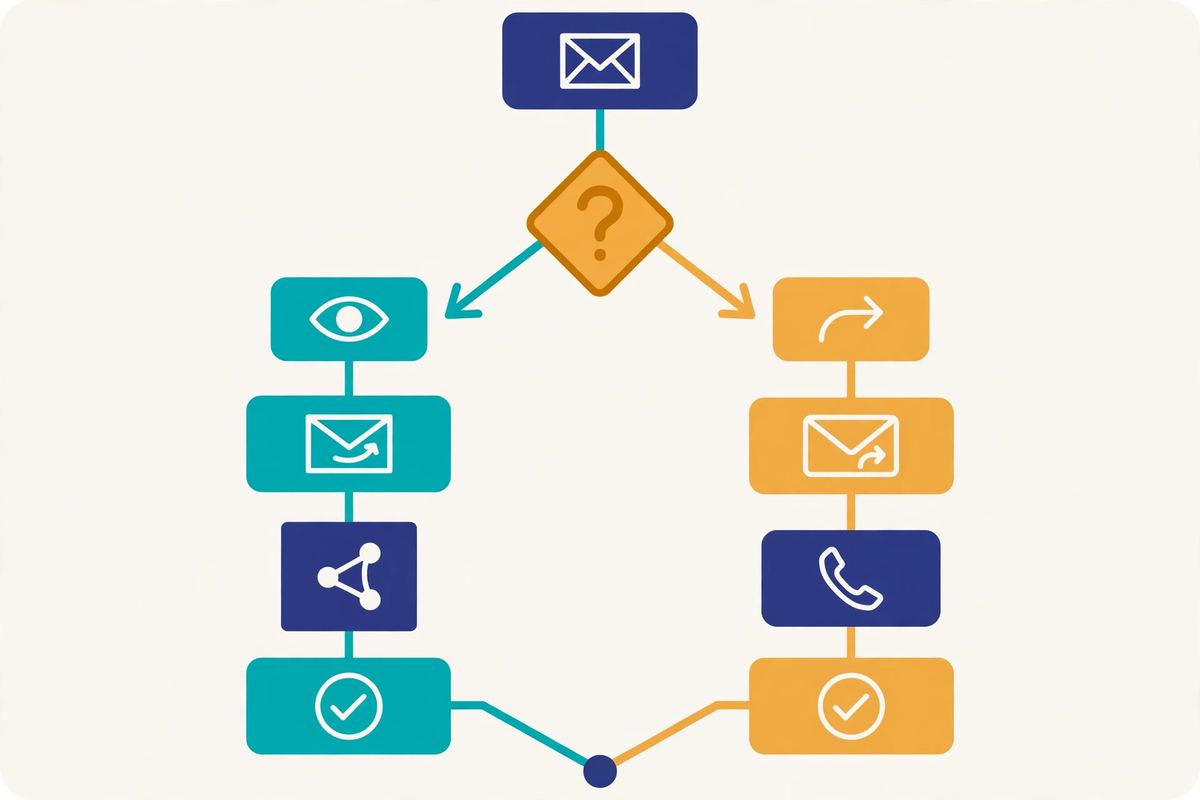
Personalisation runs through the whole sequence. Spintax varies your wording across sends, so a hundred prospects do not receive a hundred identical emails. Snippets pull in dynamic custom fields, such as a first name or a company detail, and snippet-based conditions let you branch on a field’s value. The AI email writer drafts openings and whole emails, and AI interest level detection sorts replies by how interested the prospect sounds, so you answer the hot leads first. A/B testing, with up to five versions of a step, lets you test subject lines and copy and keep the version that earns more replies. Out-of-office replies are filtered automatically, duplicate sending is detected, and you can preview and test an email before it goes out. That is a complete sequencing toolkit, and it is why Woodpecker feels like a tool built by people who send cold email every day.
Woodpecker review: LinkedIn steps and calling
Woodpecker’s sequences are not email-only. You can build combined email, LinkedIn and call sequences, with manual tasks for calls, SMS and LinkedIn steps in the middle of a campaign. LinkedIn automation runs through a Dux-Soup integration, and calling runs through an Aircall integration. That means a prospect who ignores your email can still meet you on LinkedIn or by phone, inside the same campaign, with the same conditions deciding the next step. Sending in the prospect’s timezone keeps every touch at a sensible hour, and blacklisting domains keeps you from ever contacting a company twice by mistake.
The honest trade-off is that both are partner integrations rather than native tools. Dux-Soup and Aircall both work well, yet they are extra tools to set up, and in some cases extra bills to pay. If LinkedIn is the heart of your outbound, a rival that automates those steps natively may feel smoother. Our Lemlist review covers a rival that automates LinkedIn, calls, WhatsApp and SMS inside one platform. If you only need email with the occasional LinkedIn touch, Woodpecker’s approach is more than enough, and it keeps the core product focused on what it does best.
Woodpecker review: agency panel, reporting and integrations
Finally, Woodpecker closes the loop with the tools that agencies and managers need. The Agency Panel add-on keeps each client’s prospects in a separate database, shows all client stats in one panel, and adds bulk campaign actions, bulk mailbox upload, an agency outreach calendar, a global blacklist, and automated audits for client domains. Clients can connect their own mailboxes without sharing passwords, and they get view-only access to their own numbers. Centralised billing keeps the agency’s costs in one place. That is a serious agency toolkit, and it is the reason many small agencies standardise on Woodpecker.

For teams that already live in a CRM, Woodpecker offers native two-way sync with HubSpot and Pipedrive, plus a Calendly integration for booked meetings, Google Sheets, Zapier and Zoho. Developers get an API, webhooks, an MCP server and a CLI, plus newer integrations with Claude and Clay, although API and integration access is a paid add-on rather than a free extra. Woodpecker is also GDPR and CCPA compliant, with ISO-certified storage, CASA tier 2 certification and two-factor authentication. That compliance-first stance suits European teams, and it is one more reason Woodpecker feels like a safe, grown-up choice rather than a quick experiment.
Setting up your first Woodpecker campaign
Getting started with Woodpecker is straightforward once you know the order. Most people go from signup to a live campaign in an afternoon, as long as they do not skip the setup steps.
Your first Woodpecker campaign, step by step
First, set up a separate sending domain and add SPF, DKIM and DMARC records. Never send cold email from your main company domain. Second, connect your mailboxes and let the automated warmup run for two to four weeks before any real volume. Third, find or import a small list of 50 to 200 verified prospects, filtered tightly to your ideal customer, using Lead Finder and the free Bouncer verification. Fourth, write a short sequence. Start with one opening email under 100 words, with an AI-assisted personal first line. Add two or three follow-ups that add value instead of repeating the ask. Put one LinkedIn task in the middle if you are on Multichannel, and one call step if you use Aircall.
Next, test everything on a small batch. Send to 25 people, then watch the replies, check your bounce rate, and fix what looks wrong before you scale. Finally, grow slowly. Add mailboxes, raise daily limits a little at a time, and let warmup and inbox rotation do their quiet work in the background. Patience here pays off in deliverability later. If you want to see the whole workflow on screen before you commit, the video below walks through ten lessons Woodpecker learned from more than 27 million emails.
Video: 10 things I wish I knew before sending my first cold email (learned from +27,000,000 emails) by Woodpecker.co. This video is the creator’s property, embedded via YouTube for education. OutreachCompare is not affiliated with Woodpecker.co and does not claim ownership of the video. It shares ten practical lessons for beginners, from avoiding a hard sell in the first email to testing and improving every campaign.
Woodpecker review: pros and cons
However, every tool has trade-offs, and an honest Woodpecker review should name them plainly. Here is the balanced picture after checking the official site and the verified feature profiles.
Woodpecker review: what we like
- Deliverability built in, not bolted on. Free warmup, inbox rotation, adaptive sending, a bounce shield and a deliverability monitor ship on every plan.
- Free unlimited email verification. The native Bouncer integration verifies every address, including catch-all addresses, at no extra cost.
- Unlimited team members and mailboxes. Adding a colleague or an inbox never raises the bill, because you pay for emails sent, not seats.
- Condition-based sequences with AI. Branching logic, spintax, snippets, an AI writer, AI interest detection and A/B testing with up to five versions.
- Built-in 1B+ Lead Finder database. Over a billion B2B contacts in the same tool that sends, with 100 free credits a month on every plan.
- Serious agency panel. Separate client databases, bulk actions, a global blacklist, client view-only access and centralised billing.
- Published pricing with a 14-day trial. A public price list, annual billing that saves 33%, and a trial with all features and no credit card required.
Woodpecker review: what could be better
- Price climbs with volume. You pay per email sent, so a big list with many follow-ups costs far more than the entry price, and flat-rate volume tools win at scale.
- LinkedIn and calling run through partners. LinkedIn steps need Dux-Soup and calling needs Aircall, which are extra tools to set up and sometimes extra bills.
- API and integrations cost extra. API, webhooks, MCP and CLI access are a paid add-on, not part of the base plan.
- Agency Panel costs extra. The multi-client dashboard is charged per active client, with white label on top, so agencies should price the full stack.
- No native dialler or CRM. Woodpecker sends email brilliantly, yet it is not a sales platform: pipeline and calls live in your CRM and your phone tool.
- Volume slider makes budgeting harder. The exact price depends on your email volume, so you have to work the slider rather than reading a flat rate card.
None of these downsides is a deal-breaker on its own, because each one only matters for some senders. Together, though, they draw a clear line. Woodpecker is excellent for teams that send to defined lists and want deliverability included from the first dollar. It is less complete if you send at very high volume, or you want LinkedIn, calling and a CRM in one native platform.
Woodpecker vs Instantly vs Smartlead vs Mailshake
Woodpecker does not exist in a vacuum, so this Woodpecker review would be incomplete without its closest rivals. Instantly is the high-volume benchmark, with unlimited mailboxes and unlimited warmup across a huge account pool. Smartlead is the agency-built rival, with unlimited mailboxes, AI warmup and white-label client portals. Mailshake is the multichannel veteran, with LinkedIn automation and a VOIP dialler on its higher plan. Overall, all four send cold email well; they differ in what they add around it, and in what they charge for it.
The four tools at a glance
| # | Tool | Key strengths | Starting point | |
|---|---|---|---|---|
| 1 | Woodpecker ★ Best for: Deliverability-first sending Best for deliverability-first cold email with warmup, rotation and free verification included. | ✓ Free warmup, inbox rotation, adaptive sending ✓ Free unlimited verification via Bouncer ✓ 1B+ Lead Finder database, agency panel | From $39 / month (Email plan, monthly billing) | Visit Site →Check the site for current pricing & trial |
| 2 | Instantly ★ Best for: High-volume sending Best for high-volume sending with unlimited mailboxes and unlimited warmup. | ✓ Unlimited connected accounts, inbox rotation ✓ Unlimited warmup across a 4.2M+ account pool ✓ Unibox master inbox, AI sequence generator | From $30 / month — check the site | Visit Site →Check the site for current pricing & trial |
| 3 | Smartlead ★ Best for: Agency deliverability Best for agencies that need unlimited mailboxes, AI warmup and white-label portals. | ✓ Unlimited mailboxes, inbox rotation, dynamic ESP matching ✓ Unlimited AI warmup with spam rescues ✓ Master Inbox, white-label client portals | From $39 / month (Base plan) | Visit Site →Check the site for current pricing & trial |
| 4 | Mailshake ★ Best for: Multichannel outreach Best for multichannel outreach with LinkedIn automation and a dialler on higher plans. | ✓ Email, LinkedIn and phone in one platform ✓ VOIP dialler and unlimited calls on top plan ✓ Unified inbox, A/B testing | From $29 / user / month (Starter, annual billing) | Visit Site →Check the site for current pricing & trial |
Last checked: 15 November 2026 on the official pricing pages of Woodpecker, Instantly, Smartlead and Mailshake. Smartlead’s Base plan starts at $39 a month, and Mailshake’s Starter plan starts at $29 per user a month on annual billing. Features and pricing can change, so please check the provider’s site before you buy. We do not guess at features, prices or trials.
What the prices mean
The price gap tells part of the story. Woodpecker starts at $39 a month on monthly billing for up to 5,000 emails sent. Smartlead starts at the same $39 a month for its Base plan. Mailshake starts at $29 per user a month on annual billing. Instantly starts at around $30 a month. But the cheapest starting price is not the same as the cheapest tool at your volume. Compare the tier you would actually use, not just the first number on the page. A team sending 5,000 emails a month pays the Woodpecker entry price.
A team sending 100,000 emails a month pays $119 a month on Woodpecker’s slider, while a flat-rate volume tool may charge one fixed price for the same volume. The two models cross over at different points for different teams, and the right choice is the one whose strengths match your outreach, not the one with the lowest first number.
Quick comparison at a glance
This feature matrix uses only claims we verified on each provider’s official site or in our verified tool profiles. A tick means the feature is stated on the provider’s site. A dash means it is not confirmed or is confirmed absent.
| Feature | Woodpecker | Instantly | Smartlead | Mailshake |
|---|---|---|---|---|
| Built-in B2B contact database | ✓ | ✓* | — | — |
| Cold email sequences | ✓ | ✓ | ✓ | ✓ |
| Built-in warmup | ✓ | ✓ | ✓ | — |
| Inbox rotation | ✓ | ✓ | ✓ | — |
| LinkedIn steps in sequences | ✓* | — | — | ✓ |
| Calling in sequences | ✓* | — | — | ✓ |
| Agency / multi-client dashboard | ✓ | — | ✓ | — |
| Built-in email verification | ✓ | — | — | — |
| AI writing and personalisation | ✓ | ✓ | ✓* | ✓ |
| A/B testing | ✓ | ✓ | ✓ | ✓ |
| Free trial | ✓ | — | ✓ | ✓ |
| Published pricing | ✓ | ✓ | ✓ | ✓ |
What the feature matrix shows
* Instantly’s database, SuperSearch, is an optional add-on rather than a core plan feature. Woodpecker’s LinkedIn steps run through a Dux-Soup integration and its calling runs through Aircall, rather than native tools. Smartlead’s AI features focus on warmup and reply sentiment categorisation. Last checked: 15 November 2026. Features and pricing can change, so please check the provider’s site before you buy. We do not guess at features, prices or trials.
Read the matrix as a guide to fit, not a league table. Woodpecker wins when you want deliverability built in by default, with free verification and a built-in database, at a published price. Instantly wins when you send at very high volume and want unlimited mailboxes at a flat rate. Smartlead wins when you run an agency and need unlimited mailboxes, AI warmup and white-label client portals. Mailshake wins when multichannel outreach with native LinkedIn automation and a dialler matters more than warmup. For the full ranked shortlist behind these picks, see Best Cold Email Software 2026 and Best Email Deliverability Tools 2026.
Woodpecker review: our verdict
Frequently asked questions
Is Woodpecker good for cold email beginners?
Yes, with a caveat. Woodpecker is friendly enough for a beginner who is willing to learn, and its 14-day free trial lets you explore every feature without paying or sharing a card. The caveat is the setup: Woodpecker assumes you already know about sending domains, warmup and sequences, and its many deliverability settings can feel overwhelming on day one. Beginners should read our Cold Email for Beginners guide first, then start with a small list and a simple two-step sequence before adding conditions and LinkedIn tasks.
How much does Woodpecker cost?
Woodpecker costs from $39 a month on monthly billing for the Email plan, for up to 5,000 emails sent a month. Annual billing brings that to $26 a month. Multichannel starts at $68 a month, and the LinkedIn plan costs $29 a month. Scale is custom-priced. Prices climb with your email volume on a slider, and add-ons such as extra Lead Finder credits, extra warm-ups, API access and the Agency Panel cost extra. All prices were checked on Woodpecker’s official pricing page on 15 November 2026, and they can change, so check the site before you buy.
Does Woodpecker have a free plan?
No, Woodpecker does not offer a free plan, and this Woodpecker review is clear about that. It does offer a 14-day free trial with all features included and no credit card required, so you can connect a mailbox, verify a list and run a real campaign before paying anything. When the trial ends, you move to a paid plan. If you need a free plan that never expires, our Apollo review covers a rival that offers one.
Does Woodpecker include email verification and warmup?
Yes, both are included on every plan, and that is one of Woodpecker’s biggest strengths. Email verification is free and unlimited through the native Bouncer integration, including catch-all verification. Automated warmup is also included, with 3 warm-ups on the entry tiers, alongside inbox rotation, adaptive sending and a bounce shield. That means you do not need a separate warmup tool or a separate verification tool to send safely, which saves money and keeps your setup simple.
Is Woodpecker better than Instantly or Smartlead?
Actually, it depends on what you need most. Woodpecker is better for teams that send to defined lists and want deliverability, verification and a built-in database included from the first dollar. Instantly is better for teams that send at very high volume and want unlimited mailboxes at a flat rate. Smartlead is better for agencies that need unlimited mailboxes, AI warmup with spam rescues and white-label client portals. This Woodpecker review’s comparison table above shows the differences side by side, and Best Cold Email Software 2026 ranks the tools in full.
Can I use Woodpecker with my existing CRM?
Yes. Woodpecker offers native two-way sync with HubSpot and Pipedrive, plus a Calendly integration for booked meetings, Google Sheets, Zapier and Zoho. Developers get an API, webhooks, an MCP server and a CLI, although API and integration access is a paid add-on. If you already run HubSpot or Pipedrive, you can keep your pipeline there and use Woodpecker for the outbound motion around it.
Your next step
If deliverability-first sending is your bottleneck, Woodpecker is a strong, honest choice. Start on the 14-day free trial. Build a small list of fifty to two hundred verified prospects. Set up a separate sending domain, warm up for two to four weeks, and send your first small campaign before you scale. Verify every address first. Our guide to getting your first email addresses shows the safest ways, in order. Our cold email legal checklist keeps your sending on the right side of the rules. Finally, if you are still deciding between tools, the comparison hub at Best and our cold email software guide will help you choose with confidence.
Keep reading — next in this series
You have the full picture from this Woodpecker review now. Go deeper with the guides that support it:
- Cold Email for Beginners: The Complete 2026 Guide — the full beginner system, from offer to first replies.
- Instantly Review 2026 — the high-volume rival, reviewed the same way.
- Smartlead Review 2026 — the agency-built rival, reviewed the same way.
- Lemlist Review 2026 — the multichannel rival, reviewed the same way.
- Apollo Review 2026 — the data + outreach all-in-one, reviewed the same way.
- Best Cold Email Software 2026 — the full ranked comparison behind the table in this review.
- How to Set Up a Sending Domain: SPF, DKIM, DMARC and Warmup — the setup to finish before your first Woodpecker campaign.
- Best hub — every ranked shortlist in one place, from warmup tools to B2B data.
Leave a Reply